IT risk assessment for WordPress sites: a simple method
A simple IT risk assessment for WordPress sites: list assets, name threats, rate on a 1–3 scale, pick measures and owners, with a worked example register.
Also in: Deutsch Français Español Italiano Polski Português Türkçe

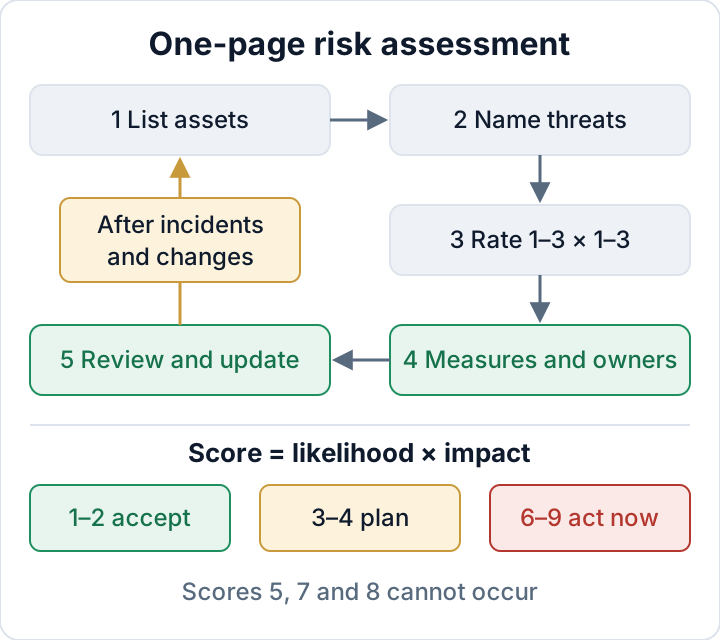
An IT risk assessment for a WordPress site fits on one page. It lists what you have, what can realistically go wrong, how bad it would be, and who fixes what by when. You can draft one this afternoon with the five-step method below. The result is something concrete to show when a client questionnaire, an insurer or a supervisory authority asks how you chose your security measures.
Why an IT risk assessment comes first under GDPR and NIS2
GDPR Article 32(1) asks for technical and organisational measures that are appropriate to the risk, taking into account the state of the art and the costs. You cannot show that a measure is appropriate without first saying what the risk is. Article 5(2) adds that you must be able to demonstrate compliance, so the assessment has to be written down. Our article on GDPR Article 32 for WordPress covers the measures themselves.
If your company is in scope of NIS2, the list of minimum measures in Article 21(2) starts with (a): risk analysis and information-system security policies. The binding duties come from national law, so check your country's NIS2 law. You can check whether NIS2 applies to you first.
This method is a pragmatic starting point. It is not an ISO 27001 implementation, and it is not a formal external audit.
Step 1: List your assets (sites, data, accounts, suppliers)
An asset is anything whose loss or misuse would hurt you. For a typical small business, four groups cover almost everything. Put personal data first, because that is where GDPR applies and where the impact is highest.
| Group | Typical WordPress examples |
|---|---|
| Personal data | Contact-form entries stored in the database, WooCommerce orders, customer accounts, newsletter list |
| Sites | Live site, staging copy, old test installs on subdomains |
| Accounts | WordPress admins, hosting panel, SFTP/SSH, database, DNS registrar, application passwords |
| Suppliers | Hosting provider, agency or freelancer, plugin vendors, backup storage, newsletter service |
Be specific. "Website" is too vague. "shop.example.com, WooCommerce with about 40 plugins, orders since 2021" is useful. If you find a forgotten staging copy or a former freelancer's admin account while you write the list, note it. That discovery alone justifies the exercise.
Step 2: Name realistic threats for each asset
You do not need a catalogue of every possible attack. For WordPress sites, four groups of threats cover most real incidents:
- Vulnerable or abandoned plugins and themes. Someone exploits a known flaw before you update, or a flaw that never gets fixed.
- Stolen or shared logins. A reused password, a shared "admin" account, or an agency login nobody removed.
- Host or server failure. An outage, data loss at the host, or a flaw in the server software itself. The PHP2Shell vulnerabilities are an example: they sat in the PHP runtime, so a fully updated WordPress was still exposed.
- Human error. A bad update that breaks checkout, a deleted page, or an editor given the Administrator role "just for a moment".
The plugin threat deserves an honest rating. The vendor Patchstack, in its State of WordPress Security in 2026 report, counted 11,334 new vulnerabilities in the WordPress ecosystem in 2025. 91 % were in plugins, and 46 % had no fix available from the developer at the time of public disclosure. For heavily exploited vulnerabilities, the weighted median time to mass exploitation was 5 hours. These are vendor figures, but they explain why "vulnerable plugin" usually lands at the top of a WordPress register.
Step 3: Rate likelihood and impact on a 1–3 scale
Use three levels and define them in plain words, so two people rating the same risk get the same answer.
Likelihood
- Unlikely within a year
- Possible within a year
- Expected, or it has already happened to you or a similar site
Impact
- Annoyance: a fix takes an hour, and no data is affected
- Downtime, or a limited amount of non-sensitive data affected
- Personal data exposed, payments affected, or the business stops
Multiply the two values. A score of 1–2 means accept, 3–4 means plan a measure, and 6–9 means act now. Scores of 5, 7 and 8 cannot occur on this scale, which keeps the bands clear.
Rate the risk as things stand today. A control that exists and works lowers the likelihood. "We have backups" only counts if someone has restored one. Do not add decimals or weighting factors. A 1–3 scale is rough on purpose, and false precision makes the register look more scientific than the knowledge behind it.
Step 4: Choose measures, owners and review dates
For every risk that scores 3 or more, pick one or two concrete measures. "Improve security" is not a measure. "Enable two-factor login for all four admins by 17 November" is. Name a person as the owner, not "IT" or "the agency", and set a date.
The deep dives cover the measures themselves. See handling vulnerable plugins and WordPress backups that actually restore. Your risk register only needs to record the decision and link to the evidence.
Two more things belong in each row. First, "accept" is a valid decision for low scores, as long as you write down the reason. Second, note the residual risk, which is the score you expect once the measure is in place. If a measure does not lower the score, it is probably the wrong measure.
Worked example: risk register for a small WooCommerce shop
The example below is for a fictional shop. It has one WooCommerce site, a staging copy, two employees, an external agency and shared hosting. "L" is likelihood, "I" is impact, and "After" is the expected residual score.
| Risk | L | I | Score | Measure | Owner | Due | After |
|---|---|---|---|---|---|---|---|
| Plugin vulnerability (shop, forms) | 3 | 3 | 9 | Delete unused plugins, auto-updates, weekly vulnerability check | Sara (owner) | 2026-11-10 | 3 |
| Admin password reused, no 2FA | 2 | 3 | 6 | 2FA for all admins, password manager | Sara | 2026-11-17 | 3 |
| Old agency admin account active | 2 | 3 | 6 | Remove account, revoke app passwords | Tom (agency) | 2026-11-06 | 3 |
| Host outage, restore never tested | 2 | 3 | 6 | Off-site backup, restore test on staging | Tom | 2026-11-24 | 3 |
| PHP runtime flaw at host | 2 | 3 | 6 | Get written confirmation of patched PHP from host | Sara | 2026-11-06 | 3 |
| Staff deletes products or pages | 2 | 2 | 4 | Editor role for staff, keep revisions | Sara | 2026-12-15 | 2 |
| Old contact-form entries in database | 1 | 3 | 3 | Delete entries older than 6 months | Lena (office) | 2026-12-15 | 2 |
| Newsletter service outage | 1 | 2 | 2 | Accept: list exported monthly | Lena | 2027-05-03 | 2 |
Read it from the top. This week the shop removes the agency account and asks the host about PHP. Both are cheap and take less than an hour. The plugin cleanup follows by next week because it has the highest score. 2FA and the restore test are scheduled within the month.
The staff-error and contact-form rows can wait until December. Their scores are lower, and for staff mistakes the backup work in row four already gives a fallback. The newsletter outage is accepted, with a reason and a review date. Every row ends at 3 or lower. That does not mean nothing can happen. It is a documented, reasoned level of risk.
Keeping the risk assessment alive
An IT risk assessment that is never reopened becomes evidence that you stopped looking. Review it when one of these triggers occurs:
- After any incident or near miss, including a failed login wave or a plugin you had to roll back
- After major changes, such as a new plugin that handles personal data, a new host, a new agency, or a shop launch
- When a supplier or a NIS2-regulated customer sends a security questionnaire
- At a fixed interval of your own choice, for example quarterly or yearly. This is your decision, not a legal rule
Give the document a version number and date, and keep old versions. A history showing that a score of 9 dropped to 3 after a measure is good accountability evidence. Our guide to security audit documentation shows how the register fits with your other records.
The audit plugin "Security Audit & Compliance" from secaudit.eu can help with Step 2 and with each review. It maps its findings to GDPR Art. 32 and NIS2 Art. 21 and exports them as a report or CSV, which you can compare against your register. The decisions in the register stay yours; the plugin gives you current input for them. → secaudit.eu
Your next step: copy the example table, replace the rows with your own assets, and schedule the first review date before you close the file.
FAQ
Do I need ISO 27001 for this?
No. This method is a practical start that you can run with your own team. ISO 27001 is a full management-system standard, and whether to adopt it later is a separate business decision, often driven by large customers.
How long does it take for one site?
For a single site with a known setup, a first draft fits into a working session. Most of the time goes into Step 1, finding accounts and suppliers. Later reviews are much faster because you only update what changed.
Does an agency do this once or for each client?
Each client is the controller for its own site and owns its risk assessment. The agency can prepare a draft for the client to approve. It should also keep a separate register for its own systems, such as its laptops, password vault and access to client hosting. Your data processing agreement should describe who does what.
This article is general information, not legal advice.
Check your own site
Security Audit & Compliance is the WordPress plugin from secaudit.eu: it scans for malware, hidden spam, changed core files and vulnerable code, and maps its findings to GDPR Art. 32, NIS2 Art. 21 and the OWASP Top 10.
See what the plugin checks