GDPR Article 32 for WordPress: what 'appropriate security' means
GDPR Article 32 and WordPress security in practice: encryption, updates, access control, tested backups, regular scans, records and processor contracts.
Also in: Deutsch Français Español Italiano Polski Português Türkçe

GDPR Article 32 does not name a plugin, a server setting or a password length. It asks for security that is appropriate to the risk, and for most WordPress sites that translates into a short, concrete list: HTTPS everywhere, current software, personal logins with two-factor authentication, backups you have actually restored, and regular checks. If you do these things and can show it, you already cover most of what Article 32 expects of a typical WordPress site.
This guide turns Article 32(1)(a)–(d) into WordPress measures, point by point. It also covers the two duties around it: documenting your measures (accountability) and making sure your hosting provider and agency do their part.
GDPR and WordPress security: what Article 32 says
Article 32 of the GDPR obliges both the controller (your business) and any processor (for example your host) to implement appropriate technical and organisational measures. What is appropriate depends on the state of the art, the costs of implementation, the nature, scope, context and purposes of the processing, and the risk to the people whose data you process.
The article then lists four things these measures include, "inter alia as appropriate":
- (a) pseudonymisation and encryption of personal data;
- (b) the ability to ensure the ongoing confidentiality, integrity, availability and resilience of systems and services;
- (c) the ability to restore availability of and access to personal data in a timely manner after an incident;
- (d) a process for regularly testing, assessing and evaluating whether the measures work.
Behind this stands Article 5(1)(f): personal data must be processed with appropriate security. And a typical WordPress site processes more personal data than its owner expects: user accounts, comments with names, email and IP addresses, contact-form entries, newsletter sign-ups, WooCommerce orders and server logs.
A risk-based approach: state of the art versus costs
Article 32 is deliberately risk-based. A company site with one contact form, a shop with thousands of customer accounts and a members' area that stores health information do not need the same effort, but each needs a level that matches what could go wrong. Article 32(2) names the risks to weigh: accidental or unlawful destruction, loss, alteration, unauthorised disclosure of, or access to personal data.
"State of the art" is best read as "established and widely available", not "the most expensive product on the market". HTTPS, supported software versions and two-factor login for administrators are state of the art today, and they cost little. Costs can justify running a small blog without an enterprise web application firewall. They rarely justify skipping the basics.
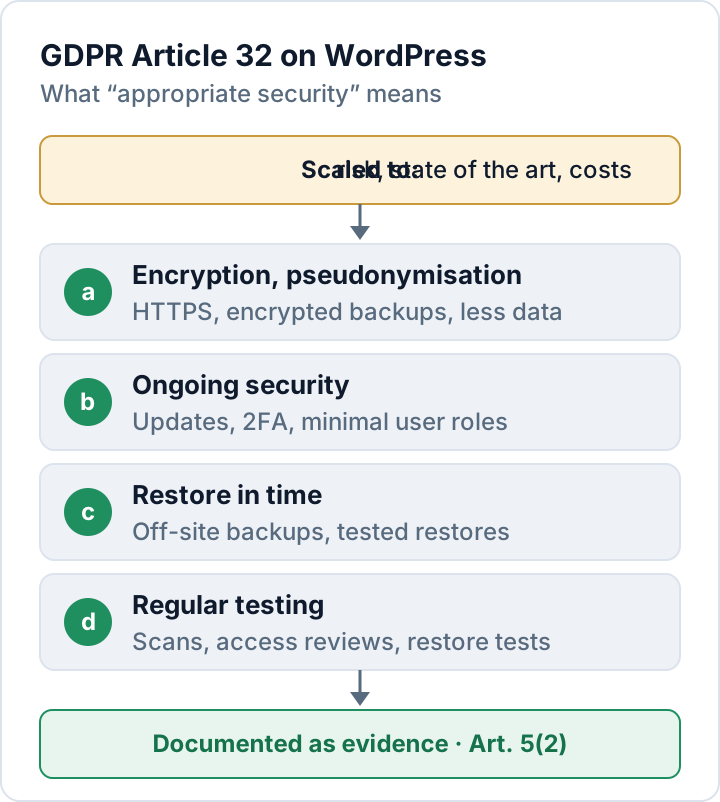
Article 32(1)(a)–(d) as WordPress measures
The table maps each point to typical WordPress measures and to the evidence worth keeping.
| Art. 32(1) | WordPress measures | Evidence to keep |
|---|---|---|
| (a) Encryption | HTTPS, encrypted backups, less stored data | TLS check, backup settings |
| (b) Ongoing security | Updates, 2FA, least privilege, integrity checks | Update log, user list |
| (c) Restore | Off-site backups, documented restore | Restore-test log |
| (d) Regular testing | Scans, access reviews, restore tests | Scan reports, review dates |
(a) Encryption and pseudonymisation
Serve the whole site over HTTPS only, including /wp-admin/ and every form, and add HSTS once that runs reliably. Passwords are not encrypted but hashed, which is the right approach for them: since WordPress 6.8, user passwords are hashed with bcrypt.
Backups are the most overlooked copy of your personal data. Encrypt them and store them away from the web server. True pseudonymisation is rare on a typical WordPress site, but related steps lower the risk: shorten IP addresses in analytics and logs, and do not keep contact-form entries in the database longer than you need them. Data you no longer store cannot leak.
(b) Confidentiality, integrity, availability and resilience
Updates come first. Patchstack, a security vendor, counted 11,334 new vulnerabilities in the WordPress ecosystem in 2025, 91 % of them in plugins. For heavily exploited ones, the weighted median time to mass exploitation was five hours (Patchstack report). Enable auto-updates where they fit (core has offered them for plugins and themes since WordPress 5.5) and delete plugins you don't use. Our guide to vulnerable plugins explains how to audit them.
Access control is the second pillar: one personal account per person, the lowest role that works (Editor, Author or Contributor instead of Administrator), and two-factor authentication for every admin. WordPress core does not include it. To protect integrity, remove the dashboard file editors in wp-config.php:
define( 'DISALLOW_FILE_EDIT', true );Compare core files with the official checksums from time to time (wp core verify-checksums with WP-CLI). For availability and resilience, choose hosting with adequate resources and monitoring. No plugin can absorb a large DDoS attack; that is the job of a CDN or edge firewall. The official WordPress hardening guide lists more server-side settings.
(c) Restoring availability after an incident
A backup only counts if you can restore it. Back up files and the database, keep at least one copy off-site and out of reach of the WordPress admin account, and test a full restore on a staging site. Record how long it took: "in a timely manner" is much easier to argue with a measured restore time than with a hope.
(d) Regular testing, assessing and evaluating
The GDPR does not set an interval, so set your own and keep to it. A reasonable starting point for a small business: an automated scan every week, a review of user accounts and plugins every quarter, a restore test twice a year, and an extra review after every incident or major change. Record what you found and fixed, with dates.
The Security Audit & Compliance plugin from secaudit.eu can cover part of the testing: it checks for malware, changed core files, outdated plugins and weak passwords, maps its findings to GDPR Art. 32 and shows a compliance summary on screen; signed report documents (PDF, CSV) come with secaudit.eu Pro. A scan supports your documentation; it does not make a site compliant on its own.
Accountability: document what you do (Art. 5(2))
Under Article 5(2), the controller must be able to demonstrate compliance. In practice that means a short, living security document rather than a binder nobody reads. It should cover:
- An inventory: hosting, WordPress version, plugins, themes, external services
- Who has access, with which role, and who approves new accounts
- Your measures for points (a) to (d), with the risk note behind them
- An update log and the dates of scans, access reviews and restore tests
- Your incident procedure, including the 72-hour breach notification
- Data processing agreements with your processors
Review the document once a year and whenever the site changes significantly. Our WordPress security checklist is a good starting point for the inventory.
Hosting providers and agencies: processors under Art. 28
Your host stores the database and the backups. An agency or freelancer with admin access can read every customer record. Both usually act as processors, and you then need a data processing agreement with each under Article 28. The same article says you may only use processors that provide sufficient guarantees for appropriate technical and organisational measures, and the agreement must oblige them to take the measures required by Article 32.
Ask concrete questions instead of relying on a template. Where are backups stored, and for how long? Is two-factor login enforced on the hosting panel and on the agency's accounts? How quickly will they tell you about a security incident? When an agency contract ends, remove its accounts and change shared credentials the same day.
Infringements of Articles 25 to 39, including Article 32, can be fined up to €10 million or 2 % of worldwide annual turnover, whichever is higher (Art. 83(4)(a)). The more likely moment you will need your documentation, though, is after an incident, when an authority asks what you had in place.
FAQ
Does Article 32 require a specific security plugin?
No. It requires appropriate measures, not products. A plugin can help with some of them, such as two-factor login or scanning, but updates, backups, access reviews and contracts are just as much part of it.
Does Article 32 apply to a small site without user accounts?
Yes, as soon as the site processes personal data, for example contact-form entries, comments or server logs with IP addresses. The measures scale with the risk.
Is HTTPS enough for point (a)?
No. HTTPS protects data in transit. Backups, exports and the database on the server need their own protection.
This article is general information, not legal advice.
Check your own site
Security Audit & Compliance is the WordPress plugin from secaudit.eu: it scans for malware, hidden spam, changed core files and vulnerable code, and maps its findings to GDPR Art. 32, NIS2 Art. 21 and the OWASP Top 10.
See what the plugin checks