Data processing agreement for web agencies (GDPR Art. 28)
When a web agency needs a data processing agreement (GDPR Art. 28), what the security annex should cover, subprocessors, incident reporting and offboarding.
Also in: Deutsch Français Español Italiano Polski Português Türkçe
If your agency can log in to a client's WordPress dashboard, hosts the site or keeps its backups, you are almost certainly processing personal data for that client. In that case you need a data processing agreement with them. Team size makes no difference: a five-person agency and a solo freelancer are in the same position.
This article looks at the agreement from the agency's side. It covers which of the services you sell make you a processor, what the security annex should say, and how to handle the parts that cause trouble in practice: subprocessors, incidents and the end of a contract.
When a web agency needs a data processing agreement
Almost every business WordPress site holds personal data. Common examples are contact form entries that a form plugin stores in the database, WooCommerce orders with names and addresses, customer user accounts, and newsletter sign-ups. If you can reach any of this through an admin login, hosting access, a database connection or a backup file, you can process it.
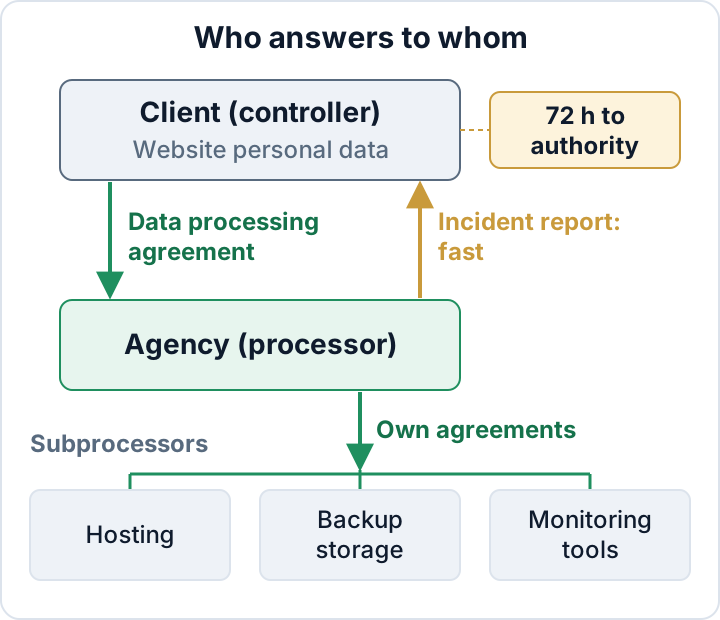
Under the GDPR, the client is the controller. They decide why and how the data is processed. You are the processor when you handle that data on their instructions, for example by keeping their site updated or running their hosting. Art. 28 requires a contract between the two of you: the data processing agreement (DPA). This contract sets out what you may do with the data and how you protect it.
Which agency services usually count as processing
The question is whether you can access the data, not whether you actually look at it. These are typical cases, not fixed rules:
| Service | Typical status |
|---|---|
| Maintenance plan with admin login | Processor |
| Managed hosting | Processor |
| Off-site backup storage | Processor |
| Remote support with admin access | Processor |
| Design work on staging, no real data | Often not |
| One-off audit with access | Check case by case |
Two points are often overlooked. First, a "design only" project stops being design-only once you copy the live database to staging to test a theme. That copy contains real customer data. Second, your own contact forms, CRM and invoicing are not client processing. For that data your agency is the controller, and you need your own privacy notice and measures for it.
A practical first step is to list every client site and write down what access you hold on each one. You will probably find logins nobody remembers granting. The user roles cleanup guide explains how to remove them.
The security part: describing your technical and organisational measures
Most DPAs include an annex on technical and organisational measures (TOM). Agencies often copy a generic list into it. A better approach is to describe what you actually do, in plain words:
- Logins: two-factor authentication on every admin account you use on client sites.
- Named accounts: one personal account per staff member, never a shared "agency" admin. Then you can tell who did what, and you can remove one person's access without affecting the rest of the team.
- Credentials: stored in a team password manager with access per client, not in spreadsheets or chat threads.
- Least privilege: use an Editor or a custom role where full admin access isn't needed.
- Backups: where they are stored, that they are encrypted, and which named people can restore or download them.
- Patching: how often you apply core, plugin and theme updates, and how quickly you act on critical security fixes.
- Logging: what activity you record and how long you keep the records.
- People: confidentiality obligations for staff and freelancers, and a written offboarding process when someone leaves.
The annex must match reality. If it promises 24/7 monitoring or quarterly penetration tests that you don't run, you have written evidence against yourself for the day something goes wrong. Keep it short and accurate, and update it when your setup changes.
These measures line up with Art. 32(1)(a)–(d): pseudonymisation and encryption; ongoing confidentiality, integrity, availability and resilience; timely restore after an incident; and regular testing of the measures. The GDPR Article 32 guide covers each point in detail.
Subprocessors: hosting, backup storage and the tools you use
Client data rarely stays with you alone. It usually passes through other services:
- the hosting provider or server platform you resell or manage
- backup storage, such as an S3-type bucket or a backup plugin's own cloud
- uptime or monitoring services that hold credentials or can see site content
- staging environments on a separate platform
- support and ticket tools where clients paste order details or customer emails
Each of these is a subprocessor. Keep a written list for every client that shows which providers you use for that client and where they store data. Tell the client before you add or change a provider, and make sure you have your own data processing agreement with each of them. If a provider stores or accesses data outside the EU, check the transfer basis before you rely on it, and say so on the list. The client should never learn from a breach report that their backups were in a service they had never heard of.
Incident reporting: how and when you tell the client
The client, as controller, must notify the supervisory authority without undue delay and, where feasible, within 72 hours of becoming aware of a personal data breach (Art. 33). They must also document every breach, including those they do not report (Art. 33(5)). They can only do this if you tell them quickly and give them facts they can use.
Agree on the following in the DPA or an operational annex:
- An internal deadline that leaves the client plenty of time. For example, report a suspected breach within 24 hours of noticing it, even before the investigation is complete.
- A named contact on each side, with a deputy.
- A reporting channel that works out of hours. Email alone is a weak choice.
- The minimum facts to send: what happened, when you noticed, which systems and data are affected, and what you have already done.
The client's own steps after your report, including assessment and notification content, are covered in the 72-hour breach notification guide.
End of contract: access removal, data return and deletion
Agency logins that are never removed are a common way into old client sites. They are also a liability for you: if one of those accounts is misused, the client will ask why it still existed. Use this checklist when a contract ends:
- Delete all agency admin accounts, after reassigning their content to a client account
- Revoke application passwords created for your tools
- Remove your SFTP/SSH keys and hosting control panel access
- Hand over or delete backups you hold, as the client instructs
- Delete local database copies, exports and staging sites
- Remove the client's entries from your password manager and monitoring tools
- Confirm the completed steps to the client in writing
On sites where you have WP-CLI access, this command lists remaining administrators before you hand over:
wp user list --role=administrator --fields=ID,user_login,user_emailKeeping the agreement true: evidence and NIS2 client questions
Under Art. 5(2), the controller must be able to demonstrate compliance. In practice the client will ask you to show that your annex reflects what you actually do. Useful evidence includes 2FA status for your staff accounts, dated access reviews, backup restore tests and recent security audit reports. The audit documentation guide explains what to keep.
Clients covered by NIS2 must manage the security of their suppliers (Art. 21(2)(d)). They will send you questionnaires even if NIS2 does not apply to you directly. A medium-sized agency, meaning 50 or more employees or more than €10 million in annual turnover and balance sheet, that manages client systems may itself be in scope as a managed service provider. Check your country's national NIS2 law; the NIS2 scope guide walks through the check.
The secaudit.eu plugin exports an audit report mapped to GDPR Art. 32 and NIS2 Art. 21, plus an incident-notification draft. Both can support this evidence. Neither makes you or your client compliant.
Infringements of GDPR Articles 25 to 39, which include Art. 28 and 32, can lead to fines of up to €10 million or 2 % of worldwide annual turnover (Art. 83(4)(a)). For most agencies, the more immediate risk is losing a client after an incident because the agreement didn't reflect reality.
Next step: make a list of every client site you can access. For each one, record whether a current DPA exists and whether its TOM annex describes what you actually do today. Fix the sites where either answer is "no" first.
FAQ
I'm a freelancer working alone. Do I still need a DPA?
Yes, if you process personal data for the client. The GDPR does not exempt processors based on size.
Who drafts the agreement, the client or the agency?
Either party can. Many agencies offer a standard DPA with their maintenance plans, which saves time across many clients. Have a lawyer review it once, and adapt the TOM annex for each service.
Doesn't my hosting company's DPA cover this?
No. That agreement covers your relationship with the host. Your relationship with the client needs its own agreement.
This article is general information, not legal advice.
Check your own site
Security Audit & Compliance is the WordPress plugin from secaudit.eu: it scans for malware, hidden spam, changed core files and vulnerable code, and maps its findings to GDPR Art. 32, NIS2 Art. 21 and the OWASP Top 10.
See what the plugin checks