WordPress security audit report: what evidence to keep
How to build a WordPress security audit report: the six records to keep, what good evidence looks like, supplier and insurance questions, and a template.
Also in: Deutsch Français Español Italiano Polski Português Türkçe

If a client, auditor or insurer asks you to prove your WordPress site is secured, "we keep everything updated" is not an answer. They want records. A WordPress security audit report pulls those records into one document that someone else can read and check. This article covers what to keep, what a useful entry looks like, and how to keep it current without turning it into a second job.
Why a WordPress security audit report matters: showing, not claiming
Under the GDPR, the controller must be able to demonstrate compliance. Applying the principles is not enough (Art. 5(2)). Article 32(1)(d) also asks for a process for regularly testing, assessing and evaluating your security measures. If that process is real, it leaves a paper trail.
This also applies to the people who work on the site. Hosting providers and agencies with admin access are usually processors under Art. 28. Their clients will therefore ask them for the same kind of evidence. For what the measures themselves should be, see our guide to GDPR Article 32 for WordPress.
Documentation has limits. It can provide evidence that measures were implemented, but does not by itself prove they remain effective. It does not make a site secure, and paperwork alone does not meet your GDPR obligations. Outdated documentation can be worse than none. A backup policy that describes a plugin you removed last year tells an auditor your records are not maintained.
The six records auditors and clients actually look at
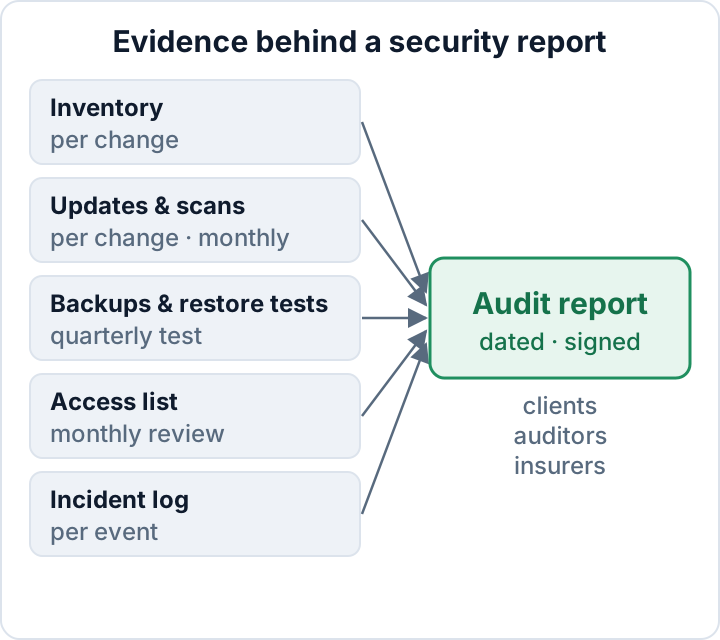
1. Inventory. This lists the core version, every plugin and theme with its version, the hosting provider, the PHP version and the third-party services you use. It also notes which personal data each part touches. A useful entry says: "Contact form plugin, stores entries in the database (name, email, message), entries deleted after 90 days per our policy." Update the inventory whenever something changes, and check it against reality every quarter.
2. Update log. Each line records the date, the component, the old and new version, who did the update and whether it ran automatically. Add entries per change. Auto-updates count, but someone should confirm the site still works afterwards.
3. Scan reports. Keep dated reports and their follow-up records under a documented retention policy, rather than simply overwriting the previous report. Record each finding and how it was resolved: fixed, accepted with a reason, or a false positive. A report with ten findings and no follow-up shows that you scanned. It does not show that you acted on the results.
4. Backups and restore tests. Record the schedule, where the backups are stored, how long they are kept, and the date and result of the last test restore. A successful backup job is not evidence that restoration works. As a practical starting point, test restores quarterly and after major changes; use a frequency suited to your risks and recovery needs. Protect restored personal data in an isolated test environment.
5. Access list. Record who holds which role, whether two-factor authentication is on for each account, when access was last reviewed, and when former staff or agencies were removed. Update it per change and review it monthly.
6. Incident log. Record every security incident, including personal data breaches you decided not to notify. Art. 33(5) requires you to document all breaches: the facts, the effects and what you did about it. Notification itself is covered in our 72-hour breach guide.
What good evidence looks like (and what doesn't count)
Good records share four traits:
- Each entry is dated.
- Each entry names the person who made it.
- All entries are kept in one consistent place.
- They are written as part of the routine, not rebuilt the week before an audit.
An auditor can usually tell when a log was written in a single afternoon.
Compare two versions of the same fact. Weak: "We update plugins regularly." Stronger template: "[date], [plugin], [old version] to [new version], auto-update, [test performed], checked by [name]." Replace every placeholder with the actual details. The second one can be checked, and it shows a habit.
Exports beat screenshots. A CSV of plugin versions or a PDF scan report keeps its data and its date. A cropped screenshot of the dashboard proves little and cannot be searched. Use screenshots only for settings that have no export, and put the date in the file name.
Store records off the WordPress server. If the site is compromised, the attacker should not be able to edit your evidence, and you still need the records during the clean-up. An access-controlled shared drive can be a practical option; restrict editing, enable version history and protect it with credentials separate from the WordPress site.
Keep it proportionate. For a small business, a spreadsheet with one tab per record and a dated folder of PDFs is a perfectly good evidence pack. Nobody expects a governance platform for a ten-page site.
Answering supplier questionnaires from NIS2 customers
Agencies, freelancers and plugin vendors receive security questionnaires even when NIS2 does not apply to them directly. The reason is Art. 21(2)(d) of the NIS2 Directive. The Directive requires supply-chain security measures, which can lead customers to request evidence from suppliers. The applicable obligations come from national implementing law: check your country's national NIS2 law. Whether your customer or you are in scope is a separate question, covered in NIS2 and your WordPress site.
The questions vary by customer and contract, so read the actual questionnaire. The topics usually follow the Art. 21(2) measures, and each one maps onto a record you already keep:
| Question area | Your evidence |
|---|---|
| Incident handling | Incident log |
| Backups, continuity | Backup and restore-test record |
| Vulnerability handling | Update log, scan reports |
| Access control, MFA | Access list |
| Encryption | Inventory (TLS, hosting) |
| Asset management | Inventory |
Answer only what you can evidence. Where a form offers yes/no, add a short note or offer the document, for example: "Yes, monthly. Last three scan reports available on request." If something is partly in place, say so. An overstated answer in a supplier contract is a risk in itself.
Cyber insurance questions: use the same evidence, read the actual form
Insurers ask their own questions, and the wording differs between them. Your answers may matter later if you make a claim. Answer accurately, keep a dated copy of exactly what you submitted, and check the answers again when your setup changes. A new hosting provider or a dropped 2FA requirement are examples of such changes.
Common themes such as backups, multi-factor authentication and patching map onto the same six records. What a specific policy requires, and how your answers affect cover, is a question for the policy wording and your broker.
Keeping the documentation current without extra work
The following schedule is a practical starting point, not a statutory minimum. Adjust it to your risks, rate of change and contractual requirements:
| When | What to update |
|---|---|
| Per change | Update log, access list |
| Monthly | Scan reports, access review |
| Quarterly | Restore test, inventory check |
| Yearly | Full review, management sign-off |
The yearly review should be signed off by someone with authority. For entities covered by national NIS2 law, Article 20 requires management bodies to approve and oversee cybersecurity measures and undertake training. An annual signature alone does not demonstrate ongoing oversight; retain records of decisions, reviews and follow-up.
Automate the exports. With WP-CLI, a monthly cron job on the server or a script run from your workstation can produce dated files:
wp core version > core-$(date +%F).txt
wp plugin list --format=csv > plugins-$(date +%F).csv
wp theme list --format=csv > themes-$(date +%F).csv
wp user list --role=administrator --format=csv > admins-$(date +%F).csv
Run the commands from a directory outside the web root, pointing WP-CLI at the site with --path=/path/to/wordpress, so the exports are never publicly reachable. Then copy them to your evidence storage. The admin export lists email addresses, so treat it as personal data.
Scan reports belong in the same folder. The Security Audit & Compliance plugin from secaudit.eu exports a report and a CSV with findings mapped to GDPR Art. 32, NIS2 Art. 21 and the OWASP Top 10:2025, which you can file directly in the evidence folder. Such a report shows that a check took place and what it found, nothing more. For the measures behind each record, use our WordPress security checklist.
Template: a WordPress security audit report outline
Copy this structure and fill it from your six records:
- Scope and date: which site(s), which period, who wrote the report.
- Site and responsible persons: owner, technical contact, processors (host, agency) and the status of their data processing agreements (Art. 28).
- Inventory summary: core, PHP, plugin and theme count, third-party services, personal data processed.
- Measures in place, mapped to Art. 32(1)(a)–(d): encryption; confidentiality, integrity and availability; restore capability; regular testing.
- Update and vulnerability status: outdated components, known vulnerabilities, planned fixes.
- Scan results and remediation: date of each scan, findings, resolution.
- Backup and restore tests: schedule, storage, retention, last test date and result.
- Access review: accounts per role, 2FA coverage, removed accounts, review date.
- Incidents and breaches logged (Art. 33(5)), including those not notified.
- Open risks and planned actions, each with an owner and a due date.
- Sign-off: name, role, date.
Start this month with two things: an inventory export and one test restore to a staging site. Between them, they cover several of the questionnaire areas in the table above. To add dated scan reports to the folder, the audit plugin from secaudit.eu runs the checks on your site and exports the results → secaudit.eu.
This article is general information, not legal advice.
FAQ
How long should I keep security records?
The GDPR sets no single retention period for these records. Keep them as long as you need them to demonstrate compliance, and check whether your sector or your contracts set specific periods. Set retention periods by record type and purpose; do not retain personal data indefinitely merely because the setup is still in use. Personal data inside the records, such as admin email addresses, should not be kept longer than needed.
Does a clean audit report mean we meet the GDPR?
No. A report shows that certain technical checks passed on a certain date. The GDPR also covers lawful bases, consent, processor contracts, data subject rights and more. Even on the security side, a clean scan says nothing about how your team handles passwords or phishing.
Can our agency keep the documentation for us?
Yes, and agencies often have the best data. The controller remains accountable, though. Put the documentation duties into the Art. 28 agreement, specifying what is recorded, how often, and how you get access. Keep your own copy so the evidence does not leave with the agency.
Check your own site
Security Audit & Compliance is the WordPress plugin from secaudit.eu: it scans for malware, hidden spam, changed core files and vulnerable code, and maps its findings to GDPR Art. 32, NIS2 Art. 21 and the OWASP Top 10.
See what the plugin checks