Google Fonts and GDPR: self-host fonts on WordPress
Google Fonts and GDPR: what the Munich court ruled, why the Data Privacy Framework doesn't settle it, and how to find and self-host fonts on WordPress.
Also in: Deutsch Français Español Italiano Polski Português Türkçe

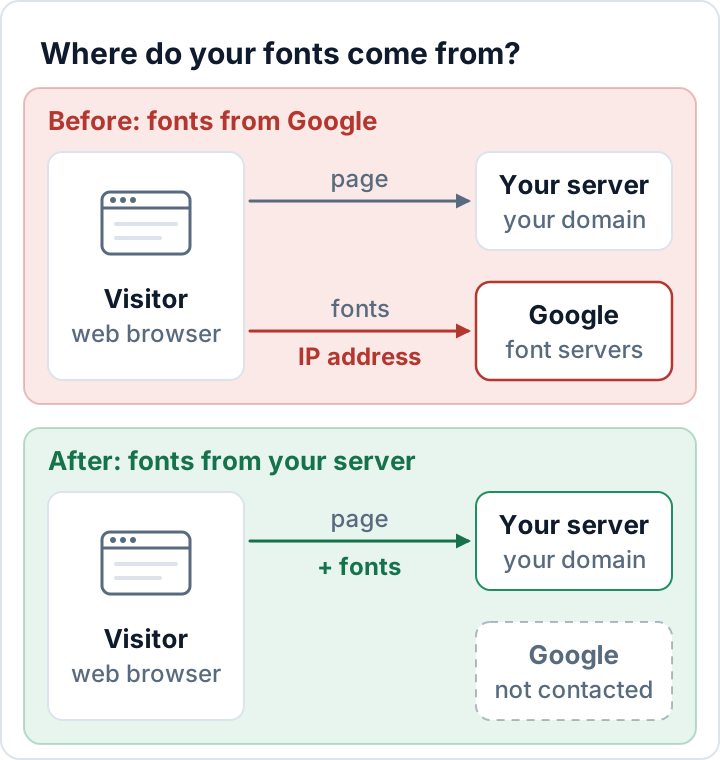
If your WordPress site loads Google Fonts from Google's servers, every visitor's browser connects to Google and reveals its IP address. That is the core of the Google Fonts GDPR question: you need a legal basis for passing on that address, and a German court ruled that a site doing this had none. The clean fix is simple: host the font files on your own server.
This guide explains the ruling and what has changed since, how to check whether your site still loads fonts from Google, and three ways to self-host them in WordPress.
What the Munich court decided on Google Fonts and GDPR
On 20 January 2022, the Regional Court of Munich I (Landgericht München I, case 3 O 17493/20) decided a case about a website that embedded Google Fonts directly from Google's servers. Every page view passed the visitor's IP address to Google. According to the published judgment (in German), the court found:
- For the website operator, the visitor's dynamic IP address is personal data.
- The visitor had not consented to it being passed to Google.
- The operator had no legitimate interest, because the fonts could have been used without any connection to Google's servers, by hosting them locally.
- The visitor was awarded €100 in damages.
This is one regional court's judgment in one case, not a ruling of the EU Court of Justice. But the reasoning is easy to follow, and it had consequences well beyond that case.
The 2022 warning-letter wave
In late 2022, the ruling was followed by a wave of mass warning letters in Germany, known as the "Abmahnwelle". The letters demanded payments from site owners who still loaded Google Fonts remotely. Several of them were later treated as abusive.
If you receive such a letter, don't pay or sign anything in a hurry; have it checked by a lawyer. Either way, fix the cause so the question doesn't come up again.
Doesn't the Data Privacy Framework solve this?
Only partly. The EU–US Data Privacy Framework (DPF), based on the European Commission's adequacy decision of 10 July 2023, gives transfers to certified US companies an adequacy basis, and Google LLC is certified. The EU General Court dismissed a challenge to the DPF (Case T-553/23, Latombe v Commission) on 3 September 2025. An appeal to the Court of Justice was lodged on 31 October 2025 and is still pending, so this could change.
The Munich ruling predates the DPF. The DPF weakens the third-country argument, the concern that data ends up in the US without adequate protection. It does not touch the other argument: you need a legal basis for sending the IP address to Google in the first place, and a legitimate interest is hard to claim when you could simply host the fonts yourself.
Self-hosting therefore remains the clean solution. It is also a textbook example of data protection by design (Art. 25 GDPR): the data simply never leaves your server.
How to check whether your site loads Google Fonts
Use the browser's developer tools
- Open your site in a private window.
- Open the developer tools (F12, or Cmd+Option+I on a Mac) and switch to the Network tab.
- Tick Disable cache and reload the page.
- Type
fonts.googleapis.cominto the filter box, thenfonts.gstatic.com.
Any request to these domains means the page loads Google Fonts: fonts.googleapis.com delivers the CSS, fonts.gstatic.com the font files themselves.
Repeat this on several page types: home page, a blog post, the contact page, shop and checkout, and the login page. Sliders, form builders, map plugins or cookie banners sometimes load their own fonts only on the pages where they appear.
Search the page source and theme files
Open the page source (Ctrl+U, or Cmd+Option+U on a Mac) and search for the same two domains. This finds <link> tags and preconnect hints, but not fonts imported inside CSS files or loaded by JavaScript, so the Network tab remains the reliable test.
With shell access, you can also list the theme and plugin files that mention them:
grep -rl -e "fonts.googleapis.com" -e "fonts.gstatic.com" wp-content/themes wp-content/pluginsPage builders often store font choices in the database, so an empty result here doesn't prove the site is clean.
How to self-host Google Fonts in WordPress
There are three routes, from least to most effort. After each one, repeat the Network tab check.
Option 1: Theme, page builder or Font Library
Many themes and page builders now offer a setting that loads Google Fonts locally. The wording varies ("load fonts locally", "self-host fonts"), so look through the theme's Customizer and the builder's performance or privacy settings.
If you use a block theme, the Font Library in WordPress 6.5 and later does this for you. In the Site Editor, open Styles, then Typography, and manage your fonts. The first time you browse the Google Fonts collection you allow WordPress to connect to Google; the fonts you install are then downloaded and stored on your site, and visitors load them from there (Learn WordPress).
Option 2: A local-fonts plugin
Several plugins in the WordPress.org directory detect Google Fonts requests, download the files to your server and rewrite the references. Search the directory for "local Google Fonts". Choose one with the same care as any other plugin; our guide to vulnerable WordPress plugins explains what to check.
Option 3: Manual @font-face in a child theme
This gives you full control without an extra plugin:
- Download the font family and keep only the styles and weights you use. For the web, WOFF2 files are the most compact format.
- Copy the files into a
fontsfolder in your child theme, together with the font's license file. - Add
@font-facerules to a stylesheet your child theme loads, usually itsstyle.css. - Stop the theme from loading the remote copy.
A minimal example for two weights of the font Inter:
@font-face {
  font-family: "Inter";
  font-style: normal;
  font-weight: 400;
  font-display: swap;
  src: url("fonts/inter-400.woff2") format("woff2");
}
@font-face {
  font-family: "Inter";
  font-style: normal;
  font-weight: 700;
  font-display: swap;
  src: url("fonts/inter-700.woff2") format("woff2");
}
body {
  font-family: "Inter", system-ui, sans-serif;
}
The url() path is relative to the CSS file, so fonts/ means the folder next to style.css.
To stop the remote copy, use the theme's own option if it has one. Otherwise, find the <link> tag for fonts.googleapis.com in the page source: its id looks like themename-fonts-css, and the stylesheet handle is that id without -css. Then add this to the child theme's functions.php:
add_action( 'wp_enqueue_scripts', function () {
    wp_dequeue_style( 'themename-fonts' ); // replace with the real handle
}, 20 );
Also remove any preconnect hints to fonts.gstatic.com: a preconnect opens a connection to Google's server even when no font is downloaded from it.
About the license: according to the Google Fonts repository, most fonts in the collection use the SIL Open Font License 1.1, some the Apache 2 license or the Ubuntu Font License. The OFL allows you to use, embed and redistribute the fonts, so self-hosting is fine. Fonts from other sources may have different terms, so always read the license.
Check other third-party requests too
The same logic applies to anything a page loads from another company's server: the visitor's IP address goes there as soon as the page opens. With the Network tab still open, look for:
- Google Maps and other map embeds
- YouTube or Vimeo video embeds
- scripts, stylesheets or icon fonts from public CDNs
- reCAPTCHA and similar bot checks
- Gravatar images in comments (Settings → Discussion → Avatars)
- chat widgets and analytics tools
For each one, decide whether to self-host it (scripts, stylesheets, icon fonts), load it only after a click (maps and videos behind a placeholder), or ask for consent where it is required, and describe what remains in your privacy notice.
External scripts are a security question as well, because they run with full access to your pages. Our WordPress security checklist covers that side.
FAQ
Do I need consent for self-hosted fonts?
Fonts served from your own server work like your images and stylesheets: no visitor data goes to Google, so the problem from the Munich case doesn't arise.
Is the DPF enough to keep loading fonts from Google?
While it stands, it provides an adequacy basis for the transfer to the US. It does not answer whether you need to send the IP address to Google at all. Self-hosting avoids both questions.
Will self-hosting slow my site down?
Usually not. The browser no longer needs a separate connection to Google's domains, and you only ship the weights you actually use.
This article is general information, not legal advice.
Check your own site
Security Audit & Compliance is the WordPress plugin from secaudit.eu: it scans for malware, hidden spam, changed core files and vulnerable code, and maps its findings to GDPR Art. 32, NIS2 Art. 21 and the OWASP Top 10.
See what the plugin checks