WordPress security checklist for EU businesses (2026)
A practical WordPress security checklist for EU businesses: 25 steps for hosting, updates, 2FA, monitoring, backups and docs, mapped to GDPR and NIS2.
Also in: Deutsch Français Español Italiano Polski Português Türkçe
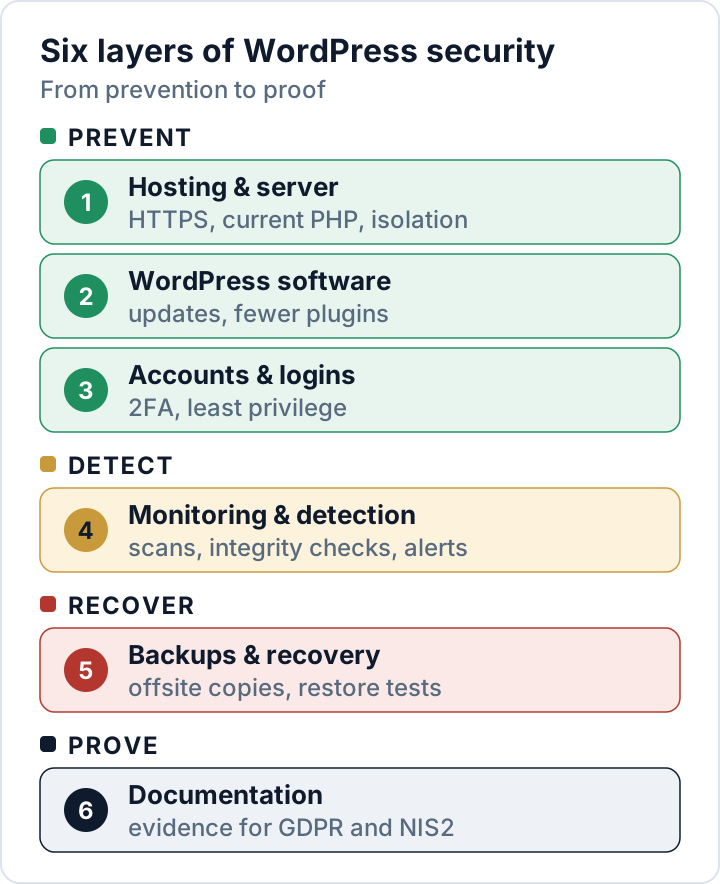
This WordPress security checklist covers the 25 measures we recommend for every business website in the EU, grouped into six areas: hosting, WordPress software, accounts, monitoring, backups and documentation. Work from top to bottom: the first three groups prevent most attacks; the last three help you notice an incident, recover and prove what you did.
Each item has a one-line reason and, where needed, a link to a detailed guide. No checklist makes a site "100 % secure", but this one gives you protection you can explain to a customer, an auditor or a supervisory authority.
Why speed matters: the security vendor Patchstack counted 11,334 new vulnerabilities in the WordPress ecosystem in 2025, 91 % of them in plugins, and found that about half of the high-impact ones were exploited within 24 hours (Patchstack, State of WordPress Security in 2026, a vendor report). Routine beats any single tool.
Hosting and server
If the server is weak, nothing you configure inside WordPress fully makes up for it.
- HTTPS on every page, then HSTS. HTTPS encrypts logins, form entries and orders in transit, and GDPR Art. 32(1)(a) names encryption explicitly. Add HSTS (RFC 6797) only once HTTPS works everywhere, starting with a short
max-age: browsers then refuse plain HTTP for that period. - A supported PHP version. End-of-life PHP branches no longer receive security fixes; compare your version with the official list.
- SFTP or SSH instead of FTP, and one isolated account per site. FTP sends passwords unencrypted, and without isolation one hacked site can infect every other site on the same account.
- No PHP execution in the uploads folder. Uploads should only hold media; a PHP file in there is almost always a web shell.
For Apache 2.4, put this into wp-content/uploads/.htaccess:
<FilesMatch "\.(?i:php|phtml|phar)$">
    Require all denied
</FilesMatch>
On nginx, add this to the server block above your general location ~ \.php$ block (the first matching regex location wins):
location ~* ^/wp-content/uploads/.*\.(php|phtml|phar)$ {
    deny all;
}
Test the nginx configuration with nginx -t before reloading. With either server, check afterwards that images still load and that a test .php file in uploads returns "403 Forbidden".
WordPress core, plugins and themes
Plugins are where most vulnerabilities live, so this group needs a weekly routine. Our guide to vulnerable WordPress plugins goes deeper.
- Keep automatic core security updates on. By default, WordPress installs minor releases, which carry security fixes, in the background. Make sure no setting or hosting tool has switched this off.
- Update plugins and themes within days, not months. For heavily exploited vulnerabilities, Patchstack measured a weighted median of five hours to mass exploitation. Auto-updates, available since WordPress 5.5, narrow that gap for low-risk plugins.
- Delete what you don't use. A deactivated plugin's files stay on the server and can still be exploitable;
wp plugin list --status=inactivelists candidates. - Replace abandoned plugins and never use "nulled" copies. In the Patchstack data, 46 % of vulnerabilities had no fix at the time of disclosure. An abandoned plugin may never get one, and a pirated copy gets no updates at all.
- Disable the dashboard file editor.
define( 'DISALLOW_FILE_EDIT', true );inwp-config.phpremoves the Theme and Plugin file editors, so a stolen admin login can't simply paste code into a theme file.
Accounts and logins
An administrator can install plugins, which means running code on your server. The default roles (Administrator, Editor, Author, Contributor, Subscriber) make least privilege easy.
- Unique passwords plus two-factor authentication for every Administrator and Editor. Leaked, reused passwords are what credential-stuffing attacks try. WordPress core has no built-in 2FA; our two-factor guide explains the options.
- One personal account per person, with the lowest role that works. Shared "agency" logins hide who did what and can't be revoked cleanly.
- Remove old accounts and unused Application Passwords. Former staff and agencies keep access until someone deletes it; Application Passwords (since WordPress 5.6) are listed on each user's profile.
- Throttle logins and turn off XML-RPC if nothing uses it. XML-RPC is enabled by default and accepts passwords outside the normal login form. Check first whether a plugin or app still relies on it.
Monitoring and detection
You can only meet a 72-hour reporting deadline if you notice the breach in the first place.
- Scheduled malware and file-integrity scans. New PHP files in uploads, changed core files and obfuscated code are typical traces of a compromise.
wp core verify-checksumscompares core files with the official WordPress.org checksums. See 12 signs your site has been hacked. - Activity logs and alerts for new administrators. Hidden admin accounts are a common way for attackers to keep access. Logs help reconstruct an incident; set a retention period, as they contain IP addresses.
- Vulnerability alerts for the plugins you actually run. A vulnerability database, for example from WPScan or Patchstack, tells you when one of your plugins has a known issue.
- Google Search Console and uptime monitoring. Search Console reports security issues Google detects on your site, such as injected spam; uptime checks catch outages.
The Security Audit & Compliance plugin from secaudit.eu automates several of these checks: file integrity, malware signatures, hidden admins, outdated plugins, weak passwords and hardening settings, and maps its findings to GDPR Art. 32 and NIS2 Art. 21.
Backups and recovery
GDPR Art. 32(1)(c) asks for the ability to restore availability and access to personal data in a timely manner after an incident. Only tested backups keep that promise.
- Automatic backups of files and database, at least daily for active sites. Orders and form entries change daily; a week-old backup loses them.
- At least one copy off the server and out of reach. A backup archive in the web root can be downloaded by anyone who guesses its name, and a backup the site itself can delete, an attacker can delete too.
- Test a restore at least twice a year. A backup you have never restored is a hope, not a plan, and Art. 32(1)(d) asks you to test your measures regularly.
- A one-page incident plan. Who decides, who calls the host, where the clean backups are and how to notify a data breach within 72 hours. Our malware removal plan covers the cleanup.
Documentation and compliance
Under GDPR Art. 5(2), you must be able to demonstrate your measures. Short, dated records are enough.
- An inventory of plugins, themes, external services and access. You can't patch or review what you don't know about. Third-party requests such as Google Fonts loaded from Google's servers belong on the list too.
- Data processing agreements with your host and your agency. Anyone who processes personal data on your behalf, including an agency with admin access, needs one under GDPR Art. 28.
- A breach and incident log. Art. 33(5) requires you to document every personal data breach, including the ones you did not have to report.
- Dated evidence, reviewed at least once a year. Update logs, scan reports and restore tests show that your measures actually work.
How this WordPress security checklist maps to GDPR and NIS2
GDPR Art. 32(1) requires appropriate technical and organisational measures, taking into account the state of the art, the costs and the risk. NIS2 Art. 21(2) lists ten minimum measures for entities in its scope.
| Checklist area | GDPR Art. 32(1) | NIS2 Art. 21(2) |
|---|---|---|
| Hosting & server | (a) encryption, (b) | (d) supply chain, (h) cryptography |
| WordPress software | (b) integrity | (e) maintenance, vulnerabilities |
| Accounts & logins | (b) confidentiality | (i) access control, (j) MFA |
| Monitoring | (b), plus Art. 33 | (b) incident handling |
| Backups & recovery | (c) restore | (c) business continuity |
| Documentation | (d) testing, Art. 5(2) | (a) policies, (f) effectiveness |
NIS2 mainly covers medium-sized and large companies in the listed sectors, and the details differ by country, so check your country's national NIS2 law. Smaller suppliers are affected indirectly, because entities in scope must manage supply-chain security and ask for evidence. See our articles on GDPR Art. 32 and NIS2 scope. If you sell plugins or themes, the Cyber Resilience Act adds manufacturer duties.
FAQ
How often should I go through this checklist?
We recommend a full pass at least once a year and after major changes, such as a new host or agency.
Does completing the checklist make my site GDPR compliant?
No checklist can do that on its own. Art. 32 is risk-based: a shop with customer accounts needs more than a brochure site. The checklist covers the technical baseline; your documentation explains why it fits your risk.
We only have a small brochure site. Does this apply to us?
Mostly, yes. Automated attacks ignore company size, and the GDPR applies as soon as a contact form collects personal data.
This article is general information, not legal advice.
Check your own site
Security Audit & Compliance is the WordPress plugin from secaudit.eu: it scans for malware, hidden spam, changed core files and vulnerable code, and maps its findings to GDPR Art. 32, NIS2 Art. 21 and the OWASP Top 10.
See what the plugin checks