WordPress HTTPS: fix mixed content and redirects
WordPress HTTPS done right: free certificates, safe URL replacement with WP-CLI, one 301 redirect, proxy redirect loops, mixed content and expiry checks.
Also in: Deutsch Français Español Italiano Polski Português Türkçe
Most WordPress HTTPS problems come from a half-finished move, not from a missing certificate. The certificate is installed and the homepage shows a padlock. But the blog posts have a warning icon, old http:// links are still in the content, and a visitor who types example.com goes through two or three redirects before reaching the real page. This guide fixes that state in a safe order.
WordPress HTTPS: a certificate is only the first step
Start by measuring. These two commands show what a visitor's browser goes through:
curl -sI http://example.com
curl -sIL http://example.com | grep -iE '^(HTTP|location)'
The first command shows the status code and Location header of the first response. The second follows every redirect. If you see more than one 301 before the final 200, you have a redirect chain. Then open your site in the browser, press F12 and look at the Console. Mixed-content warnings appear there.
It also helps to be clear about what HTTPS does. It encrypts traffic between the browser and the server and protects it from being changed in transit. That is one of the measures named in GDPR Art. 32(1)(a), encryption, for login passwords, contact forms and checkout data. It says nothing about whether the site itself is secure. A site with a valid certificate can still run a vulnerable plugin, carry malware or have an admin account protected by password123. How encryption fits with the other security measures is covered in GDPR Article 32 for WordPress.
Get a free certificate from your host or via ACME
Most EU hosting control panels offer a free Let's Encrypt certificate behind a single toggle, often under "SSL/TLS" or "Security". Turn it on and make sure it covers both example.com and www.example.com. A certificate for only one name causes browser errors on the other one, even if that name only redirects.
On your own server, use an ACME client. Certbot is the common choice and sets up automatic renewal:
sudo certbot --nginx -d example.com -d www.example.com
sudo certbot renew --dry-run
Use --apache instead of --nginx if you run Apache. The dry run checks that renewal will actually work. If it fails now, it will also fail at the next real renewal.
You do not need to pay for a domain-validated certificate to get the padlock. Paid certificates make sense for support contracts or specific validation needs. For encryption, a free certificate is just as strong.
Back up, then switch WordPress Address and Site Address
Take a database backup before you change anything. The next steps rewrite thousands of rows, and a backup is your undo button. WordPress backups that actually restore explains how to make backups you can rely on. With WP-CLI, this takes one line:
wp db export before-https.sqlThen go to Settings > General and change both WordPress Address (URL) and Site Address (URL) from http:// to https://. If WordPress is installed in a subdirectory, keep the path. You can also do this on the command line:
wp option update home 'https://example.com'
wp option update siteurl 'https://example.com'
If the two fields are greyed out, WP_HOME and WP_SITEURL are defined in wp-config.php. Change the values there instead. Settings in the dashboard cannot override them.
If you are logged out and cannot log back in, for example because the certificate does not work yet, temporarily define WP_HOME and WP_SITEURL in wp-config.php with the old http:// address (or change them back if they are already there), or run the two wp option update commands with the old values. Fix the certificate first, then try again.
Replace old http:// URLs safely with wp search-replace
Your posts, menus, widgets and theme options still contain hundreds of http://example.com links. Do not fix them with a raw SQL REPLACE. WordPress and many plugins store settings as serialized PHP, which records the length of each string, for example s:22:"http://example.com/img". Adding the "s" makes the string one character longer. The stored length no longer matches, PHP cannot read the value, and widgets, page-builder layouts or theme settings quietly disappear.
[wp search-replace](https://developer.wordpress.org/cli/commands/search-replace/) unserializes the data, replaces the text and serializes it again with correct lengths. Always run a dry run first:
wp search-replace 'http://example.com' 'https://example.com' --all-tables --skip-columns=guid --dry-runRead the counts per table. If they look plausible, run the same command without --dry-run. A few notes:
--skip-columns=guidleaves post GUIDs alone. They are identifiers, not links, and by convention they are not changed.--all-tablestouches every table in the database. If the database is shared with another site or application, use--all-tables-with-prefixinstead.- If your canonical host is non-www, run a second replacement from
http://www.example.comtohttps://example.com. - Some page builders store JSON with escaped slashes (
http:\/\/example.com), which a plain search does not match. Run a dry run for that form, or use the page builder's own URL replacement tool.
Afterwards, flush every cache: wp cache flush, your page-cache plugin, any server cache and the CDN. Regenerate page-builder CSS files if your builder offers that. Without SSH, a search-replace plugin that handles serialized data, such as Better Search Replace, does the same job. Delete it when you are done.
One 301 redirect to the canonical HTTPS host
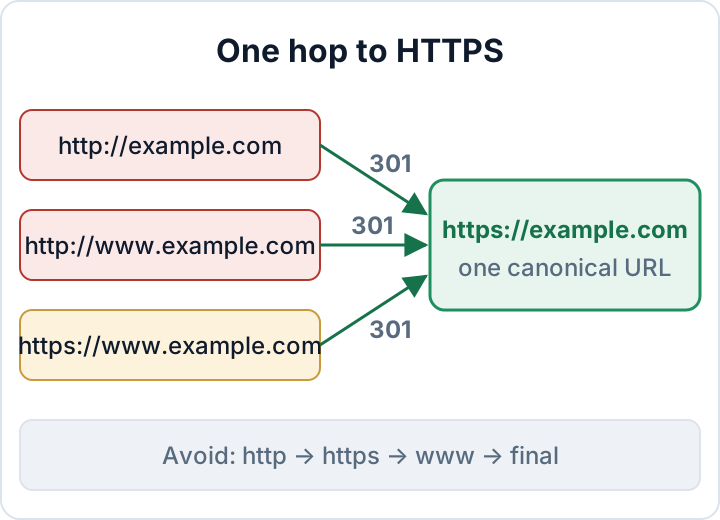
Choose one canonical address, with or without www, and stick to it. Every other variant should go directly to that address in a single 301 redirect. A chain like http → https → www → final slows down every first visit, wastes search engine crawls and makes mistakes hard to trace.
Apache, placed above the # BEGIN WordPress block in .htaccess:
RewriteEngine On
RewriteCond %{HTTPS} off [OR]
RewriteCond %{HTTP_HOST} ^www\.example\.com$ [NC]
RewriteRule ^ https://example.com%{REQUEST_URI} [L,R=301]
nginx:
server {
    listen 80;
    listen [::]:80;
    server_name example.com www.example.com;
    return 301 https://example.com$request_uri;
}

server {
    listen 443 ssl;
    listen [::]:443 ssl;
    server_name www.example.com;
    ssl_certificate     /etc/letsencrypt/live/example.com/fullchain.pem;
    ssl_certificate_key /etc/letsencrypt/live/example.com/privkey.pem;
    return 301 https://example.com$request_uri;
}
Keep the redirect in one place. If a plugin, .htaccess and the CDN all redirect, you get chains or loops. Pick the server or the CDN and remove the others.
Redirect loops behind a CDN or reverse proxy
The classic loop is Cloudflare's "Flexible" SSL mode. The browser talks HTTPS to Cloudflare, but Cloudflare talks plain HTTP to your server. The server sees HTTP, redirects to HTTPS, and the cycle repeats. Install a certificate on the server and set the mode to Full (strict) in the Cloudflare SSL/TLS settings. Traffic to the server is then encrypted and the server's certificate is validated.
Other proxies and load balancers pass the original scheme in an X-Forwarded-Proto header. WordPress does not read it by default. Add this above the "stop editing" line in wp-config.php:
if ( isset( $_SERVER['HTTP_X_FORWARDED_PROTO'] ) && $_SERVER['HTTP_X_FORWARDED_PROTO'] === 'https' ) {
    $_SERVER['HTTPS'] = 'on';
}FORCE_SSL_ADMIN and the login page
define( 'FORCE_SSL_ADMIN', true );This makes WordPress serve the login page and the dashboard only over HTTPS. Passwords and admin cookies are never sent unencrypted, even if someone opens an old http:// bookmark. It is a safety net, not your redirect solution. It does nothing for the public pages. Other wp-config.php settings are covered in wp-config.php hardening: 10 settings to check.
Find the remaining mixed content in dev tools
Mixed content means an HTTPS page loads a resource over HTTP. Browsers block insecure scripts and frames and warn about or upgrade images, which is why the padlock disappears. Open DevTools on an affected page. The Console lists every insecure request with its URL. In Chromium-based browsers, type scheme:http in the Network tab filter to see them all at once.
After a clean search-replace, the remaining causes are usually outside the database. Typical sources are hard-coded URLs in theme files, Custom HTML widgets, custom CSS (background: url(http://...)), page-builder CSS files and old third-party embeds. To find them in the theme:
grep -rn "http://" wp-content/themes/your-theme/
wp db search 'http://example.com'
Fix the problem at the source. Plugins that rewrite URLs on every page load hide the problem without fixing it, and they stop working once deactivated. The CSP directive upgrade-insecure-requests can serve as a temporary bridge while you clean up. It is explained in WordPress security headers.
Check more than the homepage. Test the checkout, the contact form, the login page, a blog post, a category archive and any landing page built with a different template.
Monitor certificate expiry, then turn on HSTS
Automatic renewal can fail without anyone noticing. Common causes are a DNS change, a switch to a new CDN, or a firewall or redirect rule that blocks /.well-known/acme-challenge/. Set up an external monitor that checks the certificate and alerts you at least two weeks before it expires. Many uptime services include this check. To read the expiry date yourself:
echo | openssl s_client -connect example.com:443 -servername example.com 2>/dev/null | openssl x509 -noout -enddateHSTS (RFC 6797) comes last. It tells browsers to use HTTPS only, so a broken certificate becomes a hard error for visitors, and with includeSubDomains so does any forgotten HTTP-only subdomain. Enable it only when every subdomain and redirect works, and start with a short max-age. Values and the preload warning are covered in WordPress security headers.
The audit plugin from secaudit.eu checks hardening and configuration settings alongside file integrity and outdated plugins. After the move, you have a record of the site's state that you can keep for your documentation. → secaudit.eu
Next step: run the curl -sIL hop check against all four variants (http, http://www, https://www, https). Then open your five most important pages with the DevTools Console open. At most one 301 per variant, a direct 200 for the canonical HTTPS URL and no mixed-content messages mean the move is complete.
FAQ
Is a free certificate good enough for an online shop?
Yes. A free domain-validated certificate encrypts traffic just as strongly as a paid one. The shop's security depends on its plugins, updates, logins and payment setup, not on the price of the certificate.
Why does the padlock disappear on some pages only?
Those pages load at least one resource over HTTP. This is usually an image, script or embed from a widget, template or page-builder section that the other pages do not use. The DevTools Console on that page shows the exact URL.
Does HTTPS make my site GDPR compliant?
No. HTTPS is one technical measure under Art. 32, encryption in transit. GDPR also expects you to secure the systems themselves, restore data after incidents, test your measures regularly and document all of this.
This article is general information, not legal advice.
Check your own site
Security Audit & Compliance is the WordPress plugin from secaudit.eu: it scans for malware, hidden spam, changed core files and vulnerable code, and maps its findings to GDPR Art. 32, NIS2 Art. 21 and the OWASP Top 10.
See what the plugin checks