WordPress security headers: CSP, HSTS and more
WordPress security headers explained: safe starting values for HSTS, CSP, Referrer-Policy and Permissions-Policy, where to set them, and how to avoid breakage.
Also in: Deutsch Français Español Italiano Polski Português Türkçe
Most WordPress sites can fix a failing header grade in under an hour. Add four low-risk headers today: HSTS, X-Content-Type-Options, Referrer-Policy and Permissions-Policy. Then roll out Content-Security-Policy slowly, in report-only mode first. This guide covers safe starting values for each of these WordPress security headers, where to configure them, and which ones can break your editor or embeds.
What WordPress security headers do, and what they don't
Security headers are instructions your server sends to the visitor's browser. They tell the browser to use only HTTPS, not to guess file types, not to let other sites frame your pages, and which scripts it may run. That reduces downgrade attacks, MIME sniffing, clickjacking and the impact of cross-site scripting (XSS).
They do not patch a vulnerable plugin, stop a password-guessing attack or protect the server itself. If an attacker can write PHP files to your server, no header will help. Treat headers as one layer of browser-side hardening, not as a security fix.
Missing headers are a classic example of security misconfiguration in the OWASP Top 10. They are also cheap, well documented measures, which makes them part of the "state of the art" that GDPR Article 32 asks you to take into account.
The baseline: safe starting values for each header
These values are deliberately conservative. They should not break a typical WordPress site, and you can tighten them later.
| Header | What it does | Safe start value |
|---|---|---|
| Strict-Transport-Security | Forces HTTPS on later visits | max-age=300 |
| X-Content-Type-Options | Stops MIME type guessing | nosniff |
| Referrer-Policy | Limits URL data sent to other sites | strict-origin-when-cross-origin |
| Permissions-Policy | Disables browser features you don't use | camera=(), microphone=(), geolocation=() |
| Content-Security-Policy | Frame protection (for now) | frame-ancestors 'self' |
| X-Frame-Options | Legacy frame protection | SAMEORIGIN |
HSTS is defined in RFC 6797. Start with five minutes (max-age=300) and confirm nothing breaks. Then raise it to a day (86400), then a week, and finally a year (31536000). Add includeSubDomains only after you have checked that every subdomain serves HTTPS.
Referrer-Policy strict-origin-when-cross-origin sends only your domain to other sites, not the full URL. That matters on WordPress because URLs often carry query strings such as search terms, order IDs or campaign parameters, and you do not want those to reach third parties.
Permissions-Policy switches off camera, microphone and geolocation for your pages and any embedded frames. If you run a store locator that needs location access, leave geolocation out of the list.
Frame protection now belongs in CSP as frame-ancestors 'self'. Keep X-Frame-Options: SAMEORIGIN only as a fallback for old browsers. A small enforced CSP that contains only frame-ancestors is safe to deploy now. The full CSP comes later.
X-XSS-Protection is deprecated. Do not enable it. It controlled an XSS filter that modern browsers have removed, and the filter itself could be abused to cause new problems on pages that were otherwise safe. Setting 1; mode=block gains you nothing. CSP is the replacement.
Where to set security headers: server, plugin or CDN
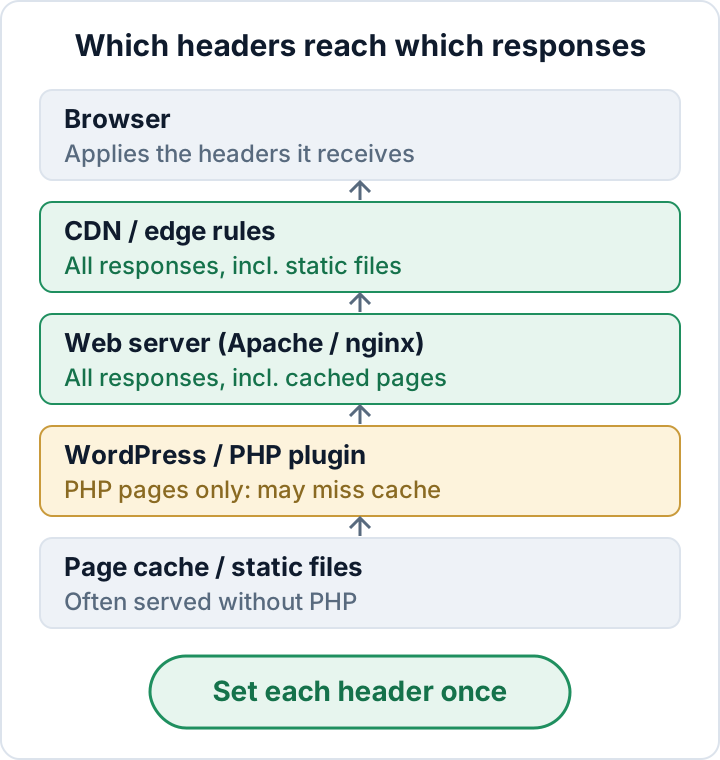
Choose one place per header. If the server, a security plugin and the CDN all send Strict-Transport-Security, you get duplicate or conflicting values, and nobody remembers which one is active.
The web server is usually the best place. Server rules apply to every response, including images, CSS files and pages served from a full-page cache. On Apache, which includes most shared hosting, add this to the .htaccess file in your WordPress root, above the # BEGIN WordPress block. This requires mod_headers:
<IfModule mod_headers.c>
  Header always set Strict-Transport-Security "max-age=300"
  Header always set X-Content-Type-Options "nosniff"
  Header always set Referrer-Policy "strict-origin-when-cross-origin"
  Header always set Permissions-Policy "camera=(), microphone=(), geolocation=()"
  Header always set Content-Security-Policy "frame-ancestors 'self'"
  Header always set X-Frame-Options "SAMEORIGIN"
</IfModule>
On nginx, put the equivalent lines in the server block for your HTTPS site, then run nginx -t before you reload:
add_header Strict-Transport-Security "max-age=300" always;
add_header X-Content-Type-Options "nosniff" always;
add_header Referrer-Policy "strict-origin-when-cross-origin" always;
add_header Permissions-Policy "camera=(), microphone=(), geolocation=()" always;
add_header Content-Security-Policy "frame-ancestors 'self'" always;
add_header X-Frame-Options "SAMEORIGIN" always;
Watch for one nginx pitfall. A location block that has its own add_header line does not inherit any add_header lines from the server level. A cache-control header added for /wp-content/uploads/ can silently remove all your security headers on those files. Repeat the headers in that block, or move them into a snippet that you include everywhere.
Plugins and code using WordPress's send_headers hook only run when PHP builds the page. Static files never pass through PHP. Pages served from a full-page cache may skip PHP as well, depending on how the cache stores and replays headers. CDN or edge rules are a good alternative because they cover everything that passes through the CDN. Managed hosts often provide their own header settings in the control panel. If yours does, use that panel and don't duplicate the rules in .htaccess.
Content-Security-Policy without breaking WordPress
CSP is the header with the biggest benefit and the highest risk. It tells the browser which sources of scripts, styles, images, fonts and frames are allowed. WordPress makes this difficult. Core and the block editor output inline scripts and styles. Page builders inject more of them. Analytics tools, YouTube and map embeds, cookie banners and payment widgets each load code from other domains. A strict policy that blocks any of these can break checkout or leave a blank editor screen.
Start in report-only mode. The browser then logs violations without blocking anything:
Content-Security-Policy-Report-Only: default-src 'self'; img-src 'self' data:; object-src 'none'; base-uri 'self'Open your main page types: home, a blog post, a page with an embed, the cart and checkout. Then open the browser's developer tools and check the Console for each one. Every violation names the blocked resource and the directive it broke. Treat the list as an inventory of the third-party requests your site makes. You will often find things nobody remembers adding, such as an old chat widget or fonts loaded from Google. Our Google Fonts article explains how to deal with those.
Add sources you actually need, remove the ones you don't, and check the Console again. Switch the header name to Content-Security-Policy only when the violations have stopped on all important pages. Include frame-ancestors 'self' in that full policy: browsers ignore frame-ancestors in report-only mode, and the full header will replace the small one you set earlier. Inline scripts are the hard part: allowing 'unsafe-inline' removes much of the XSS protection, while nonces or hashes need theme or plugin support. The MDN CSP reference documents every directive.
Consider keeping wp-admin out of the strict policy, at least at first. On nginx, set the front-end CSP in the locations that serve the public site rather than in the whole server block.
You can add a report-uri or report-to endpoint to collect violations centrally. Those reports contain page URLs and browser details, and each one arrives with the visitor's IP address. A third-party reporting service typically acts as your processor under GDPR, so you need a data processing agreement (Art. 28). For a small site, reading the Console yourself is often enough.
HSTS preload: why to wait
Preloading puts your domain on a list that browsers ship with. Those browsers then use HTTPS for your domain before the first visit, and for every subdomain. That is the problem. An old webmail host, a staging site, a printer interface or an intranet tool that only works over plain HTTP becomes unreachable in those browsers.
Removing a domain from the list is possible, but it is slow. Browsers only drop the entry after the change reaches users through browser updates. Plan as if the decision is permanent.
Raise max-age step by step and keep it at the higher values for a while. List every subdomain your organization uses, including those in DNS that nobody visits any more. Consider preload only when all of them serve HTTPS. The submission site at hstspreload.org publishes the current requirements for the header. Read them there instead of copying values from blog posts.
Testing your headers and keeping them in place
Check the actual responses, not your config files. In the browser's developer tools, open the Network tab, click the document request and read the response headers. From a terminal:
curl -sI https://example.com/
curl -sI https://example.com/wp-includes/css/dist/block-library/style.min.css
Public header-checker sites give a quick overview. The OWASP Secure Headers Project explains the reasoning behind each recommended header. Test at least these five responses:
- Home page
- A page that is served from cache, opened while logged out
- A static file (CSS, JS or image)
/wp-login.php- A screen in wp-admin, including the block editor
Headers tend to disappear without anyone noticing. Common causes are a host migration that drops your .htaccess rules, a CDN change, or a new caching or security plugin that sends its own values. Check the headers again after any of these changes. Keep the active configuration and the date you tested it with your other hardening records from the security checklist. That record is what you show a client questionnaire or an auditor.
The audit plugin from secaudit.eu runs a hardening and configuration scan and maps its findings to GDPR Art. 32 and NIS2 Art. 21. Use it alongside the header checks above → secaudit.eu
FAQ
Do security headers affect SEO or page speed?
The effect is negligible. They add a few hundred bytes to each response. HSTS can save the HTTP-to-HTTPS redirect on repeat visits.
Can a plugin set all security headers for me?
Partly. A plugin covers pages built by PHP, but it can miss static files and cached pages. Server or CDN rules are more reliable.
Should I send X-XSS-Protection: 0 or leave it out?
Leave it out, or send 0 if a questionnaire insists on an explicit value. 0 turns the legacy filter off. Never use 1; mode=block.
Is HSTS required by GDPR?
No GDPR rule names specific headers. GDPR does require appropriate security that takes the state of the art into account. Enforcing HTTPS with HSTS is a cheap, standard measure that fits that requirement.
This article is general information, not legal advice.
Check your own site
Security Audit & Compliance is the WordPress plugin from secaudit.eu: it scans for malware, hidden spam, changed core files and vulnerable code, and maps its findings to GDPR Art. 32, NIS2 Art. 21 and the OWASP Top 10.
See what the plugin checks