wp-config.php hardening: 10 settings to check
wp-config.php hardening in 10 checks: unique salts, production debug settings, FORCE_SSL_ADMIN, file permissions, stray backups and how to edit safely.
Also in: Deutsch Français Español Italiano Polski Português Türkçe
wp-config.php holds your database password, the keys that sign every login cookie, and the switches that decide whether errors are shown to visitors. Most site owners have never opened it. This wp-config.php hardening guide is a ten-point audit of that one file. For each check you get the exact line, the production value, how to verify it, and what the setting does not protect against.
What wp-config.php controls, and how to edit it without a white screen
The file contains three kinds of things. First, the database credentials. Second, eight security keys and salts. Third, constants that change how WordPress behaves. Anyone who can read the file can log into your database. Anyone who can write to it can run code on every page load.
It is also the easiest file to break. A single missing semicolon produces a white screen or a fatal error for every visitor. Use this workflow every time:
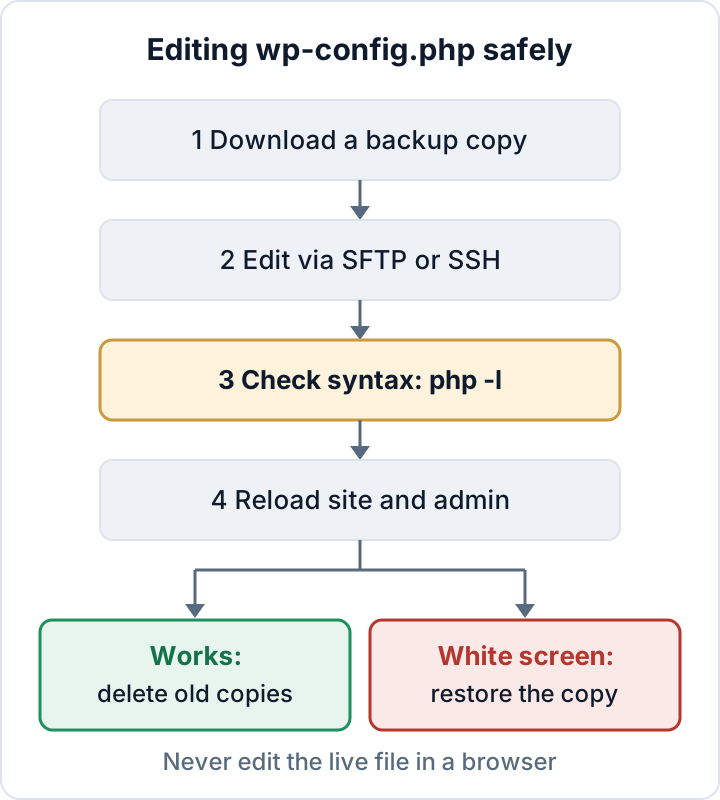
- Download a copy of the current file to your computer.
- Edit over SFTP or SSH, not in a browser-based file manager or a plugin.
- If you have shell access, run
php -l wp-config.php. It should print "No syntax errors detected". - Reload the front end and
/wp-admin/in a private window. - If anything breaks, upload your copy again. Then fix the edit calmly.
- If it works, delete any temporary copies you made on the server (such as
wp-config.php.bak). Keep the copy on your computer.
Placement matters. Near the bottom of the file you will find the comment /* That's all, stop editing! Happy publishing. */, followed by require_once ABSPATH . 'wp-settings.php';. Constants defined after that line come too late for most settings. Put every new define() above the comment. The official reference is the wp-config.php page in the WordPress developer docs.
Secrets: database credentials and unique security keys and salts
Check 1: database credentials. DB_USER should be a database user that exists for this one site only, with a long random password. If three sites share one database user, a leak from one site exposes all three. Never reuse your hosting panel or control panel password here. This check does not help if the attacker already runs code on the server, because they can read the file anyway.
Check 2: keys and salts. There are eight: AUTH_KEY, SECURE_AUTH_KEY, LOGGED_IN_KEY, NONCE_KEY and the four matching _SALT constants. They must be long, random and unique to this site. If any of them still says put your unique phrase here, fix it today. You can generate a fresh set at api.wordpress.org/secret-key/1.1/salt/ and paste it over the old block. With WP-CLI, use one command:
wp config shuffle-saltsRotate the salts after a hack, when an administrator or agency with file access leaves, or if the file was ever exposed.
After a compromise, rotating these secrets is one step of a larger cleanup. See WordPress malware removal for the full order.
Debug settings for production: WP_DEBUG, WP_DEBUG_DISPLAY and WP_DEBUG_LOG
Check 3: WP_DEBUG. On a live site this should be false. Displayed errors reveal server paths, plugin names and sometimes query fragments. An attacker can use that to pick a target.
define( 'WP_DEBUG', false );WP_DEBUG set to false does not switch off PHP's own display_errors setting. If your host has it on, warnings can still appear on the page. Ask the host, or check the PHP configuration if you run your own server.
Check 4: if you need logs, hide them and move them. Sometimes you have to debug production. In that case, never display errors on the page, and do not use the default log location. WP_DEBUG_LOG set to true writes to wp-content/debug.log, which is often publicly downloadable. Give it a file path outside the web root instead:
define( 'WP_DEBUG', true );
define( 'WP_DEBUG_DISPLAY', false );
define( 'WP_DEBUG_LOG', '/home/example/logs/wp-debug.log' );
@ini_set( 'display_errors', '0' );
The directory must exist and be writable by the PHP user. Then confirm that no old log is still public:
curl -I https://example.com/wp-content/debug.logYou want 403 or 404. A 200 means anyone can read the log. Delete it.
Logs often contain email addresses, IP addresses and form submissions, which makes them personal data. Switch logging off again when you are done, and delete or rotate old log files. Details on each constant are in the WordPress debugging documentation.
HTTPS and environment: FORCE_SSL_ADMIN and WP_ENVIRONMENT_TYPE
Check 5: FORCE_SSL_ADMIN. This keeps the login page, the dashboard and the admin cookies on HTTPS:
define( 'FORCE_SSL_ADMIN', true );It covers only the admin area and logins. It does not replace a site-wide HTTP-to-HTTPS redirect at the server, and it is not HSTS.
Check 6: WP_ENVIRONMENT_TYPE. This setting tells WordPress and plugins what kind of site they are running on. Valid values are production, staging, development and local. Production is the default.
define( 'WP_ENVIRONMENT_TYPE', 'production' );The setting has some real effects. In core, a development environment turns WP_DEBUG on when you have not defined it yourself. Some plugins and hosts read the value to stop outgoing email or to change caching on non-production sites. The bigger point is labeling. A staging copy usually holds a full copy of the real customer and order data. Mark it as staging and protect it with HTTP authentication or an IP restriction. Delete it when the project ends. A forgotten staging subdomain with last year's customer database is a common source of leaks.
File editor and file modifications: DISALLOW_FILE_EDIT and DISALLOW_FILE_MODS
Check 7: Add this line to every site:
define( 'DISALLOW_FILE_EDIT', true );It removes the Theme and Plugin file editors from the dashboard. A stolen admin login then cannot be turned into running code with a few clicks. It does not stop an attacker who can upload a plugin.
Check 8: DISALLOW_FILE_MODS goes further. It also blocks installing and updating plugins and themes from the dashboard, and it switches off automatic background updates. Enable it only once you have another update path, such as WP-CLI, a deployment pipeline or host-managed updates. Otherwise you have just frozen the site on today's vulnerable versions. Both settings and the update workflow are covered in DISALLOW_FILE_EDIT: disable the WordPress file editor.
File permissions, location and stray copies of wp-config.php
Check 9: permissions. The right value depends on which user PHP runs as:
- 400 or 440: use when the file owner is a different user than PHP. The group must include the PHP user, which then needs only read access.
- 600: use when PHP runs as the file owner, which is common with PHP-FPM pools per account.
Avoid 644 on shared hosting, because other accounts on the same server may be able to read it. Never use 777.
ls -l wp-config.php
chmod 440 wp-config.phpFor ownership and permissions across the rest of the installation, see web shells and file permissions.
Moving the file one directory above the web root is allowed. WordPress looks there automatically when the parent folder has no WordPress installation of its own. The benefit is small. It only matters if PHP stops executing and the server serves .php files as plain text. Do it if it is easy, but do not count it as a fix.
Check 10: stray copies. This is the bigger and more common risk. Files such as wp-config.php.bak, wp-config.php.old, wp-config.php.save, wp-config.php~ or an editor swap file like .wp-config.php.swp do not end in .php. The web server may hand them out as plain text, database password included. Find them:
find /var/www/example -name '*wp-config*' -type fOnly wp-config.php, and the harmless wp-config-sample.php, should remain. Delete the rest. Renaming them does not help. If a copy was reachable over the web, also rotate the database password and the salts.
The 10-point wp-config.php check in one table
| # | Setting | Production value | How to verify |
|---|---|---|---|
| 1 | DB credentials | Dedicated user, strong password | Compare DB_USER across sites |
| 2 | Keys and salts | Unique, random | grep -c "put your unique phrase" wp-config.php returns 0 |
| 3 | WP_DEBUG | false | wp config get WP_DEBUG |
| 4 | Debug display/log | Display off, log outside web root | curl -I .../debug.log gives 403/404 |
| 5 | FORCE_SSL_ADMIN | true | wp config get FORCE_SSL_ADMIN |
| 6 | WP_ENVIRONMENT_TYPE | production | wp config get WP_ENVIRONMENT_TYPE |
| 7 | DISALLOW_FILE_EDIT | true | wp config has DISALLOW_FILE_EDIT |
| 8 | DISALLOW_FILE_MODS | Only with an update path | wp config has DISALLOW_FILE_MODS |
| 9 | Permissions | 400, 440 or 600 | ls -l wp-config.php |
| 10 | Stray copies | None | find command above |
A clean result here says nothing about vulnerable plugins, weak admin passwords or an outdated PHP version. Use the WordPress security checklist for those.
The Security Audit & Compliance plugin from secaudit.eu includes a hardening and configuration scan and checks for exposed secrets and files, such as leftover backups. It also has an optional switch to disable the dashboard file editors → secaudit.eu
Your next step: download a copy of wp-config.php now and run the find command for stray copies. It takes two minutes and covers the exposure most often overlooked.
FAQ
Will changing the salts break my site?
No. Content, settings and passwords stay as they are. Every logged-in user is logged out and has to sign in again, so warn your editors and shop customers first.
Should I change the table prefix on an existing site?
Usually not. A custom prefix adds little real protection, and changing it on a live site means renaming tables and updating entries in the options and usermeta tables. A mistake can lock out every user. Leave it unless you are rebuilding the site anyway.
Can a plugin manage wp-config.php for me?
Some can. However, a plugin that can write to wp-config.php is itself a risk, because a vulnerability in it becomes write access to your most sensitive file. Prefer manual edits over SFTP or SSH, and keep a copy of the last working version.
Check your own site
Security Audit & Compliance is the WordPress plugin from secaudit.eu: it scans for malware, hidden spam, changed core files and vulnerable code, and maps its findings to GDPR Art. 32, NIS2 Art. 21 and the OWASP Top 10.
See what the plugin checks