WordPress SEO spam: find hidden casino and pharma links
WordPress SEO spam explained: find hidden casino and pharma links, see what Googlebot sees, clean the database and files, and request a Google review.
Also in: Deutsch Français Español Italiano Polski Português Türkçe

If Google shows unexpected casino, pharma or Japanese-language results for your domain but your site looks normal in your browser, investigate WordPress SEO spam. The results may reflect an active compromise or spam that remains indexed after a clean-up. The spam is either hidden in the markup or served only to Google and to visitors who arrive from search. This guide shows how to see your site the way Google does, where the spam is stored, and how to get it out of Google's index.
What WordPress SEO spam looks like, and why you don't see it
You don't see it because it isn't meant for you. Attackers want your domain's reputation, not your visitors' attention. The injected code often skips logged-in users and people who type your address directly.
There are three common forms:
- Hacklinks. Links to casino, pharma or loan sites are injected into your pages. They usually sit inside a
display:noneblock, are positioned off-screen, or appear in a footer nobody reads. - The Japanese keyword hack. Thousands of auto-generated pages with Japanese text and shop links. They often come with their own sitemap so Google finds them quickly.
- Conditional redirects and cloaking. The code checks the user agent, IP address or referrer. Googlebot gets spam content. A visitor clicking through from Google gets redirected. You get the normal page.
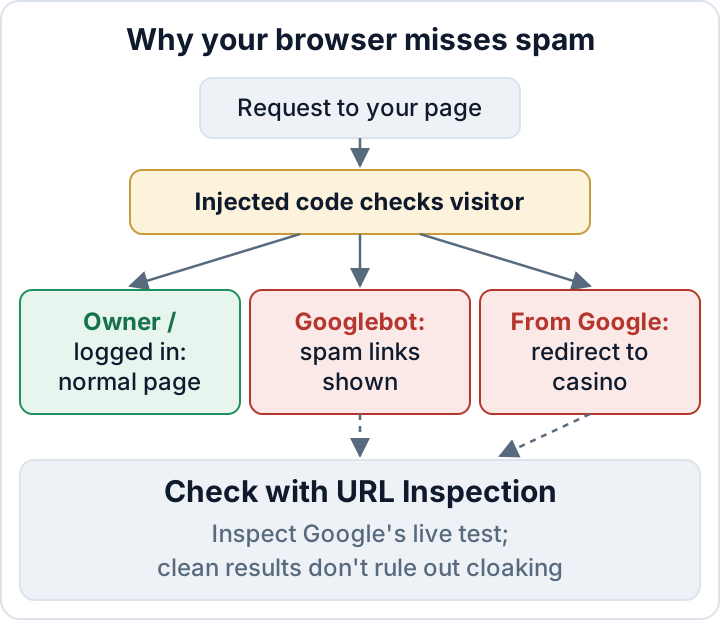
The damage is real even though you can't see it. Rankings can drop, visitors lose trust, and Google may spend crawling effort on spam pages instead of your real ones. If you are still unsure whether you've been hacked at all, start with our 12 signs your WordPress site has been hacked.
See your site the way Google does
Start in Google itself. Search for site:example.com and scroll through the results, then narrow down:
site:example.com casino
site:example.com viagra OR cialis
site:example.com 激安
site:example.com inurl:.html
Results in a language you don't publish in, or URL patterns your site doesn't use, are strong evidence.
A useful additional check is URL Inspection in Google Search Console. Paste a suspicious URL (or your homepage), click Test live URL, then View tested page. The HTML tab shows the rendered markup Google's crawler received, and the screenshot shows what it rendered. Search that HTML for casino, href or display:none. The live test uses Google's inspection crawler, which attackers may treat differently from the indexing crawler. It can reveal cloaking, but a clean result does not rule it out.
You can do a rough comparison from your own machine with curl:
curl -s https://example.com/ -o normal.html
curl -s -A "Mozilla/5.0 (compatible; Googlebot/2.1; +http://www.google.com/bot.html)" https://example.com/ -o googlebot.html
diff normal.html googlebot.html
curl -sS -D - -o /dev/null -e "https://www.google.com/" https://example.com/
The last command makes a GET request with a Google referrer and prints the response headers. A Location: header can reveal an HTTP redirect, but this does not detect JavaScript redirects or reproduce every browser session. There is a further limitation. If the injected code checks for Google's IP ranges, curl from your laptop will see a clean page. A clean curl result does not mean a clean site.
Finally, open Indexing > Pages in Search Console. A sudden jump in indexed or discovered URLs that you didn't publish usually points to generated spam pages.
Where SEO spam hides in WordPress
Preserve a files-and-database backup before investigating. Protect that backup, because it may contain personal data and secrets. Prefer an isolated copy with restricted network access, and run the commands below from its WordPress root: many WP-CLI commands load WordPress and can execute compromised code. Adding --skip-plugins --skip-themes reduces that risk, but mu-plugins and a modified wp-config.php still run. If you cannot isolate it safely, ask your host or an incident responder to investigate.
In the database
wp db search 'casino' --all-tables
wp db search 'viagra' --all-tables
wp post list --post_type=any --post_status=any --orderby=date --order=DESC --fields=ID,post_type,post_status,post_date,post_title
wp option list --search='widget_*'
wp option list --search='theme_mods_*'
wp user list --role=administrator --fields=ID,user_login,user_email,user_registered
Check posts and post meta for links you didn't write, and look for recent posts or pages with odd titles or statuses. In wp_options, look at:
- text and HTML widgets
- theme mods, where custom footer code often lives
- autoloaded options with names you don't recognise
The wp_ table names above assume the default prefix; check $table_prefix in wp-config.php if yours differs. Unknown administrators are a serious finding on their own.
In the files
wp core verify-checksums
wp plugin verify-checksums --all
ls -la wp-content/mu-plugins
find wp-content/uploads -type f \( -name "*.php" -o -name "*.phtml" -o -name "*.phar" \)
find . -type f -name "*.php" -mtime -14
grep -rnE "base64_decode|gzinflate|str_rot13|eval\(" wp-content --include=*.php
wp core verify-checksums compares core files with WordPress.org. wp plugin verify-checksums --all only works for plugins hosted on WordPress.org. For premium plugins, get a fresh copy from the vendor and compare against that.
The grep for obfuscation markers will produce false positives, because legitimate plugins use some of these functions too. Look for long encoded strings and code that makes no sense in its context.
Also check these places by hand:
- the theme's
functions.php,header.phpandfooter.php - plugin folders you didn't install (attackers like plausible names)
wp-config.phpandindex.php, for extraincludelines.htaccess, forRewriteCondrules onHTTP_USER_AGENTorHTTP_REFERER- the web root, for sitemap XML files and
google*.htmlverification files you didn't create
| Spam form | Usual hiding places |
|---|---|
| Hacklinks | Theme footer, widgets, theme mods, post content |
| Japanese keyword hack | Generated files, rogue sitemap, fake plugin, .htaccess |
| Cloaking and redirects | functions.php, mu-plugins, .htaccess, index.php |
Check Search Console for the attacker's footprints
Attackers often verify themselves as owners of your property in Search Console. They then submit their own sitemaps so Google indexes the spam faster. While they keep that access, they can keep pushing URLs.
Open Settings > Users and permissions and remove any owner or user you don't know. Then remove their verification method as well. That can be a google*.html file in your web root, a meta tag in your theme or header settings, or a DNS TXT record. If you skip this step, they can simply verify again.
Under Indexing > Sitemaps, investigate unfamiliar submissions: legitimate plugins or other authorised site managers may have submitted them. Remove attacker-submitted sitemaps from Search Console and remove or disable their source on the site. Then open Security & Manual Actions and read both the Security issues and Manual actions reports. The sample URLs listed there tell you which spam Google found, which makes a useful checklist for your clean-up.
Clean the spam, then close the way in
Deleting the visible links is cosmetic. If the entry point stays open, the spam usually comes back, often within days.
- If you haven't already, back up the infected state (files and database) and keep it as evidence.
- Remove spam posts, options, widgets and users from the database.
- Replace modified core, plugin and theme files with fresh copies from known-good sources. Don't edit infected files line by line.
- Find the entry point. Common ones are a vulnerable or nulled plugin, a stolen admin password, or leaked FTP or hosting credentials.
- Fix it, then rotate all passwords and the salts in
wp-config.php.
Our WordPress malware removal plan covers the full procedure. Vulnerable WordPress plugins covers the most common way in.
The same hole may also have exposed customer data, such as form entries or user accounts. In that case GDPR breach duties may apply; see the GDPR 72-hour breach notification.
Get the spam out of Google: 410s, removals and the review request
Once the generated spam-only pages are gone, their URLs should return 404 (Not Found) or 410 (Gone); either is suitable. If legitimate pages were modified, restore them rather than removing their URLs. Don't redirect spam URLs to your homepage. Google may treat that as a soft 404 and keep crawling them.
If the spam URLs share a pattern that none of your real pages use, you can answer with 410 at server level:
RedirectMatch 410 "^/spam-pattern/"location ~ ^/spam-pattern/ { return 410; }For urgent cases, such as spam showing for your brand name, use the Removals tool in Search Console. It hides URLs from results only temporarily and is not a permanent removal method. Keep the spam-only URLs returning 404/410 and let Google crawl those responses; don't block them in robots.txt, because Google needs to see the removal status. See Google's Removals tool guidance. Resubmit your genuine sitemap so Google recrawls the pages that matter.
Whether you need a review depends on the reports:
- If the Security issues or Manual actions report lists an unresolved issue, use its review option after fixing all affected pages. Keep the request short and factual: what you found, what you removed, how the attacker got in and what you changed to close that hole.
- If neither report lists an issue, there is no review to request. Google needs to recrawl the cleaned site.
Set realistic expectations. Reviews take time, spam URLs drop out gradually, and rankings may recover slowly or not fully. Nobody can promise a timeline.
Catch the next injection early
SEO spam is designed to go unnoticed, so you need checks that don't rely on looking at the page:
- Keep a file integrity baseline and investigate any change you didn't make.
- Run a
site:search for your domain once a month. - Turn on email notifications in Search Console so Security issues and manual actions reach you.
- Scan the database regularly for link patterns like the ones above.
- Treat every new administrator account you didn't create as an incident.
The Security Audit & Compliance plugin from secaudit.eu scans for hidden SEO spam and hacklinks, database spam, hidden admins and other compromise indicators. It also compares files against a baseline. It detects and reports. It does not clean your site automatically, and the entry point still needs a person to fix it. → secaudit.eu
FAQ
Why can't I see the spam when I visit my own site?
The injected code decides who sees what. It usually excludes logged-in users and checks the user agent, IP address and referrer. Some attacks target Googlebot or visitors coming from search; others also show spam to ordinary visitors or hide links in markup served to everyone. Use URL Inspection's live test as one check, but remember that attackers may serve its inspection crawler different content from the indexing crawler.
Will Google penalize my site permanently?
There are no guarantees either way. Clean thoroughly, close the entry point and remove attacker access in Search Console. Request a review if a Security issues or Manual actions report requires one. Recovery then depends on Google recrawling your site, which takes time.
Is a security plugin enough to remove SEO spam?
A plugin can help you find the spam and the changed files. Removing the spam cleanly and finding how the attacker got in needs manual work or professional help. Otherwise the spam tends to come back.
Check your own site
Security Audit & Compliance is the WordPress plugin from secaudit.eu: it scans for malware, hidden spam, changed core files and vulnerable code, and maps its findings to GDPR Art. 32, NIS2 Art. 21 and the OWASP Top 10.
See what the plugin checks