Hacked WordPress site? The GDPR 72-hour breach notification
Hacked WordPress site? When a hack is a GDPR data breach, when the 72-hour notification clock starts, what to report, what to document, and who to inform.
Also in: Deutsch Français Español Italiano Polski Português Türkçe

If a hack exposes, changes or destroys personal data on your WordPress site, it is a personal data breach under the GDPR. The GDPR data breach notification rule then gives you 72 hours: you must notify the supervisory authority without undue delay and, where feasible, within 72 hours of becoming aware of the breach, unless it is unlikely to result in a risk to people.
The clock does not start at the moment of the attack, and it does not wait until the cleanup is finished. Here is when it starts, what to do first, what to report, and when to tell your users.
When is a hacked WordPress site a personal data breach?
The GDPR defines a personal data breach as a breach of security leading to the accidental or unlawful destruction, loss, alteration, unauthorised disclosure of, or access to personal data (Art. 4(12) GDPR). The European Data Protection Board (EDPB) distinguishes three types, and a WordPress hack can cause each of them:
- Confidentiality: an attacker downloads the user table, WooCommerce orders or contact-form entries, or a skimmer on the checkout page reads what customers type.
- Integrity: the attacker alters user accounts or customer records, for example by changing email addresses so that password resets go to them.
- Availability: the database is deleted or encrypted by ransomware. According to the EDPB, even a temporary loss of availability is a breach that you must at least document.
Not every hack involves personal data; a defaced static page with no forms and no user accounts may not. But almost every WordPress site stores user accounts, comments or form entries, so assume personal data is involved until you have checked. Our list of signs that a WordPress site has been hacked helps you notice the problem early.
The GDPR data breach notification: when the 72 hours start
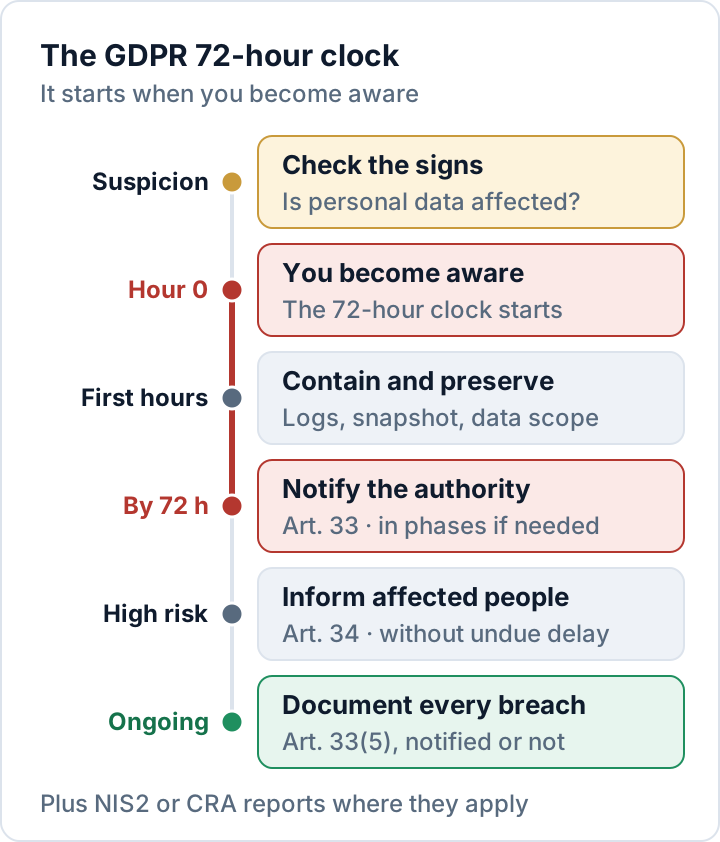
Article 33 counts the 72 hours from the moment you become aware of the breach. In its guidelines on personal data breach notification, the EDPB explains that a controller is aware when it has a reasonable degree of certainty that a security incident has occurred that has led to personal data being compromised. A short investigation to establish this is allowed, and during it you are not yet "aware". The investigation should start as soon as possible, though.
For example: your host reports malware on Monday morning. In the afternoon you find a new administrator account and signs that the user table was exported. From that point you are aware, and the 72 hours end on Thursday afternoon.
Three more points matter for WordPress sites:
- The duty to notify lies with the controller, usually the business that owns the site, not with the agency or the host.
- A processor, such as your host or agency, must inform you without undue delay once it becomes aware of a breach (Art. 33(2)).
- If you notify after 72 hours, you must give the reasons for the delay (Art. 33(1)).
The first hours: contain, preserve, assess
Work through these steps in order and note what you do, with times. That log becomes the core of your documentation.
- Record the start. Note when you became aware, who found what, and which systems are affected.
- Contain. Put the site into maintenance mode or take it offline. Change all administrator, hosting, SFTP and database passwords, note and then remove unknown accounts, revoke application passwords, and replace the security keys and salts in
wp-config.php(for example withwp config shuffle-salts), which logs out every user. - Preserve evidence. Before cleaning anything, copy the server access and error logs and take a snapshot of files and database. Store it securely: it contains the same personal data.
- Assess the data. Which tables and plugins hold personal data: users, orders, form entries, newsletter lists? Which categories (names, email addresses, postal addresses, hashed passwords, order histories), and roughly how many people and records?
- Find the entry point. An outdated plugin, a stolen password, a compromised agency account? You need it to close the gap and judge the consequences.
- Involve the right people. Your data protection officer, if you have one, your host and your agency.
Cleaning the site properly is a separate job; our step-by-step malware removal plan covers it.
What the notification must contain
Under Article 33(3), the notification to the supervisory authority must at least:
- describe the nature of the breach, including where possible the categories and approximate number of people affected and the categories and approximate number of records concerned;
- give the name and contact details of your data protection officer or another contact point;
- describe the likely consequences of the breach;
- describe the measures taken or proposed, including, where appropriate, steps to mitigate possible adverse effects.
You will rarely have all of this after 72 hours, and the GDPR allows for that: where it is not possible to provide everything at the same time, you may provide the information in phases without undue further delay (Art. 33(4)). Report what you know, say what you are still investigating, and send updates. Look up your authority's notification form or procedure now, not during an incident.
The Security Audit & Compliance plugin from secaudit.eu checks for typical compromise indicators such as hidden admin accounts, suspicious cron jobs and changed core files, and it can export an incident-notification draft structured by the 24 h / 72 h / 1 month stages used under NIS2. You still review, complete and submit the notification yourself.
Document every breach, even if you don't notify
Article 33(5) requires you to document every personal data breach: the facts, its effects and the remedial action taken, whether or not you notify it. The record must allow the authority to verify that you complied. If you decide that a breach is unlikely to result in a risk and do not notify it, write down why.
A useful breach record contains:
- Timeline: first signs, moment of awareness, containment, notification
- Affected systems, data categories and approximate numbers
- Cause and entry point, as far as known
- Risk assessment and the decision to notify or not, with reasons
- Measures taken and planned, with dates
- Copies of the notification and of any messages to affected people
Lessons from the incident should flow back into your security measures under GDPR Article 32.
Informing affected users (Art. 34)
When a breach is likely to result in a high risk to people's rights and freedoms, you must also inform the affected people without undue delay (Art. 34). The message must describe the nature of the breach in clear and plain language and contain at least a contact point, the likely consequences and the measures taken or proposed. Add practical advice, such as changing reused passwords and watching for phishing.
A high risk is more likely when the data enables fraud or identity theft, or concerns sensitive matters such as health. Article 34(3) lists three exceptions: the data was made unintelligible to unauthorised persons, for example by encryption; later measures ensure the high risk is no longer likely to materialise; or individual messages would involve disproportionate effort, in which case a public communication or a similar, equally effective measure must inform people instead.
NIS2 and the CRA: additional reports can apply
GDPR notification is about personal data. Two other EU rules can require separate reports for the same incident, to different recipients and with their own deadlines:
- NIS2: If your organization is an essential or important entity under your country's NIS2 law, significant incidents require an early warning within 24 hours, an incident notification within 72 hours and a final report within one month (Art. 23 of the NIS2 Directive). Details depend on national law; our NIS2 guide explains who is in scope.
- Cyber Resilience Act: If you sell a WordPress plugin or theme to EU customers, you are its manufacturer under the CRA. Since 11 September 2026, actively exploited vulnerabilities and severe incidents affecting your product must be reported: early warning within 24 hours, notification within 72 hours, and a final report within 14 days after a fix is available (vulnerabilities) or within one month (severe incidents), through ENISA's Single Reporting Platform (European Commission).
One incident can therefore lead to up to three reports. Agree in advance who handles which one.
FAQ
Do I have to notify if I'm not sure data was accessed?
You are "aware" once you are reasonably certain that personal data was compromised; a short investigation to find out is allowed. If the data may have been accessed and you cannot conclude that a risk to people is unlikely, the safer course is to notify within the deadline with what you know and update the authority later. Document your reasoning either way.
Do weekends count toward the 72 hours?
Yes. Under the EU rules on time limits (Regulation 1182/71), Saturdays, Sundays and public holidays count. The deadline is 72 hours, not three working days, so plan who can act on a Saturday.
This article is general information, not legal advice.
Check your own site
Security Audit & Compliance is the WordPress plugin from secaudit.eu: it scans for malware, hidden spam, changed core files and vulnerable code, and maps its findings to GDPR Art. 32, NIS2 Art. 21 and the OWASP Top 10.
See what the plugin checks