WordPress redirect hack: find and remove spam redirects
WordPress redirect hack: reproduce conditional redirects with curl and dev tools, find them in .htaccess, PHP, the database or CDN, and stop them returning.
Also in: Deutsch Français Español Italiano Polski Português Türkçe

A WordPress redirect hack is built so that you, the owner, don't see it. The malicious code checks who is visiting and redirects only some people: mobile users, visitors who arrive from Google or social media, and often each visitor only once. It usually skips logged-in users and administrators on purpose.
So when a customer says "your site sent me to a fake prize page" and your site looks normal on your laptop, believe the customer. The targets are typically scam pages, fake giveaways, aggressive ad networks or malware downloads. Google may flag the site, and visitors stop trusting it. Redirects are one of several symptoms. The others are covered in 12 signs your WordPress site has been hacked.
Why the owner never sees the WordPress redirect hack
The conditions are simple and effective. The code reads the User-Agent header to detect phones and the Referer header to detect search traffic. It also checks for the WordPress login cookie. After the first redirect, it sets its own cookie or records the IP address so the same person isn't redirected again.
That combination explains most "I can't reproduce it" reports. You are logged in, on a desktop, typing the address directly, and you may already have been redirected once. Any one of those conditions can switch the redirect off.
Reproduce the redirect safely
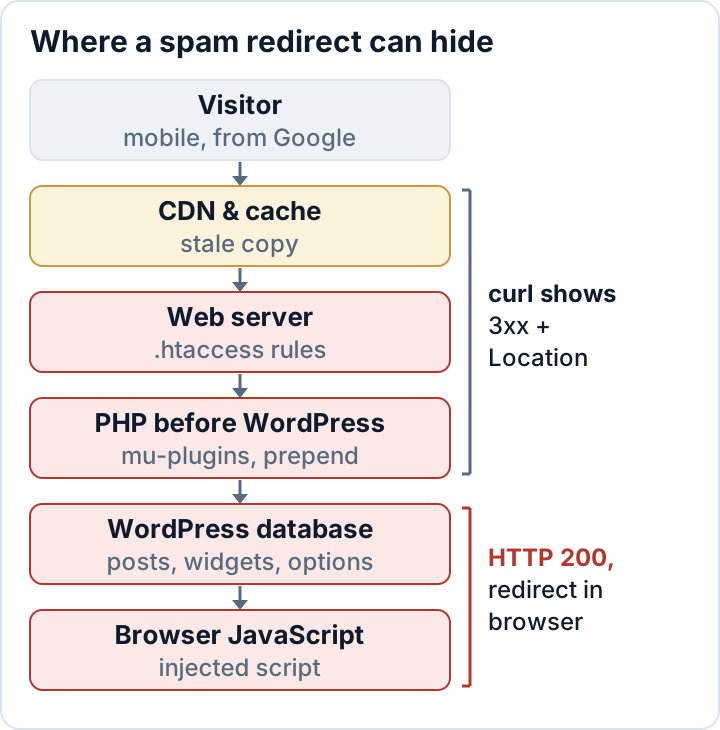
Before you search files, find out what kind of redirect you are dealing with. The response type tells you which layer to search.
Start in the browser. Open a private window and make sure you are logged out. Open the developer tools (F12 in Chrome, Edge and Firefox) and switch on the device toolbar (Ctrl+Shift+M) to emulate a phone. In the Network tab, tick Preserve log (in Firefox: Persist Logs in the Network settings menu) so the entries survive the page change. To get a real Google referrer, search for your own domain on Google and click the result.
Now look at the first entry in the Network tab:
- **Status 301, 302, 307 or 308 with a foreign
Location**: the redirect happens on the server. That includes the CDN, the web server rules, PHP and WordPress itself. - Status 200, then a request to a foreign domain: the page loaded normally, then JavaScript (or a meta refresh tag) sent the browser away. Look for injected script.
Then confirm the result with curl. Curl never runs JavaScript and doesn't follow redirects unless you tell it to. The command below makes a normal GET request and prints only the response headers; avoid curl -I, because some injected code ignores HEAD requests:
curl -s -o /dev/null -D - \
  -A "Mozilla/5.0 (iPhone; CPU iPhone OS 17_5 like Mac OS X) AppleWebKit/605.1.15 (KHTML, like Gecko) Version/17.5 Mobile/15E148 Safari/604.1" \
  -e https://www.google.com/ \
  https://example.com/
A Location: line that points to an unknown domain confirms a server-side redirect. If the status line shows 200, fetch the page body and search it for redirect code and obfuscation:
curl -s -A "Mozilla/5.0 (iPhone; CPU iPhone OS 17_5 like Mac OS X)" \
  -e https://www.google.com/ https://example.com/ \
  | grep -Eio 'window\.location|location\.href|location\.replace|http-equiv=.?refresh|atob\(|eval\(|fromCharCode|script[^>]+src="[^"]+"'
Repeat the test without -A and -e and compare the results. Then test several URLs, such as a blog post, a product page and the contact page. Many injections only touch some templates.
A clean result does not prove the site is clean. If the code redirects each IP only once or only targets certain countries, your test can miss it. Retest from another network, for example a phone on mobile data.
Server-side redirects: .htaccess, server config and PHP that runs first
If curl shows a 3xx to a foreign domain, search the server and the code that runs before WordPress renders anything.
On Apache, check every .htaccess file, not only the one in the web root. Look for rewrite conditions on the user agent or referrer, and for auto_prepend_file. That directive makes PHP load an attacker's file before every request:
grep -rn --include=.htaccess -E "HTTP_(USER_AGENT|REFERER)|auto_prepend_file" .
grep -rn --include=.user.ini --include=php.ini "auto_prepend_file" .
Legitimate RewriteCond %{HTTP_USER_AGENT} lines exist, for example in some cache plugins. A rule that sends mobile or Google traffic to a domain you don't recognize is not legitimate.
Next, list PHP and config files that changed recently. Attackers can reset file timestamps, so treat this list as a starting point, not as proof. Run this from the WordPress root:
find . -type f \( -name "*.php" -o -name ".htaccess" -o -name ".user.ini" \) -mtime -14 -printLook closely at anything added at the top or bottom of wp-config.php and at every file in wp-content/mu-plugins. Must-use plugins load automatically and don't appear in the normal plugin list. Also check the active theme's functions.php. Then run wp core verify-checksums to catch modified core files. For how to read its output and reinstall core safely, see our guide to verifying WordPress checksums.
On nginx, rules live in the server configuration, not in .htaccess. On managed hosting you may not be able to see them. In both cases, ask your host to check for redirect rules and prepend settings at the server level.
The siteurl and home options
A different, cruder variant changes the siteurl and home options. WordPress then redirects every visitor to the attacker's domain, including you. Check both values:
wp option get siteurl
wp option get home
Without WP-CLI, open phpMyAdmin and look at the wp_options table. Your table prefix may differ from wp_, so check $table_prefix in wp-config.php. To fix the values:
wp option update siteurl 'https://example.com'
wp option update home 'https://example.com'
Also run grep -n "WP_HOME\|WP_SITEURL" wp-config.php. If these constants are defined, they override the database values. An attacker can plant them there, and your database fix will then appear to do nothing.
JavaScript redirects in posts, widgets, theme files and header scripts
A 200 response followed by a jump to another domain means a script is running in the page. It can come from several places:
- Post content: injected script tags in
post_content, often in dozens of posts at once. - Options: widget rows (
widget_*), theme options and page builder settings inwp_options. - "Insert headers and footers" settings: code-snippet plugins and page builders store site-wide scripts there. An attacker with an admin login only needs to paste one line.
- Theme and plugin files:
header.php,footer.phpand enqueued JavaScript files.
A quick database search (adjust wp_posts if your table prefix is different):
wp db query "SELECT ID, post_title FROM wp_posts WHERE post_content LIKE '%script%src=%';"
wp db search 'fromCharCode' --all-tables
wp option list --search='widget_*' --fields=option_name
Expect obfuscation. Injected code rarely contains the target URL in plain text. Look for atob(, long base64 strings, String.fromCharCode, and script sources that imitate well-known CDN or analytics domains with a slightly different spelling. The database search technique and the cleanup are covered in more depth in WordPress SEO spam.
Cached copies: cache plugins, server cache and CDN
You can clean the origin completely and visitors may still be redirected, because the infected page is still stored somewhere. Copies can survive in page cache files (wp-content/cache), in an object cache such as Redis or Memcached, in your host's server cache, and on CDN edge servers.
Purge in request order, from the origin outward:
- Finish cleaning files and database at the origin.
- Clear the cache plugin's page cache.
- Flush the object cache with
wp cache flush. - Purge the host's server cache in the hosting panel.
- Purge everything at the CDN.
- Retest with the curl commands above, with and without the mobile user agent and Google referrer.
Also consider the reverse case: someone set the redirect at the CDN or DNS level. Anyone with access to your CDN account can create a redirect rule without touching WordPress. Check the redirect and page rules in your CDN dashboard and your DNS records. Review who has logins to those accounts, and remove access that people no longer need.
Find the entry point, or the redirect comes back
The redirect is the payload, not the hole. If you only delete the payload, it usually comes back within days, because the way in is still open. Common entry points are vulnerable or nulled plugins, stolen admin or hosting credentials, web shells in wp-content/uploads, and leftover backdoors that reinject the code through a cron job or a database option.
A short first check:
- Unknown administrators:
wp user list --role=administrator - Application passwords you didn't create (Users > Profile)
- Unfamiliar scheduled events:
wp cron event list - PHP files in uploads:
find wp-content/uploads -name "*.php" - Outdated or nulled plugins and themes
Once the hole is closed, change the admin, hosting, database, SFTP and CDN passwords. Then rotate the salts with wp config shuffle-salts. This logs everyone out. Follow the full WordPress malware removal plan for evidence preservation and the clean-versus-restore decision.
The attacker may also have been able to read customer data, contact-form entries or orders. If so, assess the incident as a possible personal data breach. See the GDPR 72-hour breach notification.
FAQ
Why are only mobile users redirected?
Phone visitors are less likely to notice a strange address bar and more likely to tap through scam pages. Owners also usually check their site on a desktop while logged in. The mobile-only condition is there to hide the redirect from you.
Google shows "This site may be hacked." What now?
First clean the site, close the entry point and purge all caches. Then request a review in Google Search Console. The process is described in WordPress SEO spam. If you request a review before the redirect is really gone, it tends to fail.
Can a security plugin remove the redirect for me?
Scanners help you find it. They don't replace manual cleanup or the search for the entry point. The secaudit.eu audit plugin checks file integrity against a baseline and flags compromise indicators such as hidden admins, suspicious cron events and database spam. It also scans for hidden SEO spam. It detects and reports. Removing the code and closing the hole is up to you or a professional you hire.
Check your own site
Security Audit & Compliance is the WordPress plugin from secaudit.eu: it scans for malware, hidden spam, changed core files and vulnerable code, and maps its findings to GDPR Art. 32, NIS2 Art. 21 and the OWASP Top 10.
See what the plugin checks