WordPress brute force protection: what a plugin can stop
WordPress brute force protection in layers: login throttling, XML-RPC multicall, REST user enumeration, and why a plugin cannot stop a DDoS attack.
Also in: Deutsch Français Español Italiano Polski Português Türkçe

A security plugin is good at slowing down password guessing. It cannot stop a flood of traffic. WordPress brute force protection and DDoS protection are different problems, and each is handled at a different layer: your accounts, WordPress itself, the web server, and the network edge in front of it.
This article covers each attack you are likely to see in your logs: failed logins on wp-login.php, bursts of xmlrpc.php requests, user enumeration via the REST API, and traffic spikes. For each one, it names the layer that can actually stop it. Every measure also gets one line on what it does not do.
WordPress brute force protection works in layers
Traffic arrives from the internet and passes through several layers before it reaches your data. The further out a request is stopped, the less it costs you. A request rejected at a CDN never touches your server. A request rejected by a WordPress plugin has already used a network connection, a web server process and a PHP worker.
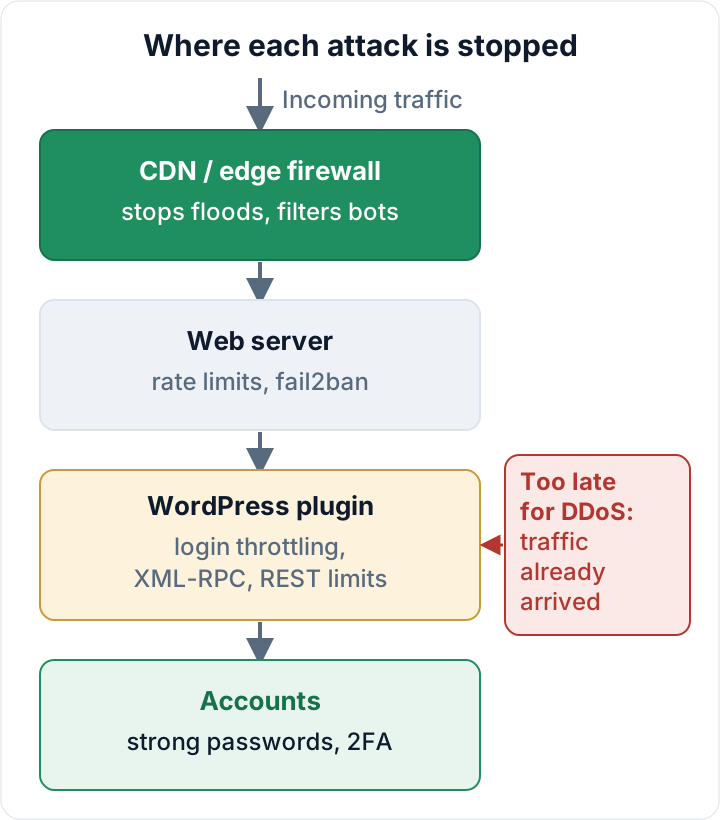
A rough mapping:
| Attack | Best layer |
|---|---|
| Password guessing | Account (2FA) + plugin |
| XML-RPC multicall | Plugin or web server |
| REST enumeration, scraping | Plugin + edge |
| Volumetric flood | CDN / edge, host |
Login throttling: slowing down password guessing on wp-login.php
Login throttling counts failed attempts and responds by adding increasing delays, temporarily blocking the source, or requiring a challenge. Out of the box, WordPress has no limit at all. An attacker can try passwords against wp-login.php as fast as your server answers.
Per-IP limits work well against a single noisy source. They work less well against a botnet that spreads guesses across thousands of addresses, each staying under your limit. This is why you also want limits per username. Twenty failures against the account "admin" from twenty different IPs is still a pattern.
Per-username limits come with a trap of their own. A hard lockout lets anyone lock your real administrator out by failing on purpose. Growing delays or a challenge are kinder than a full block.
Two things decide whether throttling helps or hurts:
- The client IP. Behind a CDN or reverse proxy, every request may appear to come from the proxy's address. A plugin that sees only that address will throttle all your visitors at once. The opposite mistake is just as bad: if the plugin trusts the
X-Forwarded-Forheader from anyone, attackers can fake a new IP on every request and are never blocked. Configure the plugin, or the web server's real-IP module, to accept forwarded headers only from your proxy's IP ranges. - Your own way back in. Allowlist your office IP if it is static, and know your recovery path before you need it.
What throttling does not do: it does not make a weak or reused password safe. A password from a breach list may work on the first try. The real fix is a second factor for every account with elevated rights, set up as described in two-factor authentication for WordPress admins.
XML-RPC: why system.multicall turns one request into many guesses
xmlrpc.php is enabled by default in WordPress. It is an old remote-publishing interface, and one of its methods, system.multicall, runs many method calls inside a single HTTP request. An attacker can pack a long list of username/password attempts into one POST.
This sidesteps login protection that only watches wp-login.php or counts requests. One request in your log can mean hundreds of guesses. Make sure your throttling counts XML-RPC authentication failures, or remove the attack surface entirely.
XML-RPC pingbacks can also be abused to make your site send requests to third parties. This is one more reason to switch them off if nothing needs them.
Before you disable XML-RPC: check what still uses it
Some legitimate tools still talk to xmlrpc.php. Candidates include older desktop blogging and remote publishing tools, older mobile app setups, some connector plugins, and integrations built years ago. Jetpack's connection has historically relied on XML-RPC, so check its current documentation if you use it.
Look at your access logs first. On a typical Apache or nginx server with the combined log format:
# Which IPs send POST requests to xmlrpc.php?
grep "POST /xmlrpc.php" /var/log/nginx/access.log | awk '{print $1}' | sort | uniq -c | sort -rn | head

# Which user agents?
awk -F'"' '/POST \/xmlrpc.php/ {print $6}' /var/log/nginx/access.log | sort | uniq -c | sort -rn | head
Adjust the path for your server (for example /var/log/apache2/access.log), and include rotated logs. Thousands of hits from rotating IPs with generic user agents are attacks. A handful of requests from one known service IP probably belongs to an integration, so ask your agency or the vendor before you cut it off.
You have two options:
- **The
xmlrpc_enabledfilter.** It disables XML-RPC methods that require authentication, which stops password guessing via XML-RPC. Unauthenticated methods such as pingbacks still work. See the WordPress developer reference. - Block the file at server level. This stops everything, and PHP never runs for these requests.
<Files xmlrpc.php>
    Require all denied
</Files>
location = /xmlrpc.php {
deny all;
}After the change, test publishing, your app and any connected service. Write down what you changed and why, so the next person does not "fix" it back.
REST API user enumeration and anonymous rate limiting
/wp-json/wp/v2/users lists users who have published content, including their slugs. /?author=1 redirects to an author archive that reveals the slug in the URL. Slugs often match the login name, which hands an attacker half of the credentials.
Restricting the users endpoint for anonymous visitors and blocking author scans reduces reconnaissance noise. Usernames are not secrets, though. Hiding them is not a control on its own.
Rate limiting anonymous REST requests helps against scraping and automated probing. Apply it to anonymous traffic only, and test afterwards. The block editor uses the REST API for logged-in users, and integrations authenticate with Application Passwords (in core since WordPress 5.6). A limit that hits these will break editing or a sync job in ways that are hard to trace.
What it does not do: rate limiting does not fix a vulnerable REST endpoint in a plugin. It only slows down the attempts to use it.
Why a plugin cannot stop a DDoS attack
A plugin is PHP code. It runs only after a request has crossed the network, been accepted by the web server, and been handed to a PHP worker. A volumetric flood saturates your bandwidth, your connection limits or your pool of PHP workers long before that point. Even if the plugin rejects every request in a millisecond, each rejection still occupies a worker, and a server has only so many of them.
Application-layer floods are different. These are many expensive but valid-looking requests, such as search queries or uncached pages. Here, rate limiting closer to the application helps somewhat, but only up to the server's capacity.
A plugin's traffic-spike alert is useful because it tells you something is happening. It does not absorb anything. Any product that calls a WordPress plugin "DDoS protection" is overselling it.
What a CDN or edge firewall does instead, and what the web server can add
A CDN or edge firewall sits in front of your host, on a network much larger than yours. It can absorb and filter floods, apply rate limits and bot rules before traffic reaches you, serve cached pages when your server struggles, and challenge requests to wp-login.php and xmlrpc.php. Once it is in place, lock the origin: allow only the CDN's IP ranges at your server firewall. Otherwise, attackers can go around the CDN to your server's real address.
On the web server, nginx's [limit_req module](https://nginx.org/en/docs/http/ngx_http_limit_req_module.html) can cap login attempts before PHP starts. Behind a CDN or reverse proxy, configure the real-IP module first (trusting only your proxy's ranges); otherwise $binary_remote_addr is the proxy's address and all visitors share one limit:
# http context
limit_req_zone $binary_remote_addr zone=wplogin:10m rate=5r/m;

# server context
location = /wp-login.php {
    limit_req zone=wplogin burst=5 nodelay;
    # keep your existing fastcgi_pass / include lines here
}
fail2ban takes a different approach. It reads your logs and bans repeat offenders at the firewall, which is cheaper than answering them in PHP. Behind a CDN this does not work as is: the server firewall only sees the CDN's addresses, so bans have to happen at the CDN (or via its API) instead. On managed hosting, ask what network protection your host already provides.
Limits apply here too. An edge firewall does not fix weak passwords or vulnerable plugins. It also does not help with what an attacker can do after logging in, which is the subject of disabling the WordPress file editor.
A setup order for small EU businesses
- Strong, unique passwords and 2FA for every admin and editor.
- Login throttling with per-IP and per-username limits, correct client IP detection and a tested recovery path.
- The XML-RPC decision: check the logs, then use the filter or a server block.
- Restrictions on user enumeration and limits on anonymous REST requests.
- A CDN or edge firewall with a locked origin for sites where downtime costs money.
This also matters for compliance. GDPR Art. 32(1)(b) requires the ongoing confidentiality, integrity, availability and resilience of systems (GDPR on EUR-Lex). For entities in NIS2 scope, Art. 21(2)(j) lists multi-factor authentication among the minimum measures (NIS2 on EUR-Lex). Check your country's national NIS2 law for the details.
The Security Audit & Compliance plugin from secaudit.eu offers login throttling, XML-RPC disabling, rate limiting for anonymous REST requests and traffic-spike alerts. It is not DDoS protection; use a CDN or edge firewall for that. → secaudit.eu
Next step: work through the rest of the WordPress security checklist. If your logs already show successful logins you don't recognize, go to the signs of a hacked site instead.
FAQ
Will disabling XML-RPC break Jetpack or my app?
It can. Check your logs for legitimate XML-RPC clients, and check the vendor's current documentation. The xmlrpc_enabled filter is the gentler option. A server-level block is the stricter one. Test after either change.
Does renaming wp-login.php stop brute force?
It reduces the noise from simple bots, but it is not a security control. Attackers can still find the login page or use XML-RPC. Use throttling and 2FA as well.
Is my security plugin enough during a DDoS?
No. Contact your host or CDN provider. Edge filtering and caching are what keep the site reachable.
Will throttling lock me out?
It can, if the client IP is detected incorrectly or you mistype your password repeatedly. Allowlist your IP, and keep WP-CLI or SFTP access ready to deactivate the plugin.
This article is general information, not legal advice.
Check your own site
Security Audit & Compliance is the WordPress plugin from secaudit.eu: it scans for malware, hidden spam, changed core files and vulnerable code, and maps its findings to GDPR Art. 32, NIS2 Art. 21 and the OWASP Top 10.
See what the plugin checks