OWASP Top 10:2025 for WordPress, explained
The OWASP Top 10:2025 mapped to WordPress: what each risk looks like in plugins, themes and settings, and the checks owners and developers can run.
Also in: Deutsch Français Español Italiano Polski Português Türkçe
The OWASP Top 10 is the best-known list of security risks for web applications, and its 2025 edition replaces the 2021 list. For WordPress it reads like a map of how sites really get broken into: missing permission checks in plugins, careless configuration, and outdated or abandoned components.
This guide translates each of the ten risks into WordPress terms, shows which ones site owners can check today, and which ones only developers can fix in code.
What the OWASP Top 10 is, and what it isn't
The list is published by the OWASP Foundation, a nonprofit community for software security. OWASP describes it as "a standard awareness document for developers and web application security": a ranking of the most critical risk categories, built from vulnerability data and a community survey.
It is not a certification, and no site is "OWASP compliant". Use it to decide where to look first. If you need a detailed list of testable requirements, OWASP publishes the Application Security Verification Standard (ASVS) for that.
What changed in 2025
Compared with 2021, the OWASP Top 10:2025 has two new categories and a few moves:
- A03 Software Supply Chain Failures is new. It widens the old "Vulnerable and Outdated Components" to everything you build and update with.
- A10 Mishandling of Exceptional Conditions is new: poor error handling, logic errors and systems that "fail open".
- Server-side request forgery (SSRF) is no longer a category of its own; it now belongs to A01 Broken Access Control.
- Security Misconfiguration climbed from fifth place to second.
- A09 is now called Security Logging and Alerting Failures, a reminder that logs nobody reads don't help.
The ten risks in WordPress terms
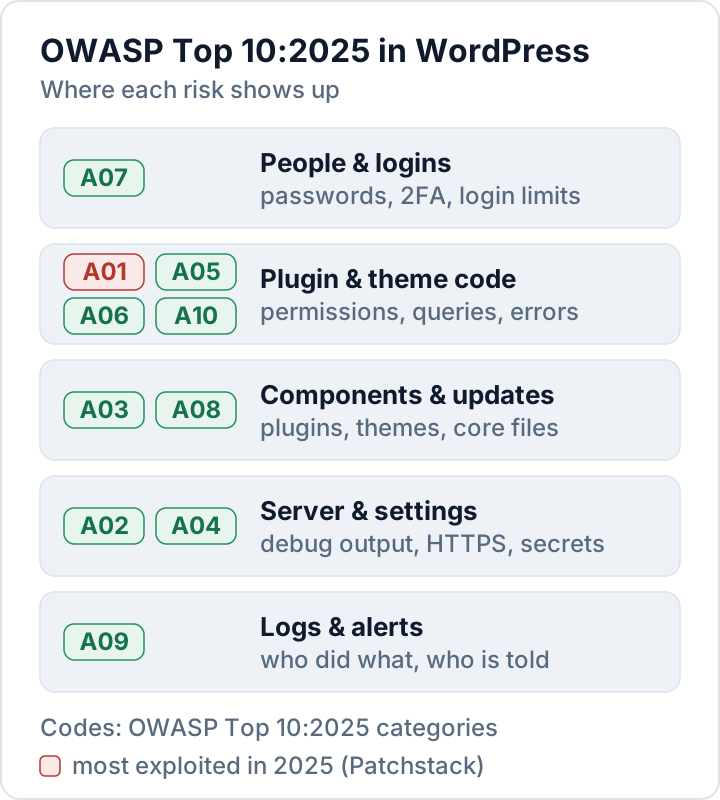
| OWASP 2025 | What it looks like in WordPress | First check |
|---|---|---|
| A01 Broken Access Control | Plugin AJAX or REST endpoints without capability or nonce checks | Roles and plugin endpoints |
| A02 Security Misconfiguration | Error output on the live site, open directory listings, backups in the web root | Debug settings, server config |
| A03 Software Supply Chain Failures | Outdated, abandoned or nulled plugins and themes | Plugin inventory |
| A04 Cryptographic Failures | No HTTPS everywhere, leaked keys or a downloadable wp-config.php backup | HTTPS and secrets |
| A05 Injection | SQL injection and cross-site scripting in plugin or theme code | Code review, updates |
| A06 Insecure Design | Features that trust the browser, for example a price sent by the client | Design review |
| A07 Authentication Failures | Weak or reused passwords, no second factor, unlimited login attempts | 2FA, login limits |
| A08 Software or Data Integrity Failures | Modified core files, injected code, unsafe unserialize() | Checksums |
| A09 Security Logging and Alerting Failures | No record of logins, new admins or file changes | Activity log |
| A10 Mishandling of Exceptional Conditions | PHP errors that reveal paths, checks that allow access when they fail | Error settings |
Broken access control sits at the top for WordPress, too: Patchstack's report State of WordPress Security in 2026 names it the most exploited vulnerability category of 2025. Patchstack is a security vendor, so treat this as one well-informed source.
Five risks site owners can check today
You don't need to read code for these. Each check takes minutes with the dashboard or WP-CLI.
A03: Know and update your components
Most WordPress vulnerabilities are in plugins and themes, not in core. Keep an inventory, update security releases quickly, and delete what you don't use. This command lists plugins with an update waiting:
wp plugin list --update=available --fields=name,version,update_versionOur guide on vulnerable WordPress plugins covers abandoned and nulled plugins in detail.
A02 and A10: Hide errors from visitors
A live site should never print PHP errors or warnings, because they reveal file paths and sometimes database details. In wp-config.php, keep debugging off on production:
define( 'WP_DEBUG', false );
define( 'WP_DEBUG_DISPLAY', false );
Also make sure your server doesn't list directory contents, and that no backup or export files are reachable under the web root.
A07: Protect every login
Turn on two-factor authentication for all administrators and editors, and limit failed login attempts. Our guide to two-factor authentication for WordPress explains the options, from authenticator apps to passkeys.
A08: Verify that files are original
WP-CLI compares your files with the official checksums from WordPress.org:
wp core verify-checksums
wp plugin verify-checksums --all
Any changed or unknown file in core deserves a look. Plugins from outside WordPress.org can't be checked this way; compare them with a fresh download from the vendor.
A09: Keep a record and get alerts
Log logins, new users, role changes, plugin installs and file changes, and make sure someone is alerted. Without these records you can't tell what happened after an incident, or meet the GDPR 72-hour notification timeline described in our data breach guide.
Three risks only developers can fix
If you build plugins or themes, A01, A05 and A10 are mostly about a few WordPress functions used consistently.
- Access control (A01): check
current_user_can()before every privileged action, verify nonces withcheck_ajax_referer()orwp_verify_nonce(), and give every REST route apermission_callback. Since WordPress 5.5 a route without one triggers a notice; WordPress recommends__return_truefor routes that are meant to be public. - SSRF (now part of A01): when you fetch a URL that a user supplied, use
wp_safe_remote_get(). It validates the address and every redirect, and rejects local and private networks by default. - Injection (A05): build queries with
$wpdb->prepare(), sanitize input when it arrives (sanitize_text_field(),absint()), and escape output late (esc_html(),esc_attr(),esc_url()). - Exceptional conditions (A10): check
is_wp_error()on every call that can fail, and make security checks fail closed: if a permission or licence check can't complete, deny the action.
A REST route that follows these rules looks like this:
register_rest_route( 'myplugin/v1', '/report', array(
    'methods'             => 'POST',
    'callback'            => 'myplugin_save_report',
    'permission_callback' => function () {
        return current_user_can( 'manage_options' );
    },
) );
The security chapter of the WordPress developer handbook explains each function with examples.
OWASP, GDPR and NIS2
The OWASP Top 10 is not a law, but it is a common reference for "the state of the art" in web security. GDPR Article 32 asks for appropriate technical measures and a process for regularly testing, assessing and evaluating their effectiveness. Testing a WordPress site against the ten categories is a practical way to show that process.
For organizations covered by NIS2, Article 21(2) lists security in acquisition, development and maintenance, including vulnerability handling, among the minimum measures. A03 and A05 map directly onto that duty.
Our plugin Security Audit & Compliance maps each finding to an OWASP Top 10:2025 category, next to GDPR Article 32 and NIS2 Article 21, so a report shows which risk a problem belongs to. It detects and reports; fixing remains your decision. See what it checks.
FAQ
Is the OWASP Top 10 a legal requirement?
No. It is an awareness document. Laws such as the GDPR require appropriate security, and the Top 10 helps you decide what that means for a website.
Do I need to redo my security review because of the 2025 edition?
Not from scratch. Most risks stayed; update your notes for the new A03 and A10 categories and the new numbering.
Is WordPress core itself a big OWASP risk?
Rarely. Patchstack counted six core vulnerabilities in 2025, all low priority, against thousands in plugins and themes. Your plugin list is where the risk is.
This article is general information, not legal advice.
Check your own site
Security Audit & Compliance is the WordPress plugin from secaudit.eu: it scans for malware, hidden spam, changed core files and vulnerable code, and maps its findings to GDPR Art. 32, NIS2 Art. 21 and the OWASP Top 10.
See what the plugin checks