Broken access control in WordPress plugins: prevent it
Broken access control in WordPress plugins: fix AJAX, admin-post and REST handlers with capability checks, correct nonces and object ownership checks.
Also in: Deutsch Français Español Italiano Polski Português Türkçe

Most broken access control bugs in WordPress plugins come from one missing line: a capability check that nobody wrote. The handler works, the nonce is checked, the feature ships, and any logged-in Subscriber can call it. This article is for plugin and theme developers and for agencies that write custom plugins. It covers the coding patterns behind these bugs and the checks that prevent them.
Why broken access control tops the exploited list for WordPress plugins
Patchstack's State of WordPress Security in 2026 is a vendor report covering data for 2025. It found that broken access control was the most exploited category. The same report counted 11,334 new vulnerabilities in the WordPress ecosystem, 91 % of them in plugins. For heavily exploited flaws, the weighted median time to mass exploitation was 5 hours. If you ship a hole, you will not have days to fix it.
In plugin terms, broken access control means a request handler that changes or reveals data without checking who is asking and what that person may touch. Every handler should answer four questions, in this order:
- Is the user logged in? Skip this only if the action is genuinely public.
- Are they allowed to do this? This is a capability check.
- Did they mean to do it? This is a nonce check against CSRF.
- May they touch this specific object? This is an ownership or meta-capability check on the ID.
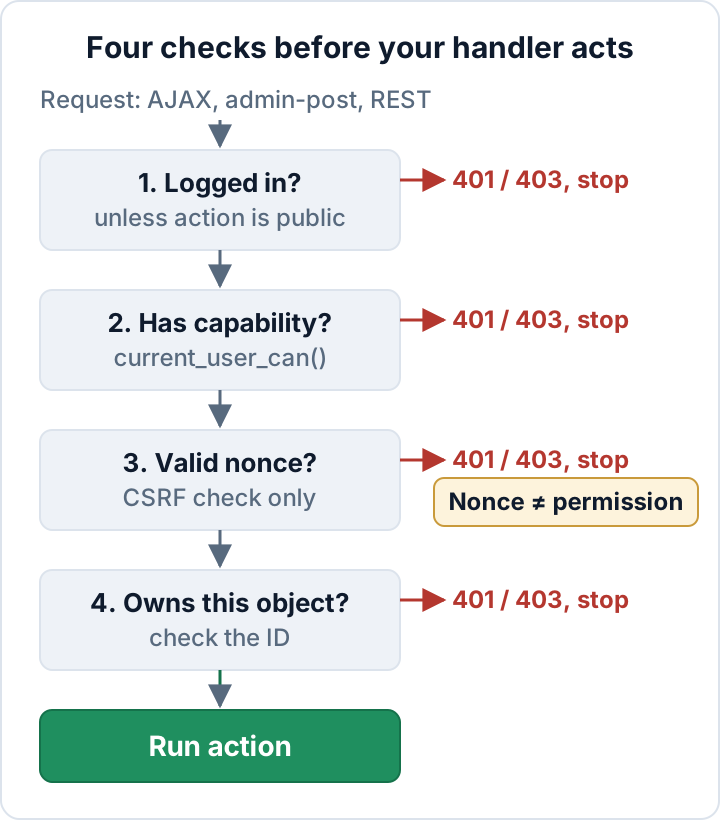
Find every entry point in your plugin first
You can't secure handlers you don't know about. Every place a request reaches your code is a door. That includes wp_ajax_ and wp_ajax_nopriv_ hooks, admin_post_ and admin_post_nopriv_ hooks, and register_rest_route() calls. It also includes handlers on init or template_redirect that read $_POST or $_GET, and shortcodes or blocks that process form input.
Run these commands from your plugin's root directory:
# Registered entry points
grep -rnE "wp_ajax_|admin_post_|register_rest_route" --include='*.php' .

# Public ones deserve a second look
grep -rn "wp_ajax_nopriv_\|admin_post_nopriv_\|__return_true" --include='*.php' .

# Raw request data read anywhere
grep -rn '\$_POST\|\$_GET\|\$_REQUEST' --include='*.php' .
Write the results into a table with one line per entry point. Keep it in the repository next to the code:
| Entry point | Type | Who may call it |
|---|---|---|
myplugin_save_settings | AJAX | manage_options |
myplugin_export | admin-post | myplugin_export_entries |
GET /myplugin/v1/stats | REST | Public, read-only |
If you can't fill in the last column for an entry point, you have found your first bug.
AJAX handlers: wp_ajax_nopriv_ and the missing current_user_can()
wp_ajax_nopriv_{action} makes an action reachable without any login. Register it only for actions that are truly public, such as a front-end search. Developers often add it "so the form also works for guests" and forget that the handler deletes or exports data.
wp_ajax_{action} on its own is not a permission check either. It means any logged-in user can call the action, and that includes Subscribers. Don't rely on is_admin(). It returns true for every request to admin-ajax.php and admin-post.php, because those files load in the admin context. It tells you where the request landed, not who sent it.
A handler that answers the questions:
add_action( 'wp_ajax_myplugin_delete_entry', 'myplugin_ajax_delete_entry' );
// Deliberately no wp_ajax_nopriv_ hook.

function myplugin_ajax_delete_entry() {
    if ( ! current_user_can( 'myplugin_manage_entries' ) ) {
        wp_send_json_error( array( 'message' => 'Forbidden' ), 403 );
    }

    // Dies with a 403 if the nonce is missing or invalid.
    check_ajax_referer( 'myplugin_delete_entry', 'nonce' );

    $entry_id = isset( $_POST['entry_id'] ) ? absint( $_POST['entry_id'] ) : 0;
    // ...ownership check and the actual work follow (see below).

    wp_send_json_success();
}
The capability and nonce checks can run in either order. What matters is that both run before the handler reads or writes anything. Use a custom capability such as myplugin_manage_entries when the action shouldn't be tied to full admin rights. manage_options works when only administrators should have access.
admin_post_ handlers follow the same rules. The only difference is the response:
add_action( 'admin_post_myplugin_export', 'myplugin_handle_export' );

function myplugin_handle_export() {
    if ( ! current_user_can( 'myplugin_export_entries' ) ) {
        wp_die( esc_html__( 'You are not allowed to do this.', 'myplugin' ), '', array( 'response' => 403 ) );
    }
    check_admin_referer( 'myplugin_export' ); // pairs with wp_nonce_field( 'myplugin_export' )
    // ...
}
Nonces protect against CSRF, not against the wrong user
A nonce proves the request came from a form or link your plugin generated. It does not prove the user is allowed to perform the action. The WordPress developer handbook says the same thing. Many vulnerable plugins still treat a passing wp_verify_nonce() as authorization.
There are three reasons it can't be authorization:
- Anyone who can load the page that outputs the nonce can read it from the page source. If your nonce is printed on every admin screen, or on the front end, a Subscriber has it.
- Nonces are not single-use. By default a nonce stays valid for up to 24 hours.
- Nonces created for logged-out visitors are shared between all logged-out visitors, so they protect very little.
Pair every nonce check with a capability check. Generate the nonce only on screens shown to users who hold the matching capability. Use a specific action name per operation, such as myplugin_delete_entry_42 or at least myplugin_delete_entry, rather than one myplugin_nonce for the whole plugin.
REST routes: write a permission_callback that actually checks
'permission_callback' => '__return_true' means "anyone on the internet". Use it only for public, read-only data that is already visible elsewhere on the site. Never use it on routes that write or delete, or that return personal data or settings.
add_action( 'rest_api_init', function () {
    register_rest_route( 'myplugin/v1', '/entries/(?P<id>\d+)', array(
        'methods'             => WP_REST_Server::EDITABLE,
        'callback'            => 'myplugin_rest_update_entry',
        'permission_callback' => function ( WP_REST_Request $request ) {
            return current_user_can( 'edit_post', (int) $request['id'] );
        },
        'args'                => array(
            'id'    => array(
                'validate_callback' => function ( $value ) {
                    return is_numeric( $value );
                },
                'sanitize_callback' => 'absint',
            ),
            'title' => array(
                'type'              => 'string',
                'sanitize_callback' => 'sanitize_text_field',
            ),
        ),
    ) );
} );
A failed check should return false or a WP_Error. WordPress then responds with 401 for anonymous requests and 403 for logged-in users without permission. Don't do the permission check inside callback. That splits the logic and makes reviews harder. The REST API handbook on custom endpoints covers args validation in more depth.
Cookie-authenticated REST requests from your own JavaScript must send a wp_rest nonce in the X-WP-Nonce header. Without it, WordPress treats the request as logged out. That is CSRF protection, not authorization, so the permission_callback still has to check. The built-in users endpoint and username leaks are a separate topic, covered in WordPress user enumeration.
Never trust an object ID from the request
This is the insecure direct object reference pattern. A handler takes a post, order, entry or file ID from the request and uses it without checking who owns it. The capability check passes because the user may edit some entries, so nothing stops them from editing any entry.
For posts and custom post types, use meta capabilities with the ID, such as current_user_can( 'edit_post', $post_id ) or current_user_can( 'delete_post', $post_id ). Without the ID, WordPress can't map the check to the post's author, status and type. Calling current_user_can( 'edit_post' ) on its own gives a meaningless result.
For custom tables, put the ownership check into the query itself:
global $wpdb;
$table   = $wpdb->prefix . 'myplugin_entries';
$deleted = $wpdb->query(
    $wpdb->prepare(
        "DELETE FROM {$table} WHERE id = %d AND owner_id = %d",
        $entry_id,
        get_current_user_id()
    )
);

if ( ! $deleted ) {
    wp_send_json_error( array( 'message' => 'Not found' ), 404 );
}
Returning 404 instead of 403 here avoids confirming that someone else's entry exists. For "my account" actions, take the user from get_current_user_id() and never accept user_id from the request.
Take a contact-form plugin that stores entries in the database. Its "export entries" action is registered on wp_ajax_ with a nonce check and nothing else. Any registered Subscriber can then download every message ever sent through the site. Once someone uses that hole, every affected site has a personal data breach under GDPR, with the 72-hour notification clock that comes with it.
An access control review checklist for every release
- Every entry point is listed with its intended audience.
- No
noprivhook exists without a written reason in the code. - Every handler calls
current_user_can()before reading or writing data. - Nonces use specific action names and are verified in every handler.
- No REST route that writes, deletes or returns private data uses
__return_true. - Object IDs are checked with meta capabilities or an owner column.
- Custom capabilities are added on activation and removed on uninstall.
- The error path returns 401/403 (or 404) without leaking data or stack traces.
- Automated tests confirm that a Subscriber and a logged-out request are refused on every privileged action.
- Every diff is reviewed for new hooks, routes and
$_POST/$_GETreads.
The tests are cheap to write with the WordPress PHPUnit setup:
public function test_subscriber_cannot_update_entry() {
    wp_set_current_user( self::factory()->user->create( array( 'role' => 'subscriber' ) ) );
    $request  = new WP_REST_Request( 'POST', '/myplugin/v1/entries/' . $this->post_id );
    $response = rest_get_server()->dispatch( $request );
    $this->assertSame( 403, $response->get_status() );
}
The free Security Audit & Compliance plugin from secaudit.eu includes a code vulnerability (taint) analysis of plugins and themes. Treat it as a second pair of eyes, not a replacement for review.
When someone reports a hole: vulnerability handling and the CRA
A paid plugin or theme sold to EU customers is a product with digital elements under the Cyber Resilience Act, and its seller is the manufacturer. Since 11 September 2026, actively exploited vulnerabilities must be reported through ENISA's Single Reporting Platform. The deadlines are an early warning within 24 hours, a notification within 72 hours, and a final report within 14 days after a fix is available. From 11 December 2027, a vulnerability handling process and a coordinated disclosure policy are required. The details are in our CRA guide for plugin sellers.
Make yourself easy to reach with a security.txt file and an inbox someone reads. When a report comes in, fix the issue and ship the release. Write a changelog line that clearly names the security fix, and tell customers to update. Advice for site owners on applying those updates is in Vulnerable WordPress plugins: audit, update, replace.
Your next step today: run the three grep commands above on your plugin and fill in the entry-point table.
FAQ
Is is_user_logged_in() enough to protect an action?
No. A Subscriber is logged in too. is_user_logged_in() answers only the first of the four questions, so always add a capability check.
Can a nonce be reused?
Yes, within its lifetime, which is up to 24 hours by default. A nonce is not a one-time token and not a permission, so pair it with current_user_can().
Is the Subscriber role safe to trust?
No. On many sites anyone can register as a Subscriber (Settings > General > Membership). Treat Subscriber accounts as untrusted and test every privileged action against them.
This article is general information, not legal advice.
Check your own site
Security Audit & Compliance is the WordPress plugin from secaudit.eu: it scans for malware, hidden spam, changed core files and vulnerable code, and maps its findings to GDPR Art. 32, NIS2 Art. 21 and the OWASP Top 10.
See what the plugin checks