WordPress database security: users, access and prefixes
WordPress database security that works: one DB user per site, limited privileges, no remote MySQL, no forgotten Adminer, encrypted exports. Prefix explained.
Also in: Deutsch Français Español Italiano Polski Português Türkçe

Five measures protect a WordPress database: a separate database user for each site, a strong and unique password, no remote access to MySQL, no forgotten admin tools on the web server, and encrypted exports. Changing the wp_ table prefix is not one of them. This guide ranks the WordPress database security measures that close real attack paths and shows how to check each one on shared hosting or your own server.
What WordPress database security actually depends on
The database holds everything worth stealing: user accounts and password hashes, WooCommerce orders, contact-form entries from plugins that store them, and comments with email addresses. A leak of that data is usually a personal data breach under the GDPR, with the reporting duties described in our article on the 72-hour breach notification. GDPR Art. 32 also asks for appropriate technical measures, and the database is where that requirement becomes concrete.
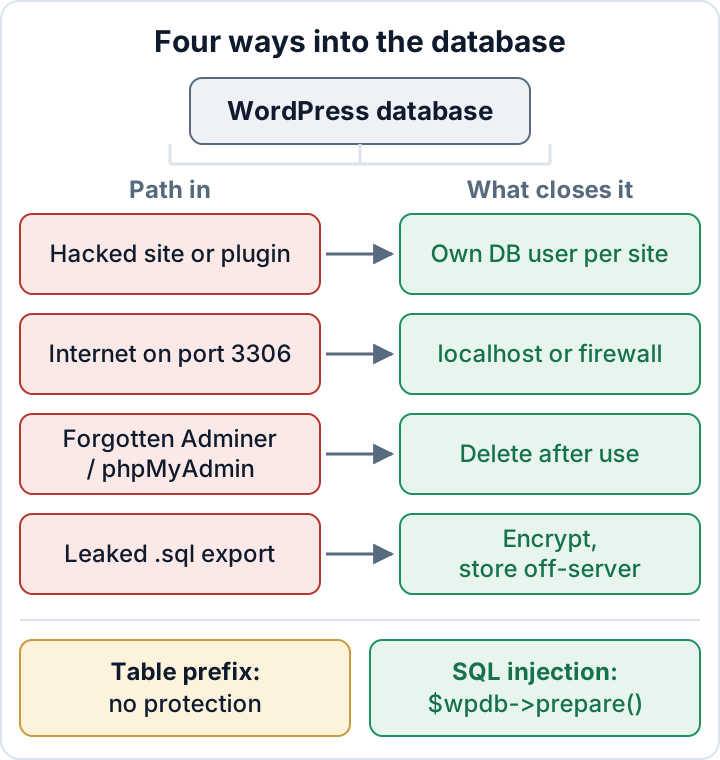
In priority order:
- One database user per site, with privileges only on that site's database.
- A long, random, unique database password.
- MySQL reachable only from localhost or a firewalled private network.
- No self-installed phpMyAdmin, Adminer or
.sqldumps in the web root. - Exports that are encrypted, moved off the server and deleted locally.
SQL injection is a separate problem. It is closed in code, not in database settings, and the table prefix does nothing against it.
One database user per site, with only the privileges it needs
If five sites on one hosting account share one database user, a single hacked plugin gives the attacker the credentials from wp-config.php, and those credentials open all five databases. With a separate user per site, the damage stays in one database.
On shared hosting, go to the database section of your panel (in cPanel: MySQL Databases; in Plesk: Databases > User Management). Create a user for each site and assign it to that site's database only. If an old user is assigned to several databases, remove the extra assignments.
On a VPS, do the same in SQL. Never let WordPress connect as root.
CREATE USER 'site1'@'localhost' IDENTIFIED BY 'long-random-password';
GRANT SELECT, INSERT, UPDATE, DELETE, CREATE, ALTER, INDEX, DROP
  ON site1_db.* TO 'site1'@'localhost';
SHOW GRANTS FOR 'site1'@'localhost';
Day to day, WordPress needs SELECT, INSERT, UPDATE and DELETE. Core updates, plugin installs and plugin updates also create and change tables, so they need CREATE, ALTER, INDEX and DROP. Some plugins need more, for example CREATE TEMPORARY TABLES or LOCK TABLES. The WordPress hardening guide discusses this trade-off.
Run SHOW GRANTS for every existing WordPress user. A line GRANT USAGE ON *.* is normal: USAGE means no privileges at all. If any other privilege is granted ON *.*, for example ALL PRIVILEGES ON *.* or SELECT, INSERT ... ON *.*, the user can reach every database on the server. Fix that first.
A strong, unique database password, and where it lives
Nobody types the database password, so it can be long. Use 32 or more random characters from a password manager, use a different password for each site, and never reuse the FTP, SFTP or hosting account password. Reused passwords are how one leaked credential turns into full account access.
Rotate it when staff or agencies who knew it leave, when you change hosts or developers, and after any incident. The order matters:
- Change the password in MySQL (
ALTER USER 'site1'@'localhost' IDENTIFIED BY 'new-password';) or in the hosting panel. - Immediately update
DB_PASSWORDinwp-config.php. - Load the site and the dashboard to confirm they work.
Between steps 1 and 2 the site shows "Error establishing a database connection". Have the new value ready so the gap lasts seconds. Protecting wp-config.php itself, and finding stray copies like wp-config.php.bak, is covered in wp-config.php hardening.
No remote access: keep MySQL on localhost or behind a firewall
A database port open to the internet invites password guessing. It also exposes you to every future flaw in the database server, before anyone reaches WordPress at all. In most setups, WordPress and MySQL run on the same machine, so nothing outside needs to connect.
Shared hosting: open Remote MySQL (or a similar entry) in your panel. Remove any host you don't recognise, and especially the wildcard %, which means "any address".
VPS: in the [mysqld] section of the server config (on Debian/Ubuntu usually /etc/mysql/mysql.conf.d/mysqld.cnf for MySQL or /etc/mysql/mariadb.conf.d/50-server.cnf for MariaDB), set:
bind-address = 127.0.0.1
mysqlx-bind-address = 127.0.0.1
The second line applies to MySQL 8 only. MariaDB does not use the X Protocol. Restart the service, then check:
sudo ss -tlnp | grep -E '3306|33060'
# from a different machine:
nc -zv your-server.example 3306
ss should show 127.0.0.1:3306, not 0.0.0.0:3306, and the external test should fail. Add a firewall rule that drops port 3306 from outside anyway. Also look for users with remote hosts: SELECT user, host FROM mysql.user; and DROP USER any '%' entries you don't need.
If you do need remote access, for example from a reporting tool, allow only fixed IP addresses or use an SSH tunnel: ssh -L 3307:127.0.0.1:3306 you@your-server.example. With a managed database on a separate host, use the provider's private network and IP allowlist, never a public endpoint open to all.
Forgotten phpMyAdmin, Adminer and database dumps on the web server
Adminer is a single PHP file. Someone uploads it to fix one thing, and it sits in the web root for years as a public database login page. A self-installed phpMyAdmin folder carries the same risk. Find them:
find /var/www -type f -iname 'adminer*.php'
find /var/www -type d -iname '*phpmyadmin*'
find /var/www -type f \( -iname '*.sql' -o -iname '*.sql.gz' \)
Adjust /var/www to your document root, or use the host's file manager search. Delete what you find once you have a copy of anything you need. Renaming adminer.php to adm1n.php only hides it until someone guesses the name.
Dumps in the web root are worse, because they need no password at all. Test whether a suspicious file downloads:
curl -sI https://example.com/backup.sqlA 200 status means anyone can fetch your entire database. For database work, use the phpMyAdmin built into your hosting panel, which sits behind the panel login. Leftover PHP files can also be web shells, and old test copies of the site belong in your staging security cleanup.
Database exports: encrypt, move off the server, delete
Every wp db export or manual dump contains all the personal data in the site. Treat it like the live database. Write it outside the web root with restrictive permissions, encrypt it, move it and delete the local copy:
umask 077
mkdir -p "$HOME/private"
f="$HOME/private/site1-$(date +%F).sql"
wp db export "$f"
gpg --symmetric --cipher-algo AES256 "$f" && rm "$f"
# or with age and a recipient key:
# age -r age1yourpublickey -o "$f.age" "$f" && rm "$f"
Transfer the .gpg or .age file to your backup storage, then remove it from the server too. Keep the passphrase or private key separately from the backups. Rotation, the 3-2-1 rule and restore tests are covered in WordPress backups that actually restore.
The table prefix myth: why changing wp_ is not SQL injection protection
SQL injection happens when plugin or theme code puts user input directly into a query. The attacker then runs SQL through that plugin's own query. They don't need to guess table names: the vulnerable query already uses $wpdb->prefix, and an injected UNION SELECT can read every table name from information_schema. A custom prefix like x7k_ costs the attacker one extra query, or none at all.
The real fix is in code: [$wpdb->prepare()](https://developer.wordpress.org/reference/classes/wpdb/prepare/) with placeholders, plus esc_like() for LIKE clauses.
// Wrong: input goes straight into SQL
$rows = $wpdb->get_results( "SELECT ID FROM {$wpdb->posts} WHERE post_title = '" . $_GET['title'] . "'" );

// Right: placeholder, escaped by prepare()
$title = sanitize_text_field( wp_unslash( $_GET['title'] ?? '' ) );
$rows  = $wpdb->get_results( $wpdb->prepare(
    "SELECT ID FROM {$wpdb->posts} WHERE post_title = %s", $title
) );

// LIKE search: escape wildcards first
$like = '%' . $wpdb->esc_like( $term ) . '%';
$rows = $wpdb->get_results( $wpdb->prepare(
    "SELECT ID FROM {$wpdb->posts} WHERE post_title LIKE %s", $like
) );
The OWASP SQL Injection Prevention Cheat Sheet gives the same advice for any language. If you are a site owner rather than a developer, your part is to update or replace plugins with known injection flaws. See vulnerable WordPress plugins.
A custom prefix has one legitimate use: several WordPress installations sharing one database. Separate databases with separate users are the better design even then.
Renaming the prefix on a live site often goes wrong. Renaming the tables is not enough. The wp_user_roles option and the usermeta keys wp_capabilities and wp_user_level contain the prefix too. Miss one, and administrators lose their rights or roles disappear. If someone insists on doing it, take a full backup and run the change on staging first.
To check this layer regularly, the free Security Audit & Compliance plugin scans for exposed secrets and files and runs a taint analysis of plugin and theme code that can flag unsafe query building. Start today with one task: run SHOW GRANTS for each WordPress database user, or check the user assignments in your hosting panel, and remove any access that reaches beyond the site's own database.
FAQ
Should I change the table prefix on an existing site?
Not for security. It does not stop SQL injection, and a partial rename can lock administrators out. Spend the time on database users and plugin updates instead.
Can I remove ALTER from the WordPress database user?
You can, but core updates, plugin installs and plugin updates that change tables may then fail. Keep ALTER and limit the user to its own database.
Is my host's phpMyAdmin a risk?
Less than a self-installed copy, because it sits behind the hosting panel login. Protect that login with a strong password and two-factor authentication.
Does a security plugin protect the database?
Only partly. A plugin can find exposed files and vulnerable code, but it cannot change database grants, MySQL's network binding or firewall rules. Those are set on the server or in the hosting panel.
Check your own site
Security Audit & Compliance is the WordPress plugin from secaudit.eu: it scans for malware, hidden spam, changed core files and vulnerable code, and maps its findings to GDPR Art. 32, NIS2 Art. 21 and the OWASP Top 10.
See what the plugin checks