WP-CLI security commands: a cheat sheet for admins
WP-CLI security commands for WordPress admins: run them safely, export the database, then check checksums, updates, admins, app passwords, cron and URLs.
Also in: Deutsch Français Español Italiano Polski Português Türkçe
With SSH access, about a dozen WP-CLI security commands can show you in a few minutes whether a WordPress site's core files, updates, administrator accounts, scheduled tasks and URLs look right. This page lists them in a safe order, read-only checks first and changes second. For each command, you get normal output and a result that should make you stop.
It is a quick reference, not a tutorial. Where a topic needs more depth, the section links to our full article.
Run WP-CLI security commands safely: user, flags, backup
Run WP-CLI as the system user that owns the site, not as root. Either log in as the hosting account user or use sudo -u:
sudo -u siteuser -- wp --path=/var/www/example.com/public_html --skip-plugins --skip-themes option get homeThe expected output is a single line such as https://www.example.com. If it shows a different site, your --path is wrong. Fix that before you run anything else. If sudo can't find wp, use its full path, for example /usr/local/bin/wp.
Don't get used to --allow-root. WP-CLI refuses to run as root by default because every command loads wp-config.php and WordPress's PHP code. On a compromised site, that means a backdoor would run with root rights. Files that WP-CLI creates as root also end up owned by root, which breaks updates later.
On any site you don't fully trust, add --skip-plugins --skip-themes so injected plugin or theme code doesn't run. Be aware of what these flags don't cover. Must-use plugins still load, as the WP-CLI global parameters documentation notes. wp-config.php still runs, and so does any PHP auto_prepend_file. These flags reduce risk. They don't make a hacked site safe to work on.
The examples below assume you are logged in as the site user inside the WordPress directory. If you are not, add --path= and the skip flags to every command.
Back up first: wp db export
Export the database before any change, with a date in the filename and outside the web root:
umask 077
mkdir -p ~/backups
wp db export ~/backups/example-$(date +%F-%H%M).sql --skip-plugins --skip-themes
Normal output is Success: Exported to '/home/siteuser/backups/example-2026-11-15-0930.sql'. The umask 077 keeps the file readable only by you.
Never write the dump into public_html. A .sql file in the web root can be downloaded by anyone who guesses the name, and that is a data leak. Delete or move the file to proper backup storage when you are done.
The export contains only the database. It does not include uploads, plugins, themes or wp-config.php. A real backup plan with off-site copies and restore tests is a separate job.
Integrity checks: core and plugin checksums
wp core verify-checksums compares core files with the official WordPress.org checksums:
wp core verify-checksums --skip-plugins --skip-themesNormal output: Success: WordPress installation verifies against checksums. Suspicious output looks like this:
Warning: File doesn't verify against checksum: wp-includes/load.php
Warning: File should not exist: wp-admin/css/colors/blue/about.php
Error: WordPress installation doesn't verify against checksums.
The first warning means a core file was modified. The second means a file was added where core has none. Both deserve attention. wp-content is not checked.
For plugins, run the following:
wp plugin verify-checksums --all --skip-plugins --skip-themesThis works only for plugins hosted on WordPress.org. A premium plugin produces a warning that checksums could not be retrieved, and the summary says that not all plugins were verified. That is expected and not suspicious. "Checksum does not match" or "File was added" for a WordPress.org plugin is suspicious. Our article on verifying WordPress checksums explains how to read these results and how to reinstall core safely.
Update status: core, plugins and themes
wp core check-update
wp plugin list --update=available --fields=name,version,update_version
wp theme list --update=available --fields=name,version,update_version
Normal output is Success: WordPress is at the latest version. and a short or empty table. Also run wp plugin list --fields=name,status,version once to see the full inventory.
Watch for these red flags:
- A plugin you don't recognize.
- An old plugin that never shows an update.
- The same plugin twice under slightly different names, such as
wp-seonext towp-seo-tools.
One caveat applies. Premium plugins with their own updater may show no update while plugins are skipped. Check those in the vendor account.
Run these checks often. Patchstack, a security vendor, reports in its State of WordPress Security in 2026 that for heavily exploited vulnerabilities the weighted median time to mass exploitation was 5 hours. It also found that about half of high-impact vulnerabilities were exploited within 24 hours.
Accounts and access: administrators, application passwords, sessions
wp user list --role=administrator --fields=ID,user_login,user_email,user_registeredNormal output lists the people you expect, with company email addresses. These are red flags:
- An email address nobody recognizes.
- A registration date in the last few days that nobody can explain.
- A generic login such as
admin2,wp-supportorsysadmin.
Our guide to WordPress user roles security covers safe deletion and other ways an account can quietly get admin rights.
Application passwords (available since WordPress 5.6) keep working after a password change, so list them per user:
wp user application-password list alice --fields=uuid,name,created,last_used,last_ip
wp user application-password delete alice <uuid>
An unknown name, or a recent last_used value for an integration you don't run, is suspicious. Delete the password only after you have recorded what you found.
To end every login of a user after a password change or a staff departure, run this:
wp user session destroy alice --allwp config shuffle-salts replaces the security keys in wp-config.php and logs out everyone, including you. Copy wp-config.php to ~/backups/ first and run this command last. Our wp-config.php hardening article explains what the salts do.
Scheduler and site URLs: wp cron event list, siteurl and home
wp cron event list --fields=hook,next_run_relative,recurrenceNormal output shows core hooks such as wp_version_check, wp_update_plugins and wp_scheduled_delete, plus hooks named after plugins you know. These are red flags:
- A hook you can't tie to a plugin.
- A random-looking name like
xq7_upd_k2. - A recurrence of every minute that nothing on the site needs.
Use wp cron event delete <hook> only after you have found the code behind the hook. Otherwise that code reschedules the event and you lose the trail.
wp option get siteurl
wp option get home
Both should print your own domain over HTTPS. A foreign domain is a strong sign of a redirect hack (see our article on the WordPress redirect hack). An http:// URL on an HTTPS site is more often an old misconfiguration, but still fix it. Also run grep -nE "WP_(HOME|SITEURL)" wp-config.php, because constants in that file override the database values. To correct a value, export the database first, then run wp option update home 'https://www.example.com'.
The cheat sheet: one table to copy
| Command | Use when | Suspicious result |
|---|---|---|
wp option get home | Before anything | Wrong or foreign site |
wp db export <file> | Before any change | File lands in web root |
wp core verify-checksums | After alerts, monthly | Modified or extra files |
wp plugin verify-checksums --all | With core check | Mismatch on .org plugin |
wp core check-update | Weekly | Old version |
wp plugin list --update=available | Weekly | Unknown or duplicate plugin |
wp theme list --update=available | Weekly | Unknown theme |
wp user list --role=administrator | Monthly, after staff changes | Unknown email, new account |
wp user application-password list <user> | Monthly | Unknown name, recent use |
wp user session destroy <user> --all | Password change, departure | n/a (change) |
wp config shuffle-salts | After an incident, last | n/a (change) |
wp cron event list | Monthly | Random hook, every minute |
wp option get siteurl / home | Monthly, after redirects | Foreign domain, http |
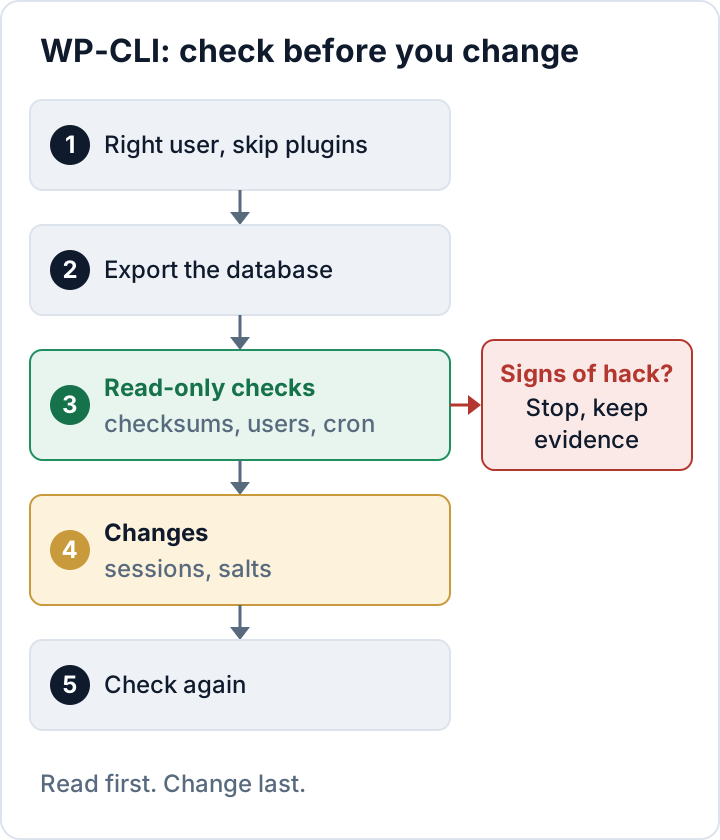
Run them in this order:
- Log in as the site user, confirm the target with
wp option get home, and use the skip flags. - Export the database outside the web root.
- Run all read-only checks and save the output to a file.
- Make changes: delete stale application passwords, destroy sessions, and shuffle the salts last.
- Run the read-only checks again and compare the results.
If you save the dated output each time, running this routine regularly also gives you evidence for the process of regularly testing and evaluating your security measures that GDPR Art. 32(1)(d) asks for.
If step 3 shows signs of a hack, stop making changes. Keep the output, the export and the logs as evidence, and follow our WordPress malware removal plan. Get help from your developer, your host or an independent professional.
These checks also have limits. They don't find spam injected into post content or options, malicious files outside core and WordPress.org-hosted plugins (for example in uploads, themes or premium plugins), or backdoors at the server level, such as a PHP auto_prepend_file or a compromised sibling site in the same account.
If you'd rather see similar checks in the dashboard, the free Security Audit & Compliance plugin from secaudit.eu runs core checksum verification and looks for hidden admins and suspicious cron events.
FAQ
Do I need root to install or run WP-CLI?
No. WP-CLI runs as the site user, and many hosts preinstall it. Running it as root is exactly what this page warns against.
Is it safe to run WP-CLI on a hacked site?
It is safer if you add --skip-plugins --skip-themes and start with read-only commands. Some site code still runs, so keep evidence before changing anything.
Why does plugin verify-checksums fail for my premium plugin?
WordPress.org publishes checksums only for the plugins it hosts. A premium plugin can't be verified this way, and that warning alone is not a sign of compromise.
Check your own site
Security Audit & Compliance is the WordPress plugin from secaudit.eu: it scans for malware, hidden spam, changed core files and vulnerable code, and maps its findings to GDPR Art. 32, NIS2 Art. 21 and the OWASP Top 10.
See what the plugin checks