security.txt for WordPress: let researchers report bugs
How to publish security.txt (RFC 9116) on WordPress: required fields, nginx and curl checks, an inbox someone reads, and CRA reporting for plugin vendors.
Also in: Deutsch Français Español Italiano Polski Português Türkçe

A security.txt file tells anyone who finds a security problem on your site or in your product where to report it. It takes ten minutes to publish on WordPress. The hard part is making sure someone reads the inbox behind it and replies.
This guide covers the fields, how to publish and test the file on a WordPress site, and how to handle the reports that arrive. For plugin and theme sellers, it also covers how the file connects to coordinated disclosure and the Cyber Resilience Act.
What security.txt is and what it is not
RFC 9116 defines a plain-text file at /.well-known/security.txt, served over HTTPS. It lists contact details and a few optional facts for security researchers. A researcher, a scanner operator or a customer's IT team can find it without hunting for a contact form or guessing names on LinkedIn. It is useful for any business website, for agencies, and especially for plugin vendors.
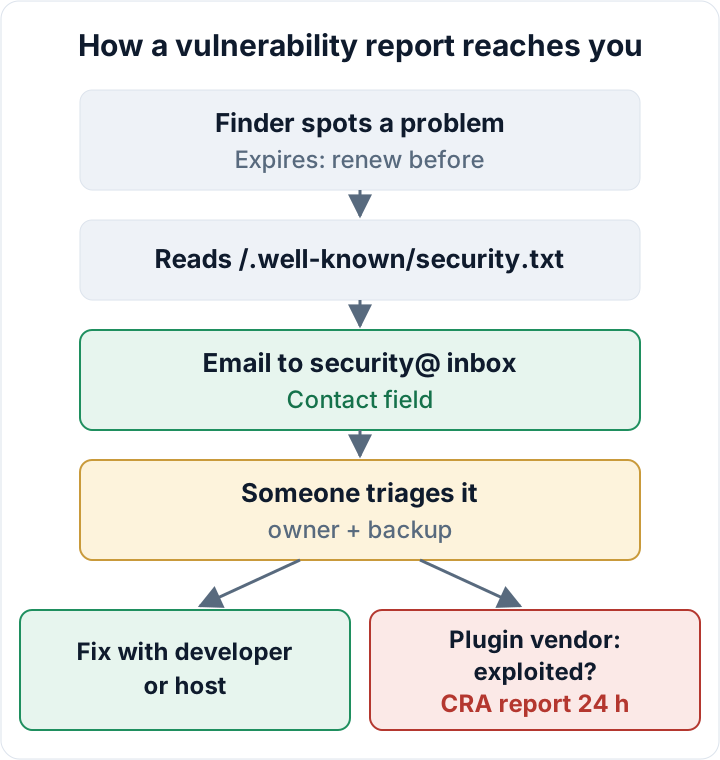
Be clear about its limits. The file fixes nothing and does not make your site more secure. It is not a bug bounty. It does not oblige you to pay anyone, and it does not promise a response time unless you write one into your policy. Like the badges discussed in our article on security seals, it is a visible signal. Unlike a badge, it only proves that a channel exists. If nobody reads the mailbox, the file is worse than having none, because reports go into a void while you look prepared.
The two required fields: Contact and Expires
Only two fields are mandatory.
Contact is a mailto:, https: or tel: URI. You can list it several times, in order of preference. Use a role address such as security@yourdomain.eu, not a personal one. People leave, and a personal address in a public file outlives their contract.
Expires must appear exactly once. It is a date and time in ISO 8601 format, and the RFC recommends setting it less than a year ahead. A few months to a year is practical. When a researcher sees a date in the past, they assume the channel has been abandoned, and many automated tools flag it.
A minimal valid file:
Contact: mailto:security@example.eu
Expires: 2027-09-30T22:00:00.000Z
Lines starting with # are comments. Save the file as UTF-8 plain text.
Useful optional fields: Policy, Preferred-Languages, Encryption, Canonical
Policy links to a short disclosure page on your site. Keep it to a few paragraphs:
- what to report (vulnerabilities in your site or product)
- what not to do: no downloading or keeping personal data, no denial-of-service testing, no social engineering of staff
- when you aim to acknowledge a report
- whether you pay rewards (usually: you don't)
Preferred-Languages lists language tags, separated by commas. This helps EU businesses: en, de, et tells a finder that English, German or Estonian all work.
Encryption links to an OpenPGP public key. It is optional. Only add it if someone on your side can actually decrypt messages. An encrypted report that nobody can read is a lost report.
Canonical states the URL or URLs where this file officially lives. This matters when the same file is reachable on several hosts.
Acknowledgments can link to a page that thanks finders, if you keep one. Hiring is for job ads, and you can ignore it.
You can also sign the whole file with an OpenPGP cleartext signature. Leave this out unless you have a process for re-signing every time the file changes. A broken or stale signature causes more confusion than an unsigned file.
A complete example:
# Security contact for example.eu
Contact: mailto:security@example.eu
Contact: https://example.eu/security-report/
Expires: 2027-09-30T22:00:00.000Z
Policy: https://example.eu/security-policy/
Preferred-Languages: en, de, et
Canonical: https://example.eu/.well-known/security.txt
# Only if someone can decrypt:
# Encryption: https://example.eu/pgp-key.txt
Publishing security.txt on a WordPress site
WordPress has no setting for this. The simplest method is to upload the file by SFTP into a folder called .well-known in the web root, which is the folder that contains WordPress's index.php (and, on most installs, wp-config.php). The folder may already exist. Your host or certificate client may keep ACME challenge files there for Let's Encrypt. Leave them alone, and only add your file.
Standard WordPress rewrite rules serve existing files directly, so no further change is usually needed. Some security or SEO plugins can also generate the file virtually. That works too, but the request then depends on WordPress and the plugin staying healthy. A physical file is simpler and survives plugin changes.
On nginx, many hardened configs contain a rule like location ~ /\. { deny all; }, which also blocks /.well-known/. Add a prefix exception. The ^~ modifier stops nginx from checking the regex rules for this path:
location ^~ /.well-known/ {
    allow all;
    try_files $uri =404;
    charset utf-8;
}On Apache, you can put a one-line .htaccess inside .well-known so that the plain-text file gets a UTF-8 charset:
AddDefaultCharset utf-8Multisite and several domains: the RFC expects one file per hostname. A multisite network usually shares one web root, so the same file appears on every mapped domain. Either list each URL in a separate Canonical line, or serve a different file per host with a server rule.
CDN: if a CDN caches text files, purge the cached copy after every edit. Otherwise visitors may keep seeing the old Expires date. A 301 redirect from the legacy location /security.txt to /.well-known/security.txt is optional.
Check it is served correctly
Run this from any terminal:
curl -sI https://example.eu/.well-known/security.txtYou want a 200 status, a content-type: text/plain; charset=utf-8 header, and no location: header. A 301 to the homepage or a text/html response means something is wrong. The usual cause is a WordPress 404 page, a "redirect all 404s" plugin, or a security plugin returning a block page. Then look at the content itself:
curl -s https://example.eu/.well-known/security.txtOpen the URL in a private browser window too. Several public validators can parse the file and warn about an expired date or a missing field. Treat them as a convenience, not as an authority.
Behind the file: an inbox someone reads
This is where most implementations fail. Before you publish, decide:
- An owner and a backup. Name one person who reads
security@and one who covers holidays. Write both names down internally, not in the file. - Spam rules. Make sure the address is never routed to junk. Reports often come from unknown senders and contain links and code.
- Acknowledgement. Send a short reply confirming receipt. Pick a target you can keep, for example two working days. That is your own choice, so publish it in the policy only if you can meet it.
- Triage. Is the issue real and reproducible? Does it affect personal data? Who fixes it: your developer, your host or the plugin vendor? If a report shows that data was actually exposed, you may be dealing with a personal data breach. See the GDPR 72-hour notification. If the issue is a third-party plugin, follow our guide to vulnerable plugins.
- An Expires reminder. Set a calendar entry about a month before the date. Updating the file takes two minutes.
Expect some low-quality mail as well. "Beg bounty" messages paste automated scanner output, such as a missing header or an SPF note, and ask for payment. Reply politely, fix anything genuine, and do not pay for scanner output you never asked for.
Keep a simple log of each report with the date received, a summary, the decision, the fix and the date closed. That log is evidence for GDPR accountability (Art. 5(2)). It also gives you a concrete answer when an NIS2-regulated customer asks in a supplier questionnaire how you receive and handle security reports.
Plugin and theme sellers: security.txt, coordinated disclosure and the CRA
If you sell plugins or themes, security.txt is the front door of your vulnerability handling. Under the Cyber Resilience Act, manufacturers need a vulnerability handling process and a coordinated disclosure policy. These are part of the main obligations that apply from 11 December 2027.
The reporting duty is already in force. Since 11 September 2026, manufacturers must report actively exploited vulnerabilities and severe incidents through ENISA's Single Reporting Platform, starting with an early warning within 24 hours. In practice, a message to your security inbox can be the moment you learn that a flaw is being exploited, and that starts the clock. This is one more reason for an owner, a backup and fast triage.
For vendors, a solid setup has four parts:
- security.txt on the vendor domain
- a disclosure policy linked from it
- the same contact in the plugin readme
- the same contact on each product page
Researchers often start from the plugin, not your company site. The full timeline, the later deadlines and the fines are covered in our CRA guide for plugin sellers.
If a report leads to a real incident on your own site, the free Security Audit & Compliance plugin shows an incident-notification draft with the 24-hour, 72-hour and one-month stages, which helps you structure the follow-up → secaudit.eu.
Your next step: create the two-line file, publish it, run the curl check, and add the Expires reminder to your calendar today.
This article is general information, not legal advice.
FAQ
Does a small business site need security.txt?
No law requires it for an ordinary business website. It is cheap and useful, though, and some customers check for it during supplier reviews.
Will security.txt attract attacks?
No. It contains contact details and no information about weaknesses. Attackers scan sites whether or not the file exists.
Do I have to pay for reports?
No, unless you announce a bounty. Say clearly in your policy that you do not offer rewards, if that is the case.
Can I use a contact form instead of an email address?
Yes. An https: URL in the Contact field is valid. Make sure submissions reach the same people who own the security inbox.
Check your own site
Security Audit & Compliance is the WordPress plugin from secaudit.eu: it scans for malware, hidden spam, changed core files and vulnerable code, and maps its findings to GDPR Art. 32, NIS2 Art. 21 and the OWASP Top 10.
See what the plugin checks