Website security seals: what a badge can and can't prove
What a website security seal can and can't prove: seal types, why static badges mean nothing, four marks of an honest seal and how to check one in a minute.
Also in: Deutsch Français Español Italiano Polski Português Türkçe

A website security seal can prove one narrow thing: a specific check ran on a specific domain at a specific time and produced a specific result. It cannot prove that the site is secure today. Before you put a badge in your footer or checkout, find out which kind of seal it is and whether anyone can verify it.
What a website security seal can prove, and what it can't
A seal is a snapshot. On the day of the check, the scanner or auditor saw a certain configuration, a certain set of plugins and a certain result. That information is useful if the seal is honest about its date.
The site keeps changing after that day. Plugins update, someone installs a contact form plugin that stores entries in the database, and new vulnerabilities are published every day. Patchstack, a security vendor, counted 11,334 new vulnerabilities in the WordPress ecosystem in 2025 in its State of WordPress Security in 2026 report. A check from three months ago tells you little about any of them.
No seal can prove any of these three things:
- that the site is secure right now;
- that personal data is processed lawfully;
- that no vulnerability exists.
A badge that implies any of them claims more than it can deliver.
Three kinds of seals: encryption, scanner and certification badges
Most badges on websites fall into three groups. Each answers a different question, so comparing them directly doesn't work.
Encryption or TLS seals show that the connection uses HTTPS and that a certificate was issued for the domain. That protects data in transit. It says nothing about outdated plugins, weak admin passwords or an injected script.
Scanner seals show the result of an automated check. Some scan from the outside and only see what any visitor sees. Others run on the site and can inspect files, users and configuration. Depth varies a lot, so ask what was actually scanned.
Certifications and formal audits are assessments by a third party against a defined standard, with a scope, evidence and an auditor's report. A badge is a different thing. The worst case is a badge that only looks like one of these assessments.
| Type | What is checked | Who checks | Not covered |
|---|---|---|---|
| Encryption/TLS | HTTPS and certificate | Certificate authority | The application itself |
| Scanner | Automated checks | Tool, external or on-site | Anything outside scan scope |
| Formal audit | Controls against a standard | Independent third party | Changes after the audit |
Why a static badge image proves nothing
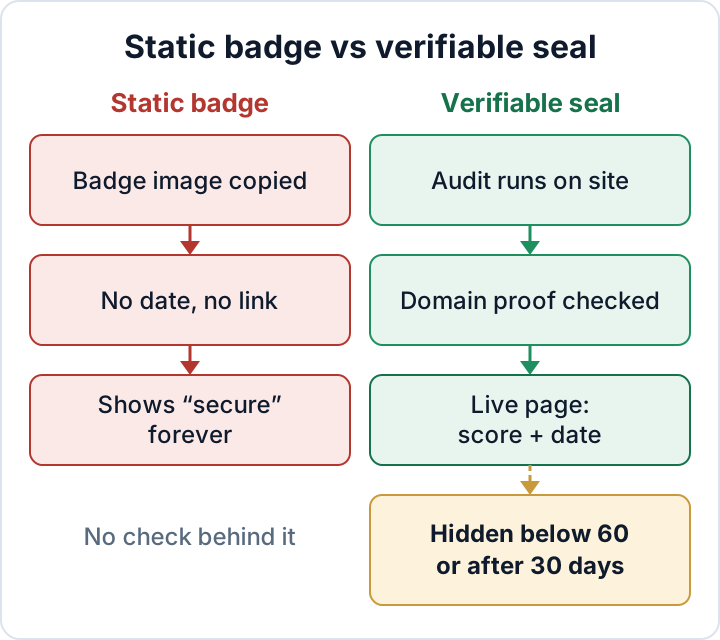
A PNG or SVG file with "Secured" on it is just an image. Anyone can save it and upload it to another site in ten seconds. It keeps saying "secure" after the last check failed, and after the subscription ran out two years ago.
A badge that links to the issuer's generic marketing page has the same problem. That page shows that the vendor exists. It says nothing about this site.
Be careful with verification links that point back to the site's own domain, such as example-shop.eu/security-verified. The site owner controls that page and can write anything on it. A verification page only means something when a third party hosts it and the site cannot edit it.
Four marks of an honest seal
You can check any seal against these four criteria:
- A visible date of the last check. Without a date you cannot judge whether the result still means anything.
- A live verification page hosted by the issuer. It shows the current result, not a frozen screenshot.
- An expiry. The seal disappears when checks stop or the result drops below a threshold. A seal that cannot expire cannot warn anyone.
- A domain check. The issuer verifies that the result belongs to the domain displaying the seal, so a copied badge does not verify elsewhere.
An honest seal also keeps the site's weaknesses private. A public page that lists "outdated plugin X, XML-RPC open" hands attackers a shopping list. Visitors only need the score and the date.
If you show a seal, keep the wording plain. Say what was checked and when, for example "Automated security audit, last run 20 October 2026". Avoid any wording that suggests absolute safety, immunity to attacks or official approval. No website can honestly make those claims, and consumer protection rules on misleading claims may apply. If you are unsure, ask your lawyer.
How visitors can check a security seal in under a minute
This needs no technical knowledge. It takes about as long as reading a product description.
- Click the seal. If nothing happens, it is a picture and proves nothing.
- Look at the address bar. The page should open over HTTPS on the issuer's own domain. It should not be on the shop's domain or on a lookalike.
- Check that the domain named on the verification page matches the site you came from.
- Check the date of the last check and whether the result is shown as current.
- If the page is a generic sales page, shows no domain or shows a date long past, treat the seal as decoration.
How the secaudit.eu seal works, including its limits
We run a seal ourselves. This is how it works and what it does not do.
The audit runs on the WordPress site itself through the Security Audit & Compliance plugin. It checks files, users, configuration, known compromise indicators and outdated components. The plugin sends the report to secaudit.eu. secaudit.eu then checks that the report really comes from that domain (domain-control proof). The public verification page on secaudit.eu shows the real score and the date of the last audit.
The seal has built-in limits:
- It disappears when the score falls below 60/100.
- It expires after 30 days without a new audit.
- The verification page shows the score and the date of the last audit. It never lists weaknesses.
- It is not a certification and makes no promise that the site is safe. It is not an official or EU mark of any kind.
The method has a limit as well. Because the audit runs on the site, a deeply compromised site could interfere with what the audit sees. An on-site audit adds to external monitoring. It does not replace it. Keep uptime checks, a look at what search engines index for your domain, and your host's malware scanning in place.
A seal is for visitors; evidence is for clients and auditors
A badge reassures a visitor who has never heard of you. A client's security questionnaire, an insurer or a data protection authority will want more. They ask for evidence: audit reports, update logs, access reviews and backup restore tests.
The GDPR requires appropriate technical and organisational measures. Under Art. 32(1)(d), these include "a process for regularly testing, assessing and evaluating" their effectiveness. Under Art. 5(2), you must be able to demonstrate compliance. Companies in NIS2 scope must also manage the security of their suppliers under Art. 21(2)(d). That is why agencies and plugin sellers increasingly get these questions. A dated audit history helps you answer them. The badge does not.
For what to keep, see what evidence belongs in a WordPress security audit report. For why regular testing matters, read GDPR Article 32 for WordPress. For the measures that come before any seal, work through the WordPress security checklist. If you want to improve the site's outward signals, security headers do more for you than a badge.
Work in this order. Fix the findings first. Show a seal only once the score is stable. Run audits at least every 30 days so the seal never goes stale on your checkout page.
The Security Audit & Compliance plugin audits your WordPress site, maps findings to GDPR Art. 32 and NIS2 Art. 21, exports a report for your records, and offers an optional seal with a public verification page → secaudit.eu
FAQ
Does a security seal show that my site meets the GDPR?
No. The GDPR covers lawful processing, information duties, contracts, security measures and much more. A dated audit can support your documentation of security testing. That is all a badge can do.
Can someone copy the secaudit.eu seal to another site?
They can copy the image, but it won't verify. The verification page is tied to the domain that passed the domain-control proof. A visitor who clicks a copied seal will see a different domain or no valid result.
What happens to the seal if my score drops?
It disappears once the score falls below 60/100. It also expires if no new audit runs within 30 days.
Is the secaudit.eu seal a certification?
No. It shows the result and date of an automated audit that ran on the site. It is not a certification and not an official mark.
This article is general information, not legal advice.
Check your own site
Security Audit & Compliance is the WordPress plugin from secaudit.eu: it scans for malware, hidden spam, changed core files and vulnerable code, and maps its findings to GDPR Art. 32, NIS2 Art. 21 and the OWASP Top 10.
See what the plugin checks