Hosting account suspended for malware: what to do
Hosting account suspended for malware? Get the host's evidence in writing, request cleanup access, check every site and write a reinstatement request.
Also in: Deutsch Français Español Italiano Polski Português Türkçe
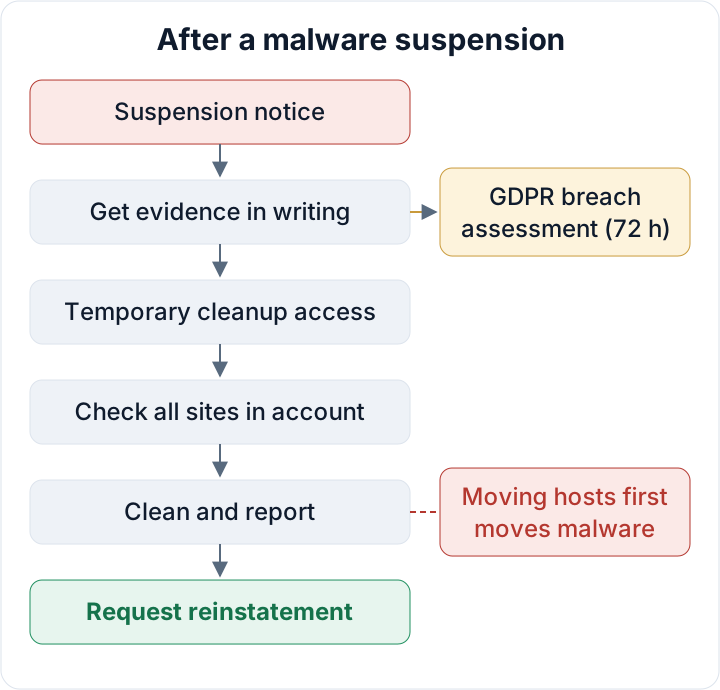
When your hosting account is suspended for malware, the fastest way back online is usually not a quick fix on the server. It is a clear written exchange with your host. They have the evidence you need, they control your access, and they decide when the sites go live again. Treat the suspension as two jobs running in parallel: a cleanup, and a negotiation with the host that you document from the first email.
Hosting account suspended for malware: the first hour
A suspension usually means the host's scanners or abuse team found something on your account: malware files, a phishing page, or scripts sending spam. They blocked the account to protect other customers on the same servers and the reputation of their IP addresses. It is a containment measure, not a punishment, and hosts generally want you back once the problem is fixed.
Suspensions vary. Some hosts block everything, including the control panel. Others take only the websites offline, or block outgoing mail while the sites keep running. Read the notice carefully so you know which of these you are dealing with.
In the first hour, avoid the three moves that cause the most damage:
- Do not delete suspicious files yet. They are evidence, and you will need them to find the entry point.
- Do not restore an old backup over everything. You may overwrite the traces and restore the vulnerability along with the site.
- Do not open an account with another host and migrate. More on that below.
Reply to the notice in writing, from the email address registered as the account owner, and quote the ticket number. Ask the host to treat everything that follows as part of that ticket. One thread is much easier to work with than five.
Ask the host for evidence in writing
The host knows what triggered the suspension. You probably do not. Ask them for the following, in writing:
- The list of flagged file paths, with the detection name for each file.
- The timestamps: file modification times and the time each detection was made.
- The abuse report or blocklist entry behind the action, for example the phishing URL that was reported or the spam complaint with message headers.
- Excerpts from the access and error logs around the suspicious activity, or the full raw logs for the relevant days.
- The date and time they first detected the problem.
There are three reasons for this. The file list and logs often point straight at the entry point, such as a vulnerable plugin or a stolen FTP password. They show how big the cleanup is. And the detection date matters for GDPR, because it helps fix when you became aware of the incident.
Save every email and ticket reply as a file outside the hosting account, on your own computer or in company storage. If the account is ever closed, the ticket history may go with it. You can also check whether your domain is currently flagged by Google with the Safe Browsing site status tool. If it is listed, put that result in your incident file too.
Get access for the cleanup without going back online
You need access to clean up, but the public site should stay blocked until it is clean. Ask for one of these, in this order of preference:
- Temporary SFTP or control-panel access while the public websites remain suspended.
- The sites restricted to your IP address, or your developer's, so you can test without exposing visitors.
- A maintenance page in front of the sites while you work behind it.
Before you change anything, ask the host for a downloadable copy of all files plus a database dump of every database in the account, or create them yourself as soon as you have access. This snapshot is your evidence. Store it offline and label it as infected. Never restore from it.
Once you are in, change the hosting panel password and turn on two-factor authentication for the panel if your host offers it. If the attacker had your panel or FTP credentials, every other step is wasted until those are changed.
Check every site in the account, not just the flagged one
On most shared hosting, every site in your account runs as the same system user. A compromised site can therefore write to its neighbors: an old test install in a subfolder, a forgotten subdomain, a staging copy, an addon domain from a project that ended years ago. If you clean only the flagged site, the infection often comes back from one of these.
Make an inventory of the whole account:
- Every document root, including subdomains, addon domains and subfolders with their own WordPress install
- Every database and which site uses it
- Mailboxes and mail-sending scripts, especially if the notice mentioned spam
- Cron jobs set at account level in the control panel
- FTP, SFTP and SSH accounts, and who each one belongs to
Delete what nobody uses. An abandoned install is not harmless just because nobody visits it; it is an unpatched entry point with write access to your live sites. For the places attackers hide code so they can come back, see where backdoors survive a cleanup.
Clean first, then decide whether to move hosts
The cleanup itself follows a fixed order, described step by step in our WordPress malware removal plan. In short: preserve evidence, find the entry point, replace WordPress core, plugins and themes from known-good sources instead of editing infected files, rotate every credential (panel, SFTP/SSH, database, WordPress admin passwords and application passwords, API keys), and restore content from backups only if you can confirm they come from a clean point in time. Our guide on backups that actually restore explains how to find that point.
Many people want to leave the host at this stage. That is understandable, but moving before cleaning simply migrates the malware and the backdoor to a new server. The new host scans uploaded accounts too, and you may find yourself suspended again, this time with a provider who does not know your history. If you want to switch, do it after the cleanup, or rebuild on the new host from fresh WordPress, freshly downloaded plugins and checked content, rather than copying the whole account across.
If nobody in your company can do this work confidently, bring in your own developer, your agency or an independent security professional. A rushed cleanup that misses a backdoor costs more time than it saves.
Write a reinstatement request the host will accept
Hosts want to know that the problem is understood and will not come back next week. A good reinstatement request is short, factual and covers six points: what was found, the entry point (or your best assessment), what was removed or replaced, which credentials were rotated, which updates were applied, and what will stop a repeat.
Subject: Reinstatement request – ticket [NUMBER] – account [USERNAME]

1. Findings: [number] malicious files at the paths you listed, plus
   [other findings, e.g. an unknown admin user, a malicious cron job].
2. Entry point: [e.g. outdated plugin X version Y] / not confirmed;
   most likely [assessment and reason].
3. Removed/replaced: WordPress core, all plugins and themes reinstalled
   from official sources; uploads checked; unused installs [list] deleted.
4. Credentials rotated: panel, SFTP/SSH, database users, all WordPress
   administrator passwords and application passwords, WordPress
   security keys and salts.
5. Updates: core, plugins and themes updated on [date]; PHP version [x].
6. Prevention: [2FA on panel and admins, file integrity monitoring,
   weekly update routine, responsible person].

Please rescan the account and confirm the reinstatement in writing.
Be honest when the entry point is unknown. Hosts see many of these reports, and an invented explanation is easy to spot. Write "not confirmed" and describe the extra monitoring you have put in place, such as file change alerts and daily log review for the next weeks. Always ask for a rescan and a written confirmation, and add that confirmation to your incident file.
Is the suspension a GDPR personal data breach?
Very often, yes. A personal data breach is not only stolen data. It covers loss of confidentiality (someone could read the data), integrity (data was changed) and availability (data could not be accessed). A suspended shop or booking site makes customer data unavailable, and malware with file access may also have read or changed contact-form entries, user accounts or orders stored in the database.
GDPR Art. 33 requires the controller to notify the supervisory authority without undue delay and, where feasible, within 72 hours of becoming aware of a breach, unless it is unlikely to result in a risk to people. The host's notice is usually the strongest indication of when you became aware, so note its exact date and time. Art. 33(5) requires you to document every breach, including those you do not notify: the facts, the effects and the remedial action.
This is where the host's evidence pays off a second time. The flagged files, log excerpts and detection dates are the factual basis for your risk assessment and for the Art. 33(5) record. If your host or agency processes the data on your behalf, they also have duties under your processing agreement to support you. The full process, from the risk assessment to the content of the notification, is in our guide to the GDPR 72-hour breach notification.
Once you are back online, ongoing checks make the next incident easier to spot and document. The free Security Audit & Compliance plugin from secaudit.eu compares files against a baseline, flags compromise indicators such as hidden admins or suspicious cron entries, and drafts an incident notification. It detects and reports. It does not clean.
This article is general information, not legal advice.
FAQ
How long does reinstatement usually take?
That depends on the host and on their abuse team's workload. What you control is the quality and speed of your report. A complete reinstatement request that answers the six points above, plus a clean rescan, avoids the back-and-forth that delays most cases.
Can I just restore a backup and ask to be unsuspended?
Only if you can show that the backup predates the compromise and that the entry point is closed. Otherwise you restore the same vulnerable plugin or stolen password, and the attacker returns. Many hosts will also ask how the infection got in before they reinstate the account.
Should I delete the malware files before downloading a copy?
No. Download a full copy of files and databases first and store it offline as evidence. You need it to find the entry point, to answer the host's questions and to document the breach under GDPR Art. 33(5).
Check your own site
Security Audit & Compliance is the WordPress plugin from secaudit.eu: it scans for malware, hidden spam, changed core files and vulnerable code, and maps its findings to GDPR Art. 32, NIS2 Art. 21 and the OWASP Top 10.
See what the plugin checks