WooCommerce card skimming: detect checkout malware
WooCommerce card skimming hides on the checkout. How to find the script, where it hides, what to do in the first hours, the GDPR 72-hour duty and prevention.
Also in: Deutsch Français Español Italiano Polski Português Türkçe

If customers say their card was misused after buying from you, or your payment provider starts asking questions, do not start by logging in and looking at the checkout. WooCommerce card skimming is built to stay invisible to you. Test the checkout the way a customer uses it, then search the places where the script can hide.
This guide follows the order of work: detect, locate, contain, handle the GDPR duty, then prevent a repeat.
How WooCommerce card skimming works, and why the shop owner doesn't see it
A skimmer is a small piece of injected JavaScript. It reads what the customer types into the checkout fields (name, address, email and, if the card fields are on your page, the card data) and sends a copy to a domain the attacker controls. The order still goes through. The page looks and works normally, so nobody complains about the shop itself.
Skimmers are usually conditional. Many run only on the checkout URL and only for logged-out visitors. Some run only once per visitor or browser, so the same person never sees the behavior twice. The code is typically obfuscated or given a harmless-looking name, such as an analytics snippet, a CDN loader or a jQuery file.
That is why an admin looking at the checkout proves nothing. The first signs usually come from outside. Several customers who all bought from you report card fraud, your payment provider sends a query, or an unfamiliar domain shows up in the checkout's network requests.
If the payment is handled entirely on the provider's page, a skimmer on your site has much less to read. Less is not nothing. It can still copy name, address and email. It can also inject a fake card form that collects the card data before sending the customer on to the real payment step.
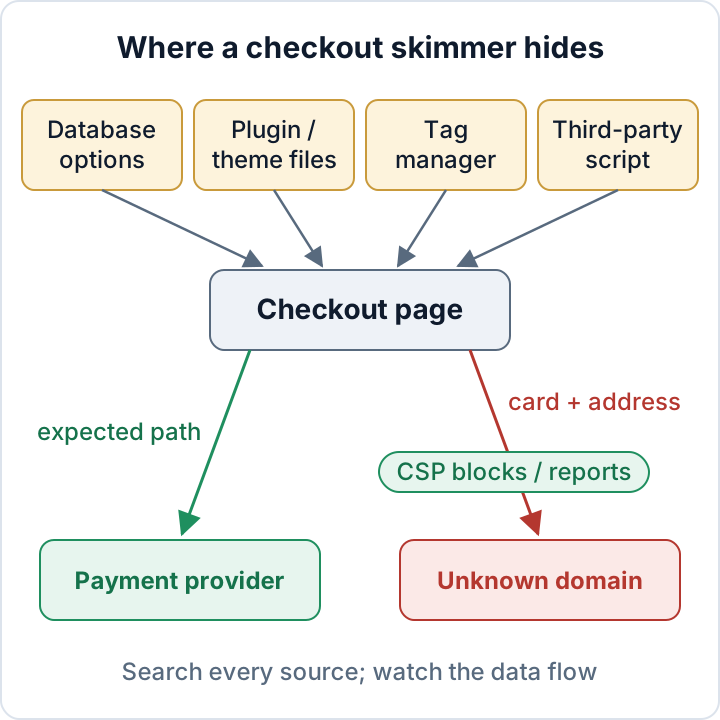
Check your checkout like a customer: list every script in dev tools
Open a private browser window and do not log in. Put a real product in the cart and go to the checkout. Before the checkout page loads, open DevTools (F12), switch to the Network tab, tick Preserve log and filter by JS, then by Fetch/XHR.
Fill in the checkout with test data, but do not enter real card details. Watch which requests fire as you type and move between fields, because skimmers often send data when a field changes or when the form is submitted. If your provider has a test mode and you can place a test order, check the order-received page as well.
Write down every host that loads a script or receives a request, and mark each one as:
- Your own domain
- Your payment provider
- A known vendor you chose (analytics, chat, consent banner)
- Unknown
Treat anything in the fourth group as suspicious until someone explains it. Then open the Sources panel and look at the inline scripts on the checkout. Very long single lines, large encoded strings and code that builds URLs from fragments deserve a closer look.
Repeat the check from a phone on mobile data and from a different network, because skimmers may filter by device, country or referrer. Each run is only a snapshot, and a clean run does not prove the checkout is clean. For a full, documented list of every external script on the site, follow our guide to third-party scripts on WordPress.
Where checkout skimmers hide: database, theme files, tag manager
Copy the files and the database before you search (see the first-hours section). The commands below only read data.
Database. Skimmers are often stored in options that print code into the page: header and footer script settings, widget content, customizer CSS/JS and page-builder settings. Search with WP-CLI for external script includes and common decoding calls:
wp db search 'script src' --all-tables-with-prefix
wp db search 'atob(' --all-tables-with-prefix
wp db search 'fromCharCode' --all-tables-with-prefix
wp db search 'base64' --all-tables-with-prefix
For a closer look at options and posts, run the queries below. Replace wp_ with the table prefix from wp-config.php. CHAR(60) is the opening angle bracket, so the queries match the start of a script tag:
wp db query "SELECT option_name, LENGTH(option_value) FROM wp_options WHERE option_value LIKE CONCAT('%', CHAR(60), 'script%') OR option_value LIKE '%atob(%';"
wp db query "SELECT ID, post_type, post_status FROM wp_posts WHERE post_content LIKE CONCAT('%', CHAR(60), 'script%');"
You will get some legitimate hits, such as your analytics or consent tool. What you are looking for are entries nobody can explain.
Files. List recently changed PHP and JavaScript files in themes, plugins and must-use plugins. Then compare core and WordPress.org plugins with the official checksums:
find wp-content/themes wp-content/plugins wp-content/mu-plugins -type f \( -name '*.php' -o -name '*.js' \) -mtime -30 -ls
wp core verify-checksums
wp plugin verify-checksums --all
Modification times can be faked. Plugin checksums only work for plugins hosted on WordPress.org, so premium plugins and your theme need a comparison with a fresh copy from the vendor. Our guide on verifying WordPress checksums explains how to read the results.
Tag manager. Open the container's version history. Look for custom HTML tags you did not create, tags that fire only on the checkout, and recent publishes by unfamiliar users. Check who has publish rights. Review header/footer script plugins and code-snippet plugins as well, because anything in them runs on every page.
Third-party vendors. A script you load on purpose from a vendor can itself be compromised. In that case your own files are clean but the file on the vendor's server is not. The network list from the previous step is the only way to see this.
Use a Content-Security-Policy on the checkout as an early-warning sensor
A Content-Security-Policy tells the browser which hosts may load scripts and receive data. In report-only mode it blocks nothing and only reports violations. On the checkout, every unexpected host then turns into a report you can read.
The minimal mu-plugin below sends a report-only header on the checkout. is_checkout() also returns true on the order-received page. Replace the placeholder hosts with your provider's documented hosts and your own report endpoint. Save it as wp-content/mu-plugins/checkout-csp-report.php. The file must begin with the standard PHP opening tag on its own first line, followed by:
// Report-only CSP for the WooCommerce checkout and order-received pages
add_action( 'template_redirect', function () {
    if ( function_exists( 'is_checkout' ) && is_checkout() ) {
        header( "Content-Security-Policy-Report-Only: script-src 'self' https://pay.provider.example; connect-src 'self' https://pay.provider.example; img-src 'self' data:; form-action 'self' https://pay.provider.example; frame-src https://pay.provider.example; report-uri https://csp-reports.example/endpoint" );
    }
} );
The img-src directive is there because many skimmers send stolen data as an image request rather than a fetch call; connect-src alone would not report that. Expect noise at first. WooCommerce and many themes print inline scripts, and this policy reports them. Work through the reports, add what is genuinely needed, and only then switch to an enforcing Content-Security-Policy header.
CSP has limits. If you allow 'unsafe-inline', an inline skimmer runs anyway. If an allowed domain is compromised, CSP lets it through. An attacker with admin or file access can also change or remove the header. Directives and where to set headers are covered in our security headers guide and in the MDN CSP documentation.
Found a skimmer: the first hours
Work in this order. Cleaning first destroys the evidence you need to find the entry point and the time window.
- Preserve evidence. Copy the files and a database dump off the server, export the tag manager container version, and save the suspicious request URL, screenshots and timestamps.
- Stop the skimming. Put the checkout into maintenance mode or switch to the provider's hosted payment page. Then remove the script from every location you found, including caches and the CDN.
- Find the entry point. This may be a vulnerable plugin, a stolen admin or tag manager login, or a compromised vendor. If you skip this step, the skimmer comes back. Our malware removal plan covers the cleanup and backdoor checks.
- Rotate everything at once. This includes WordPress admin passwords and application passwords, the security keys and salts in
wp-config.php(changing them logs out every session), hosting/SFTP accounts, the database password, payment provider API keys and webhook secrets, and tag manager and other vendor accounts. - Tell your payment provider promptly and follow their instructions.
- Establish the time window from the first appearance of the script to its removal. Backups, file dates, tag manager history and logs help. The window defines which customers are affected.
If this is beyond your team, bring in your developer, your hosting company or an independent incident-response professional early, before evidence is overwritten.
Card skimming is a GDPR personal data breach: the 72-hour clock
When customer names, addresses, emails and payment details are copied to an attacker, confidentiality is breached. That is a personal data breach under the GDPR.
Under Art. 33 you must notify your supervisory authority without undue delay and, where feasible, within 72 hours of becoming aware, unless the breach is unlikely to result in a risk. Under Art. 34 you must inform affected people without undue delay when the breach is likely to result in a high risk. Stolen payment details combined with identity data will often meet that bar, but assess it for your own case. Art. 33(5) requires you to document every breach, including your reasoning if you decide not to notify.
To identify affected customers, use the time window and an order export for that period. What belongs in the notification is covered in our 72-hour breach guide.
This article is general information, not legal advice.
Prevent the next skimmer: payment design, few admins, monitoring
Prefer a hosted payment page or the provider's hosted fields, so card data never passes through code you control. A hosted page gives the smallest exposure. Hosted fields keep the checkout on your site and carry less risk than plain card fields. Neither stops a fake form or the copying of address data. Our WooCommerce security guide covers the setup.
Keep the enforced checkout CSP in place. Keep the number of administrators low, and require two-factor login for all of them. Treat tag manager publish rights and script-injection or snippet plugins as admin-level access. Update extensions quickly and place a test order after each update.
Add monitoring: file integrity checks, regular malware and database scans, and a monthly review of checkout requests against your expected host list. The free audit plugin from secaudit.eu reports file integrity changes, obfuscated content, malware signatures and suspicious database entries. It detects and reports findings. It does not remove malware or guarantee a clean checkout → secaudit.eu.
Your next step today: run the private-window network check on your checkout and write down the expected host list. Everything else builds on it.
FAQ
Does using Stripe or PayPal hosted fields mean I can't be skimmed?
It means less exposure, not zero. A skimmer can still copy name, address and email, or show a fake card form before the real payment step.
My scan is clean but customers report fraud. What now?
Scanners can miss conditional scripts, code loaded from a remote server and tag manager tags. Run the customer-style network check from several devices and talk to your payment provider. The fraud may also come from another source.
Do I have to tell all customers?
Art. 34 applies when the breach is likely to result in a high risk to the affected people. Base the decision on the time window and the data taken, and document it either way.
Check your own site
Security Audit & Compliance is the WordPress plugin from secaudit.eu: it scans for malware, hidden spam, changed core files and vulnerable code, and maps its findings to GDPR Art. 32, NIS2 Art. 21 and the OWASP Top 10.
See what the plugin checks