WordPress theme security: outdated themes, bundled plugins
WordPress theme security: find outdated premium themes and bundled plugins that never update, then decide to update, renew, replace or delete them safely.
Also in: Deutsch Français Español Italiano Polski Português Türkçe
A premium theme you bought years ago and stopped paying for is often the least maintained code on your site. WordPress theme security depends on more than the theme files. It also depends on the slider, page builder and add-ons that came in the same zip, and none of them warn you when they fall behind.
Here is a typical case. A business site runs a multipurpose theme bought from a marketplace around 2019. The support licence lapsed long ago. The dashboard shows no update notice, so everything looks fine. The theme still ships the slider and page builder versions from that year, and they have not been touched since.
Patchstack is a security vendor, so treat its numbers as vendor data. Its State of WordPress Security in 2026 report found that 9 % of the new vulnerabilities in the WordPress ecosystem in 2025 were in themes. That figure understates the theme risk, because bundled sliders and builders are plugins. Their vulnerabilities count toward the plugin share, not the theme share. For the overall numbers and the plugin side, see our guide to vulnerable WordPress plugins.
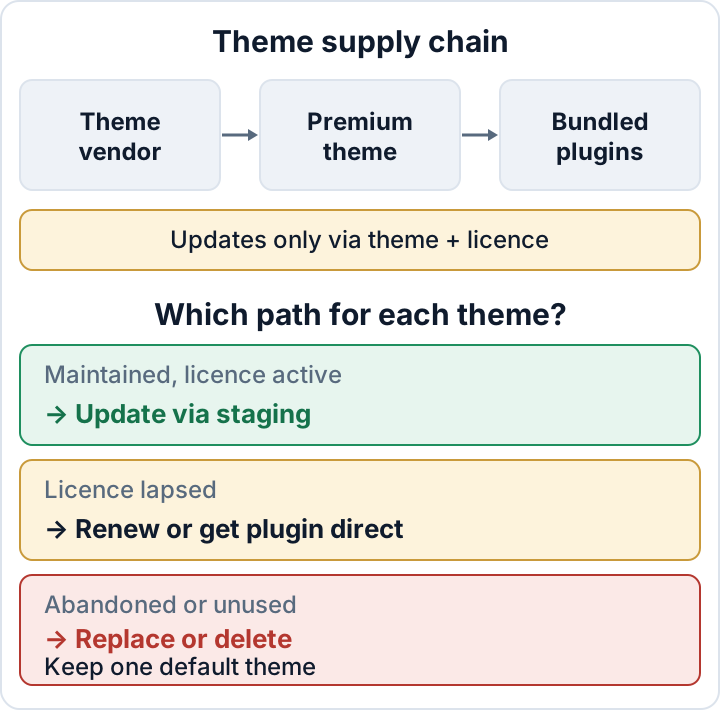
How bundled plugins get stuck: the theme is their only update channel
Bundled or "required" plugins are installed from zip files inside the theme. Most themes prompt you through a screen such as Appearance > Install Plugins right after activation. You click through once, and those plugins are on your site from then on.
Most bundled plugins get no updates from WordPress.org. Many also have their own licence check that expects a separate key, which you never had because the theme vendor bought a bundle licence. In practice, they update only when the theme vendor ships a new theme version with newer copies inside, and only if your theme licence is still active.
As a result, the site can report "everything is up to date" while the page builder is several major versions behind. Plugin and theme auto-updates have been in core since WordPress 5.5, but they only work for components that have an update source. When the update source is missing, auto-updates do nothing for that component.
Inventory your themes and the plugins that came with them
Start with a list. In the dashboard, open Appearance > Themes and Plugins > Installed Plugins. If you have SSH access, WP-CLI gives a cleaner view:
wp theme list --fields=name,status,version,update
wp plugin list --fields=name,status,version,update,update_version
The theme list shows the active theme, a parent theme if you use a child theme, and every inactive theme still on the server. On multisite, also check Network Admin > Themes. A theme that is network-enabled but active on no site is still installed code.
To spot bundled plugins in the plugin list, look for these signs:
- The Author or Plugin URI points to the theme vendor or the theme's demo site.
- The Plugins screen shows no "View details" link that opens a WordPress.org description.
- In WP-CLI, the update column reads
none, orunavailablewhen an update exists but cannot be downloaded without a licence. - The plugin name matches one listed on the theme's Install Plugins screen.
Record each item in a small table. The general plugin inventory process is covered in the plugin article. For themes, these columns are enough:
| Item | Version | Source | Licence | Last vendor update |
|---|---|---|---|---|
| Parent theme | 4.2.1 | Marketplace | Expired | ? |
| Page builder | 5.x | Bundled | Theme only | ? |
| Slider | 6.x | Bundled | None | ? |
Check the last update and changelog before you decide
Next, find out whether anyone still maintains the theme. Check the theme's page on the marketplace, which usually shows a "last update" date. Then look at the vendor's documentation site, which often has a changelog. Many themes also include a changelog.txt or readme.txt in their own folder under wp-content/themes/.
When you read the changelog, check four things:
- The date of the last release.
- Whether bundled plugin versions are listed, and whether they match current releases from those plugins' own vendors.
- Whether security fixes are mentioned.
- Whether the theme still states support for current WordPress and PHP versions.
The PHP point matters more than it looks. A theme that breaks on newer PHP versions can keep a whole server on an old PHP release, and old PHP versions stop getting security fixes. The PHP2Shell flaws showed how fast an outdated PHP version can become an urgent problem.
Use this rule: if there has been no release for a long time and the vendor does not answer a support question, treat the theme as abandoned. A theme with an active forum and recent fixes is a different case from one whose last changelog entry mentions a WordPress version from years ago.
Update, renew or replace: deciding per theme
Maintained, licence active. Update on a staging copy first. Click through the pages built with the page builder, then update the live site. Afterwards, recheck the bundled plugin versions, because some themes only offer the new plugin copies on their Install Plugins screen and do not apply them automatically.
Maintained, licence lapsed. Renew the licence, because the licence is what gives you the update channel. The alternative is to buy or activate the current standalone version of a bundled plugin directly from its own vendor, where that vendor's licence allows it. Then the plugin no longer depends on the theme to receive updates.
Abandoned. Plan a replacement with a maintained theme, or with a block theme if your layouts are simple enough. Budget it as a project, not a quick fix. Builder layouts and theme shortcodes usually have to be rebuilt, and that takes design and testing time.
Do not use nulled themes or "GPL club" copies of unknown origin to get around an expired licence. They have no trustworthy update channel, and modified copies are a known way to get injected code onto a site. The plugin article covers nulled software in more detail.
Use a child theme so updates stay possible
Many people stop updating because someone once edited the parent theme directly. Every update overwrites those edits, so the safe option starts to look like the risky one. A child theme avoids this by keeping your changes in a separate folder.
A minimal child theme needs a folder such as wp-content/themes/example-child/ with two files. In style.css, the Template: line must match the parent theme's folder name exactly:
/*
Theme Name: Example Child
Template: example
*/
In functions.php, load the parent stylesheet:
<?php
add_action( 'wp_enqueue_scripts', function () {
    wp_enqueue_style( 'example-parent', get_template_directory_uri() . '/style.css' );
} );
Some parent themes already load their own stylesheet. In that case you only need to enqueue the child's CSS, so check the parent theme's documentation first.
Put template overrides and CSS in the child theme. Code you need regardless of the theme, such as a custom post type or a tracking tweak, belongs in a small site-specific plugin. That way it survives a future theme replacement.
Old direct edits may already be in the parent theme. Before updating, compare your parent theme with a fresh copy from the vendor, for example with diff -rq example/ example-fresh/, and move anything worth keeping into the child theme. Do this on staging.
Adding [DISALLOW_FILE_EDIT](post:file-editor) to wp-config.php removes the dashboard file editors, so nobody can make new quick edits there.
Delete unused themes, but keep one default theme as fallback
Deactivating a theme or plugin does not remove it. Its files stay on the server, and PHP files inside them can still be requested directly over the web. An inactive theme or bundled plugin with a known flaw can still be attacked.
Delete what you do not use. In the dashboard, go to Appearance > Themes, click the theme, open Theme Details and click Delete. With WP-CLI:
wp theme delete oldtheme
wp plugin delete old-slider
Keep exactly one current default theme, such as the latest Twenty-something theme, as a fallback for troubleshooting, and keep it updated. Do not delete the parent of an active child theme, because the child theme needs it to work.
Deleting a theme removes its code. It does not clean a site that is already compromised.
After replacing an old theme: check for leftovers
An old vulnerable theme may already have been used to get into the site. Look for unexpected PHP files in wp-content/uploads; the web shell guide has safe commands for this. Then verify the WordPress core checksums to find modified core files.
The core checksum check does not cover themes at all, and wp plugin verify-checksums only works for plugins hosted on WordPress.org, so bundled plugins are not covered either. For the themes you keep, compare the installed files against a fresh download from the vendor, using the same diff approach as above.
The free Security Audit & Compliance plugin from secaudit.eu flags outdated plugins, themes and core. Once you turn its vulnerability checks on, it matches installed versions against the secaudit.eu vulnerability database on the site itself. Its file integrity scan records a baseline and reports changed files afterwards. A clean result is useful evidence, but it does not prove that a site is clean.
The most practical next step is to run wp theme list and wp plugin list today. Mark every item whose update column says none, and look up its last vendor release.
FAQ
Is a theme from the WordPress.org directory safer than a premium one?
It has a public update channel, so fixes reach you through normal update notices and auto-updates. Code quality still varies from theme to theme. Check its last update and support activity before you rely on it.
Can I update a bundled plugin myself without updating the theme?
Sometimes. If the plugin's own vendor sells or issues a separate licence, you can install the current standalone version. Test it on staging first, because the theme may rely on an older version of the plugin.
Does deleting an old theme remove my content?
No. Posts, pages and media stay in the database. Theme-specific shortcodes and page builder layouts can break, though, and show raw code or empty sections. Switch themes on staging first and check your key pages.
Check your own site
Security Audit & Compliance is the WordPress plugin from secaudit.eu: it scans for malware, hidden spam, changed core files and vulnerable code, and maps its findings to GDPR Art. 32, NIS2 Art. 21 and the OWASP Top 10.
See what the plugin checks