Security logging and GDPR: what to log and how long
Security logging and GDPR for WordPress: what to log, where logs live, who may read them, how to shorten IPs and how to set and enforce a retention period.
Also in: Deutsch Français Español Italiano Polski Português Türkçe
After a hack, three questions come up: how the attacker got in, what they could see, and how long they have been there. Without logs you can only guess at the answers, and a guess is weak ground for a breach decision. Good security logging under the GDPR means keeping enough data to answer those three questions. It also means treating the logs as personal data, because that is what they are.
Security logging and GDPR: why you need logs and why they are personal data
The GDPR expects you to know what happened. Article 33(5) requires you to document every personal data breach, including the facts, the effects and the remedial action, even when you do not notify the authority. You cannot write down the facts of a breach you cannot reconstruct. Article 32(1)(b) asks for ongoing integrity of your systems, and 32(1)(d) asks for a process to test whether your measures work. Logs serve both.
Logs also hold IP addresses, login names, sometimes email addresses, and a record of who did what and when. That makes them personal data. They need appropriate security (Art. 5(1)(f)), data protection by default (Art. 25) and documentation you can show (Art. 5(2)).
This creates a tension. If you keep too little, you cannot investigate. If you keep too much for too long, you have built a personal-data archive that can itself leak. The rest of this article is about finding the middle and writing it down. For the wider set of Article 32 measures, see GDPR Article 32 for WordPress.
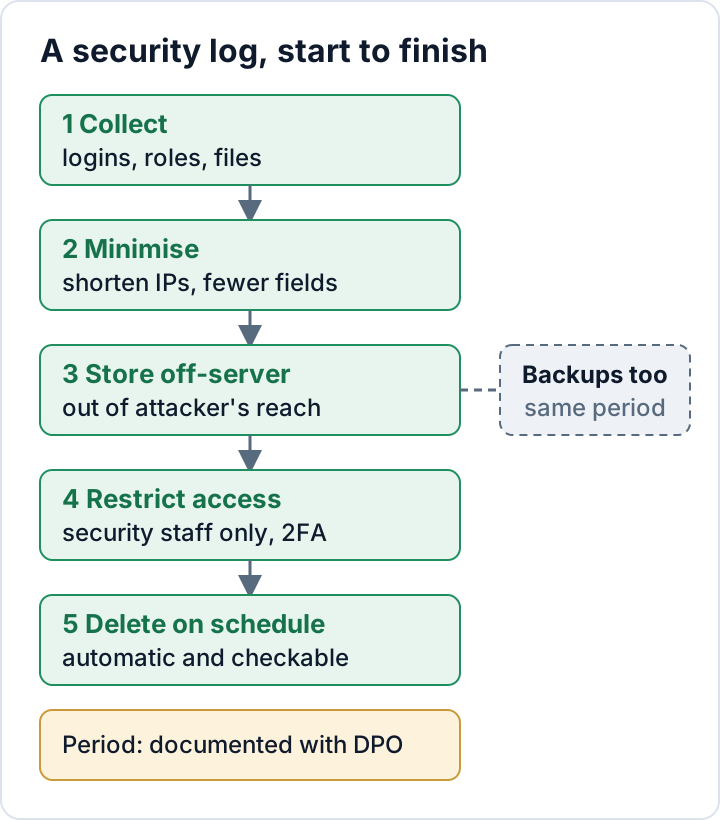
What to log on a WordPress site
WordPress core does not keep an activity log. You get events from an activity-log or security plugin, or from the web server. These are the sources that matter in an investigation:
| Log source | What it contains | Personal data | Typical use |
|---|---|---|---|
| Logins and failed logins | Username tried, IP, time, result | IP, username | Brute force, account takeover |
| User and role changes | New users, role changes, who did it | Usernames, emails | Hidden admin accounts |
| Application passwords | User, name, creation, last use | Username, IP | Persistent access |
| Plugin and theme changes | Install, update, activate, delete | Username | Entry point, backdoors |
| Settings changes | siteurl, home, admin email | Username, email | Redirect hacks, takeover |
| File integrity | New or changed files vs baseline | Usually none | Web shells, injected code |
| Web server access/error logs | Each request: IP, URL, status, user agent | IP, sometimes data in URLs | Building the timeline |
Changes to siteurl and the admin email deserve particular attention. Attackers change both to redirect visitors or to receive password-reset mails. File changes measured against a known-good baseline are often the first hard evidence of a web shell. The access log ties the events together. It shows which IP sent the POST request to which file, a few seconds before the new admin account appeared.
Some data should never go into a log: passwords (including failed attempts, which are often a real password with a typo), full contact-form contents, payment data and raw request bodies. If a plugin offers to "log everything", say no.
Where WordPress logs live, and why that matters after a hack
Logs usually end up in one of four places:
- The hosting account: access and error logs in the control panel. Hosts rotate these after a period they define, and it is often short. Check what yours does.
- The WordPress database: activity-log plugins write to their own tables.
- **
wp-content/debug.log:** PHP errors, sometimes with paths, usernames or request data. - An external log service or syslog server.
The first three share a weakness. Someone with admin rights or file access can edit or empty them. A careful attacker will delete the logins table rows that show their own logins. So keep a copy somewhere the WordPress site cannot write to. That can be a syslog server, a log service, or at minimum a directory outside the webroot that the PHP user cannot modify. nginx can send access logs to syslog directly (access_log syslog:server=logs.example.net combined;), and rsyslog can forward server logs.
An external log service processes personal data on your behalf. That makes it a processor, and you need an Article 28 data processing agreement. Check where the service stores the data, too.
Keep less personal data: shortened IPs and fewer fields
Article 25 asks for data protection by default. In practice, decide for each log whether you need the full IP address. Brute-force blocking and incident tracing do need it, but only for a short time. Statistics and long-term trend logs do not.
With nginx, you can write two logs: a full one with a short retention period, and a shortened one you keep longer. The map and log_format directives belong in the http block:
map $remote_addr $remote_addr_short {
    default                                  0.0.0.0;
    "~^(?P<ip>\d+\.\d+\.\d+)\.\d+$"           $ip.0;
    "~^(?P<ip>[^:]+:[^:]+):"                  $ip::;
}

map $request_uri $request_path {
    "~^(?P<path>[^?]*)" $path;
}

log_format privacy '$remote_addr_short [$time_local] "$request_method $request_path $server_protocol" '
                   '$status $body_bytes_sent "$http_user_agent"';

access_log /var/log/nginx/access.log combined;
access_log /var/log/nginx/access-short.log privacy;
For IPv4, this replaces the last octet with 0. For IPv6, it keeps only the first two groups. Logging only the path from $request_uri (cut at the ?) instead of $request also drops the query string, which is where email addresses, reset tokens and tracking IDs tend to appear. Plain $uri is not a good substitute on WordPress: after try_files it usually shows /index.php instead of the page that was requested. If your site sits behind a CDN or reverse proxy, $remote_addr is the proxy's address unless the real-IP module is configured. Test with nginx -t before reloading. Many security plugins have an equivalent "anonymise IP" setting for their own tables.
There are limits to this. A shortened IP is often still personal data when combined with a timestamp and a user agent, so it remains in scope of the GDPR. It is also much less useful in an investigation. That is why you keep the full log for a short time and do not rely on the shortened one alone.
Who may read the logs: access restrictions
Logs show who logged in, from where and when, so only the people who handle security should read them. Go through each place:
- The hosting panel: who has a login, and whether old staff or previous agencies still do.
- The plugin's log screen: usually visible to every Administrator. That is one more reason to keep the number of admins small.
- The external log service: named accounts only, two-factor authentication switched on.
Keep log files out of the webroot. Check that debug.log cannot be downloaded from your domain. The settings are covered in wp-config.php hardening. If an agency reads a client's logs, the agency is processing personal data for the client and needs to be covered in the processing agreement. Logging who reads the logs is optional for a small site. Whether you do it or not, write it down.
Retention: pick a justified period and delete automatically
This article will not give you a legal number of days, because no single number applies to every site. Decide the period with your data protection officer, or with whoever handles data protection in your company. Then record the reasoning:
- Detection time: how long attacks could realistically go unnoticed on your site. Logs that are deleted before you notice a problem are no help.
- Review rhythm: how often someone actually looks at the logs or alerts. See WordPress security monitoring.
- The host's rotation: what the host deletes anyway, and whether you need a copy for longer.
- Storage limitation: the GDPR principle that you keep personal data no longer than necessary for the purpose.
A common pattern is a short period for full raw logs and a longer one for shortened or aggregated data.
Then make deletion happen technically. On your own server, edit the existing /etc/logrotate.d/nginx file rather than adding a second entry for the same files:
/var/log/nginx/*.log {
    daily
    rotate 14
    maxage 14
    compress
    delaycompress
    missingok
    notifempty
    sharedscripts
    postrotate
        [ -s /run/nginx.pid ] && kill -USR1 "$(cat /run/nginx.pid)"
    endscript
}
The 14 is a placeholder. Replace it with your documented period. If the full and shortened logs need different periods, give each file its own block with its exact path instead of the *.log wildcard; logrotate rejects a file that matches two blocks. logrotate -d /etc/logrotate.d/nginx shows what would happen without changing anything.
For plugin tables, set the plugin's retention setting and check that its cleanup job exists with wp cron event list. WP-Cron only runs when the site gets visits, so a low-traffic site may need a real system cron. Set a retention policy in the external service, and an expiry rule for your backups. Then check that deletion actually happens: look at the oldest file in /var/log/nginx/ and the oldest row in the log table (wp db tables --all-tables-with-prefix | grep -i log helps you find the table; without the flag, plugin tables are often not listed).
Document it: a one-page logging record
Article 5(2) requires you to be able to demonstrate compliance. For logging, one page is usually enough:
- Purpose: detecting and investigating security incidents
- Sources: which logs, from which systems
- Fields and the personal data in them
- Storage locations and processors (with DPA status)
- Who has access, and how access is protected
- Retention period per log type, with the reasoning
- How deletion is enforced (logrotate, plugin setting, service policy, backup expiry)
- Where IPs are shortened and where they are not
- Review frequency and who does it
- Date of the last check that deletion works
Link this page from your Article 32 records and from your breach procedure. When something happens, the steps in the GDPR 72-hour breach notification guide depend on what these logs can show. If you use the free Security Audit & Compliance plugin, its file integrity baseline and on-screen compliance summary can feed into the file-change and review parts of this record.
The next step: open your hosting panel today, find out how long your access logs are kept, and write that number at the top of the page.
FAQ
Is a failed-login log with IP addresses allowed?
Logging failed logins to detect and block password guessing is a recognised security purpose. Keep the fields to what that purpose needs (username tried, IP, time and result), keep the full IP only as long as you need it, and document the purpose and period. Clarify the legal basis with your DPO.
Do I need consent for security logs?
Ask your data protection officer about the legal basis for your situation. Cookie and consent banners are designed for tracking and marketing. They are not the tool for the logs that keep your site secure. Do not add security logging to the banner just to be safe.
My host deletes access logs after a few days. Is that enough?
That depends on how fast you would notice an attack. If you would only find a hack weeks later, the logs that show how it started would already be gone. An off-server copy with a documented, longer period for the logs you actually need is worth considering.
This article is general information, not legal advice.
Check your own site
Security Audit & Compliance is the WordPress plugin from secaudit.eu: it scans for malware, hidden spam, changed core files and vulnerable code, and maps its findings to GDPR Art. 32, NIS2 Art. 21 and the OWASP Top 10.
See what the plugin checks