Third-party scripts on WordPress: security and GDPR
Third-party scripts on WordPress run with full page access and send visitor data away. Inventory them, remove, self-host, add SRI, set a CSP and document it.
Also in: Deutsch Français Español Italiano Polski Português Türkçe
Every external JavaScript file on your WordPress site runs with the same rights as your own code, but you do not control it. Third-party scripts include analytics, chat widgets, tag managers, ad and social pixels, and the jQuery plugin your theme loads from a CDN. Whoever controls those files, or the accounts behind them, controls what your pages do. That includes your login page and your checkout.
This article shows how to find every external script and decide which ones stay. It then covers how to contain the rest with self-hosting, Subresource Integrity and a Content-Security-Policy, and how to document the result for GDPR.
Why third-party scripts are a security and GDPR risk
A script tag that points to another domain is not like an embedded picture. The browser downloads the code and runs it inside your page with full access to the DOM. The script can read what a customer types into the WooCommerce checkout form or into the password field on wp-login.php. It can also read any cookie that is not marked HttpOnly.
WordPress login cookies are HttpOnly, so a script cannot simply copy them. That protection is limited. A script running on an admin page can send requests as the logged-in user and do anything that user can do.
The risk does not depend only on the vendor's intentions. A compromised CDN file, a hijacked vendor account, or a stolen login to your own tag manager can each change the code your visitors receive. Your server will never notice.
The privacy side is simpler. Every request to an external domain sends the visitor's IP address, browser details and usually the page URL to that third party. Each script is a data recipient, and you have to be able to justify it.
How to inventory the third-party scripts on your site
You cannot make decisions about scripts you have not found. Do the inventory in the browser, because many scripts are injected at runtime and never appear in your theme files.
- Open the browser dev tools and go to the Network tab. Tick "Disable cache", do a hard reload and filter by JS.
- Sort by domain and note every domain that is not your own.
- Repeat on several page types: home, a blog post, a product page, the cart, the checkout,
wp-login.php, the "My account" page, and a dashboard page while logged in as an admin. - Check the page source as a quick cross-check. The command below lists static JavaScript file references. It misses anything injected later:
curl -s https://example.com/ | grep -oE 'src="[^"]+\.js[^"]*"'- Look inside WordPress for places where someone pasted code by hand. Common spots are the theme's "header/footer scripts" fields, code-snippet plugins, Custom HTML widgets and page-builder settings.
- Open each tag manager container and list every tag inside it. A single container line in your page source can stand for twenty scripts.
Record the results in one table:
| Domain | Purpose | Owner | Pages | Data sent | Legal basis or decision |
|---|---|---|---|---|---|
| cdn.example-chat.com | Live chat | Sales | All | IP, URL, chat text | Consent |
| cdn.example.net | Slider library | Agency | Home | IP, URL | Self-host instead |
The "Owner" column matters most. If nobody in the company can explain a script, question that one first.
Remove, keep or replace: deciding script by script
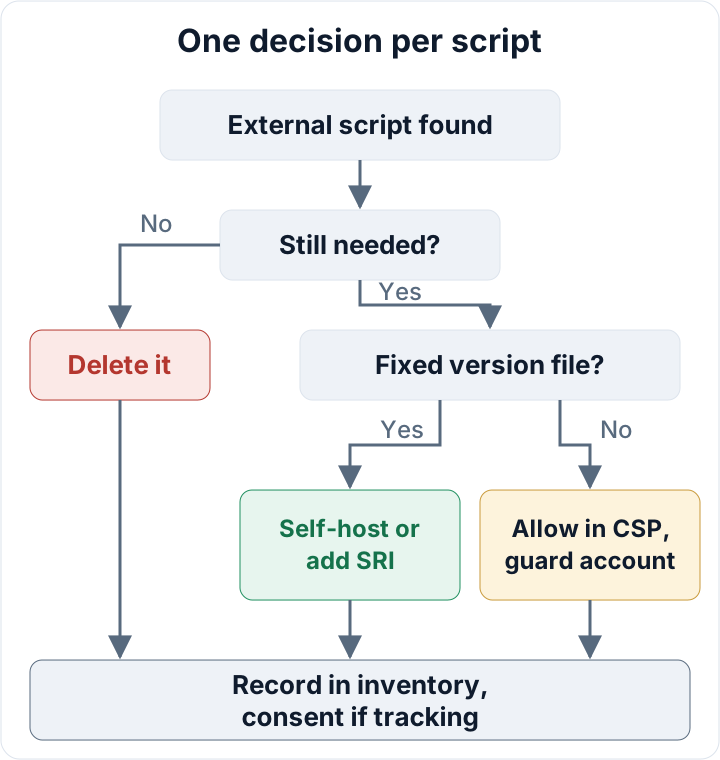
Start with deletion. Most sites carry leftovers: a pixel from a campaign two years ago, a heatmap tool from a trial, or a tag that a previous agency added and never removed. If nobody can say what breaks without it, take it out and watch the site for a week.
Deactivating a plugin is not always enough. If someone pasted the vendor's snippet into a theme field or a snippet plugin, the tag keeps loading after the plugin is gone. Check the Network tab again after every removal.
For the scripts that stay, decide where they are needed. A chat widget or ad pixel has no reason to run on the login page, the account area or the checkout. Load it only on the pages that need it, using conditional loading in your theme or the trigger rules in your tag manager. For payment pages, see our guide to WooCommerce security.
This is GDPR Art. 25 in practice. Data protection by design and by default means fewer recipients and less data. Every script you remove is one less party that can leak or misuse visitor data.
Self-host static libraries instead of loading them from a CDN
Fixed libraries such as a jQuery plugin, an icon set or a slider do not need to come from someone else's server. Download the exact version, put it in your child theme and enqueue it locally:
add_action( 'wp_enqueue_scripts', function () {
    wp_enqueue_script(
        'slider-lib',
        get_stylesheet_directory_uri() . '/js/slider-lib.min.js',
        array(),
        '4.2.1',
        true
    );
} );
This removes a third-party request and a dependency on an external service in one step. The Munich court used the same reasoning for fonts: the resource could have been hosted locally. Our article on Google Fonts and GDPR explains that ruling.
Self-hosting has a cost. You are now responsible for that file's updates. If the library publishes a security fix, nobody will deliver it to you. Add each self-hosted file to your update routine.
Subresource Integrity: pin external files to a known hash
If you must load a fixed-version file from a CDN, Subresource Integrity tells the browser to run it only if its hash matches. If anyone changes the file, the browser refuses to execute it.
Generate the hash from the exact file you tested:
curl -sL -o lib.min.js https://cdn.example.net/lib/1.2.3/lib.min.js
openssl dgst -sha384 -binary lib.min.js | openssl base64 -A
The script tag for that file then needs two extra attributes:
integrity="sha384-PASTE_HASH_HERE"
crossorigin="anonymous"
In WordPress, add the attributes with the script_loader_tag filter:
add_filter( 'script_loader_tag', function ( $tag, $handle, $src ) {
    if ( 'example-lib' !== $handle ) {
        return $tag;
    }
    return str_replace(
        ' src=',
        ' integrity="sha384-PASTE_HASH_HERE" crossorigin="anonymous" src=',
        $tag
    );
}, 10, 3 );SRI only works for URLs whose content never changes. Vendors update most analytics, tag manager and chat loaders in place, so a pinned hash would break them within days. Those scripts need the next two measures instead.
Limit where scripts can come from with a Content-Security-Policy
Your inventory table already contains your CSP allowlist. The script-src directive lists the domains allowed to deliver JavaScript. The connect-src directive limits where scripts can send data, which makes it harder for injected code to send form data to an unknown server. Directives such as img-src and form-action close other routes, so connect-src alone is not a complete barrier.
A tag manager widens the allowlist, because each tag can load code from more domains. That is another reason to keep containers small.
WordPress security headers covers the syntax and a safe rollout. A CSP limits what a compromised script can reach. It does not make a malicious script from an allowed domain safe.
Tag manager and vendor accounts are part of your attack surface
Anyone who can publish a tag manager container can inject any JavaScript into every page of your site, checkout included. They need no WordPress login, and no file on your server changes. Treat these accounts like administrator accounts:
- Two-factor authentication on every account (see two-factor authentication)
- Few users, each with the smallest role that still does the job, and only one or two people who can publish
- Former agencies, freelancers and staff removed
- Version history reviewed after every publish, with publish notifications switched on if the tool offers them
- The same rules for analytics, chat and ad accounts that can push code to your site
Apply the same thinking inside WordPress. Anyone who can edit header/footer script fields or snippet plugins can add code, so keep the number of administrator accounts low. Our guide to WordPress user roles shows how to review them.
GDPR: consent, transfers and documenting your third-party scripts
GDPR Art. 32 requires appropriate security, and Art. 25 requires data protection by design and by default. Under the ePrivacy rules as implemented in national law (in Germany, the TDDDG), scripts that set identifiers or track behavior usually need consent before they load. They should not fire until the visitor has made a choice in your banner. To test this, open the Network tab in a fresh browser profile and check what loads before you click anything.
For US recipients, the EU–US Data Privacy Framework adequacy decision of 10 July 2023 currently gives DPF-certified companies an adequacy basis. The EU General Court dismissed a challenge to it on 3 September 2025. An appeal to the Court of Justice has been pending since 31 October 2025, so the legal position could change. The fewer US recipients you have, the less you will need to redo if it does.
Keep the inventory table, with dates and decisions, as your Art. 5(2) accountability evidence. It shows that someone looked at every recipient and made a choice. Our article on GDPR Article 32 covers the wider set of measures.
The free secaudit.eu audit plugin checks file integrity, exposed files and hidden SEO spam on the site itself. It does not inventory external scripts, so you still need to do the browser check above.
Your next step: set aside one hour this week, open the Network tab on your checkout and login pages, and start the table.
FAQ
Can I use Subresource Integrity for a tag manager or analytics loader?
No. The vendor changes these loaders in place, so the hash changes and the browser would block the file. Contain them with a CSP and protect the account instead.
Does a cookie banner make external scripts safe?
No. Consent decides whether a script may load. It does nothing about what the code does once it runs.
Is a script loaded through a WordPress plugin still third-party?
Yes, if it fetches code from an external domain. The plugin is only the delivery route, and the code still comes from someone else's server.
This article is general information, not legal advice.
Check your own site
Security Audit & Compliance is the WordPress plugin from secaudit.eu: it scans for malware, hidden spam, changed core files and vulnerable code, and maps its findings to GDPR Art. 32, NIS2 Art. 21 and the OWASP Top 10.
See what the plugin checks