WordPress staging security: stop test sites leaking data
WordPress staging security: why test copies leak customer data, how attackers find them, HTTP auth for Apache and nginx, data stripping and when to delete.
Also in: Deutsch Français Español Italiano Polski Português Türkçe
Your staging site probably holds the same customers, orders and password hashes as your live site, with far less protection. Good WordPress staging security starts with that assumption: a test copy is a second production site that happens to be used for testing. It is not a harmless sandbox.
Why WordPress staging security matters: the copy holds the same data
Most staging copies are made with a one-click clone or a migration plugin. That copies the full database, including user accounts, WooCommerce orders, contact form entries, comments with email addresses, and every user's password hash. Then the copy gets none of the care the live site gets. It has no two-factor login, no monitoring, and often runs plugin versions from the day it was cloned.
The GDPR does not distinguish between "live" and "test." Storing customer data on a staging server is processing of personal data. Article 5(1)(f) requires "appropriate security" for it, and Article 32 requires appropriate technical and organisational measures. If someone breaks into the staging copy and reads those records, that is a personal data breach, exactly as it would be on the live site. Our article on what Article 32 means for WordPress covers the measures in detail.
How attackers find "hidden" staging URLs
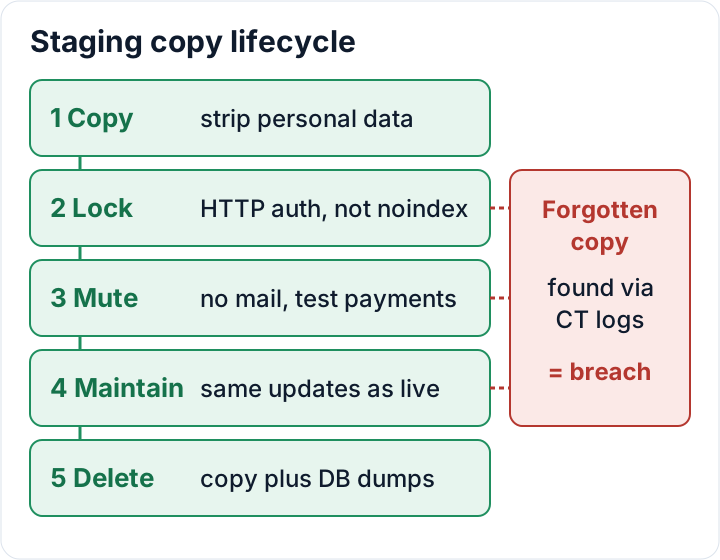
A staging site on an unlinked subdomain is not hidden. When you request a TLS certificate for staging.example.com, the certificate authority publishes it in public Certificate Transparency logs. Anyone can search crt.sh for example.com and get a list of every subdomain that has had a certificate. Scanners watch these logs and often probe new hostnames within minutes.
A wildcard certificate does not list the name, but that only removes one way to find it. Other common routes are:
- Guessable names:
staging.,dev.,test.,new.,old., or subfolders like/old/,/wp-new/,/backup/ - Temporary URLs from your host's one-click staging, which follow a predictable pattern
- Public DNS records that still point to the copy
- Leaks from the copy itself: sitemaps, links pasted into tickets or chat tools, and referrer headers sent when someone clicks an external link on staging
Open crt.sh now and search your own domain. Every staging, dev or test name in that list should either be behind a login or deleted.
noindex is not access control: put HTTP authentication in front
The checkbox under Settings > Reading > Discourage search engines from indexing this site adds a noindex signal. robots.txt rules work the same way. Both are requests that polite crawlers follow. They block no attacker, and a Disallow: /staging/ line in a public robots.txt actually points to the copy.
What works is a password prompt before WordPress loads. HTTP basic authentication does that. Many hosting panels offer it as "Password protect directory." On Apache 2.4, create the password file outside the web root:
# -c creates the file and overwrites an existing one; leave it out when adding more users
htpasswd -c /home/example/.htpasswd-staging tester
Then add the following to the staging site's .htaccess file or vhost:
AuthType Basic
AuthName "Staging"
AuthUserFile /home/example/.htpasswd-staging
<RequireAny>
    Require ip 203.0.113.10
    Require valid-user
</RequireAny>
On nginx, use the auth_basic module inside the staging server block:
satisfy any;
allow 203.0.113.10;
deny all;
auth_basic "Staging";
auth_basic_user_file /etc/nginx/.htpasswd-staging;
Replace 203.0.113.10 with the server's own IP address. WordPress calls itself for WP-Cron and loopback requests. If those calls hit the password prompt, cron jobs stop running and Site Health reports loopback errors. If you only need a few fixed office IPs, an IP allowlist on its own is a valid alternative.
Be clear about what this does not do. Basic auth is usually one shared password, so it gives no per-person accountability, and a leaked password opens the door for everyone. The WordPress accounts behind it still need strong passwords and two-factor login.
Copy less: strip or anonymise personal data before it reaches staging
Article 25 GDPR asks for data protection by design and by default. For staging, that means asking a simple question: does this test need real customers? Usually it doesn't. Checking a theme update or a new checkout field works just as well with fake data.
Choose the option that keeps the least real data:
- Build staging with synthetic test data (a few fake users, sample orders, test form entries).
- If you must copy production, strip or anonymise personal data before anyone starts working on the copy.
The data that matters usually sits in a few places: wp_users and wp_usermeta, WooCommerce orders and customer data, form plugin entry tables, comments, and logs from security, mail or activity plugins.
WP-CLI can handle the user part. Run these commands on the staging copy only, after checking which site you are on and confirming the table prefix:
wp option get siteurl          # must show the staging URL
wp config get table_prefix     # e.g. wp_
wp user list --role=customer --format=count
wp user delete $(wp user list --role=customer --field=ID) --yes
wp db query "UPDATE wp_users SET user_email = CONCAT('user', ID, '@example.test') WHERE ID > 1"
Adjust the prefix and the role to match your site. The last line resets remaining emails to a reserved test domain, so no mail can reach a real person. Before running it, make sure ID 1 is really your own account. For WooCommerce orders and form entries, use the plugin's own delete or anonymise tools, or a migration tool with an anonymisation option. Storage formats differ between plugins and versions, so hand-written SQL easily misses tables.
Database dumps that travel between environments are personal data too. Encrypt them, keep them out of web-accessible folders and email, and delete them once imported. Our backup guide covers encryption and storage.
Stop staging from talking to the real world
A copied site keeps every integration the live site had, and it will use them. Common side effects:
- Order emails, password resets or newsletters sent to real customers
- WP-Cron running scheduled jobs such as subscription renewals, reminder emails or data exports
- Webhooks pushing test orders into your ERP, CRM or accounting software
- Live payment gateway keys, which can create real charges
- Analytics and marketing pixels counting test traffic and sending visitor data out
- Outgoing API calls to shipping, stock or email marketing services
Fix these right after cloning. Route mail to a catcher such as Mailpit, or use a plugin or host setting that stops all outgoing mail. Switch payment gateways to sandbox or test mode with test keys. Deactivate webhooks and remove marketing tags. Set WP_ENVIRONMENT_TYPE to staging in wp-config.php so environment-aware plugins can switch themselves off. Our article on wp-config.php hardening explains this setting.
Then tell the team which URL is staging. Many accidental emails to real customers come from someone working in the wrong browser tab.
Keep staging patched and logins separate
A staging copy cloned six months ago still runs six-month-old plugins. That includes any vulnerability fixed since then. If the copy sits in the same hosting account as production, an attacker who gets into staging can often read the live site's files and wp-config.php. From there they can reach the live database. Cleanups also fail when a backdoor survives in a forgotten sibling copy.
Apply these rules:
- Update staging at least as fast as production. If nobody will do that, delete the copy.
- Give staging its own database and database user, never the production credentials.
- Generate new security keys and salts for the copy.
- Enable two-factor login on staging too.
- Keep only the admin accounts of the people who actually test. Downgrade or delete everyone else.
- Where your host allows it, use a separate hosting account or container for staging.
Delete old staging copies, and treat a hacked one as a breach
Start with an inventory. Look for subdomains, subfolders such as /old/, your host's one-click staging, local copies on laptops, and copies held by your agency or freelancers. For each copy, write down its purpose and an end date.
Delete everything that is not in active use. Deactivating it or removing the DNS record is not enough. Remove the files, the copy's database, and every dump file in home directories, download folders or shared drives. A forgotten copy is still processing of personal data, and if it is hacked, it is still a breach.
If a staging copy was exposed or compromised, assess it as a personal data breach. The 72-hour logic of Article 33 applies, and under Article 33(5) you must document the breach even if you decide not to notify. Our guide to the 72-hour breach notification walks through the steps. Record your staging copies and their safeguards in your Article 32 documentation. Agencies that hold client staging copies should check that their data processing agreement with the client covers them.
The free audit plugin from secaudit.eu can run on a staging copy as well as the live site. It flags outdated plugins, weak passwords and, once you turn on its vulnerability checks, known vulnerabilities, so you can see what a neglected copy is missing → secaudit.eu
Your next step: search crt.sh for your domain today, list every copy you find, and delete or lock each one before the end of the week.
FAQ
Is a password-protected staging site GDPR-safe with real data?
Not automatically. HTTP authentication is a reasonable measure, but the copy still holds real personal data, so it needs the same patching, access control and documentation as production. Anonymising the data reduces the risk far more than a password does.
Does my host's one-click staging handle all of this?
Usually only part of it. Check whether the host adds a password prompt or just noindex, whether outgoing email is blocked, and whether payment and webhook settings are changed. Also check whether the copy is deleted automatically or stays until you remove it.
Can I block search engines with robots.txt?
No. robots.txt is public and voluntary. It keeps polite crawlers away and can show attackers where to look. Use HTTP authentication or an IP allowlist.
How long may I keep a staging copy?
Only as long as it serves a current purpose, such as testing a specific update or redesign. When that work is finished, delete the copy and its database dumps, or refresh it from anonymised data.
This article is general information, not legal advice.
Check your own site
Security Audit & Compliance is the WordPress plugin from secaudit.eu: it scans for malware, hidden spam, changed core files and vulnerable code, and maps its findings to GDPR Art. 32, NIS2 Art. 21 and the OWASP Top 10.
See what the plugin checks